6
Launching the iPad
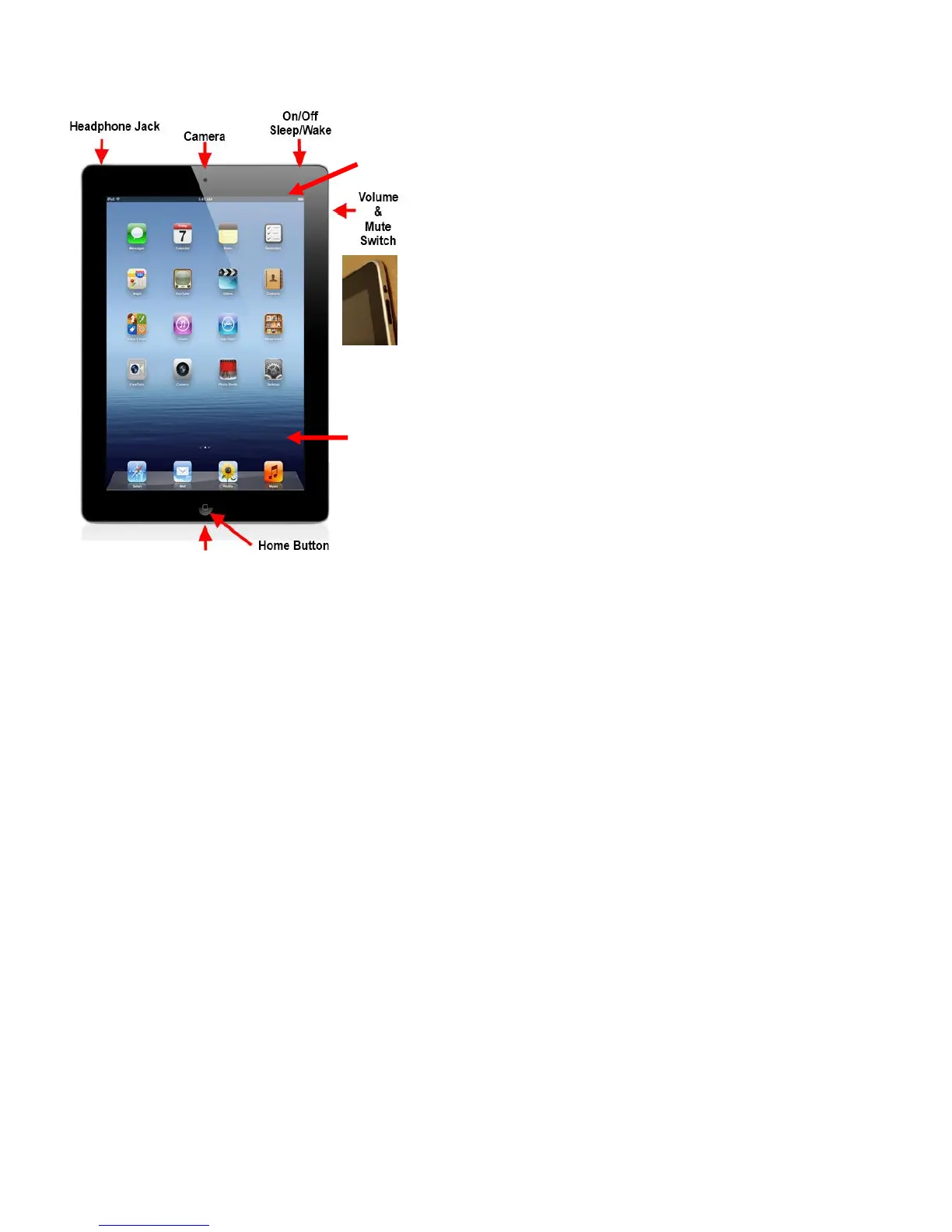
On/Off, Sleep/Wake (Lock/Unlock) Button:
This button is on the top of your iPad. You use it to
turn your iPad on or off or to put your iPad's screen
to sleep or to wake it up.
Power On: Press and hold the sleep/wake button
until the Apple logo appears.
Power Off: Press and hold the sleep/wake button
until the red slider bar appears at the top of the
screen and then slide the bar to the right to power
down.
Lock: To prevent anything from happening when you
touch the screen and the device is powered on, press
the sleep/wake button once (do not hold).
Unlock: Press the home button or sleep/wake
button; then slide the gray slider bar that appears
at the bottom of screen to the right. If a passcode
has been set, you will have to type in the 4-digit
passcode.
Home button: No matter what you are doing, you can press the Home button once at any
time to display the Home screen (the image shown above is the Home screen) on your iPad.
The Home Button has many functions when pressed a different number of times.
Camera: Your iPad has two cameras. One is on the top middle of the front, and the other
is on the top right corner on the back of the iPad.
Charging Port: This port is located below the Home Button. Plug your USB cable into this
port to charge your iPad. (See the General Maintenance Section for more information on
charging your iPad.)



 To Next Page