EasyManua.ls Logo

Apple iPhone 5 - Maps; Find places

Apple iPhone 5
180 pages
Print Icon
To Next Page IconTo Next Page
To Previous Page IconTo Previous Page
Loading...
15
96
Maps
Find places
WARNING:
For important information about navigation and avoiding distractions that could
lead to dangerous situations, see Important safety information on page 168. See also Privacy on
page 42.
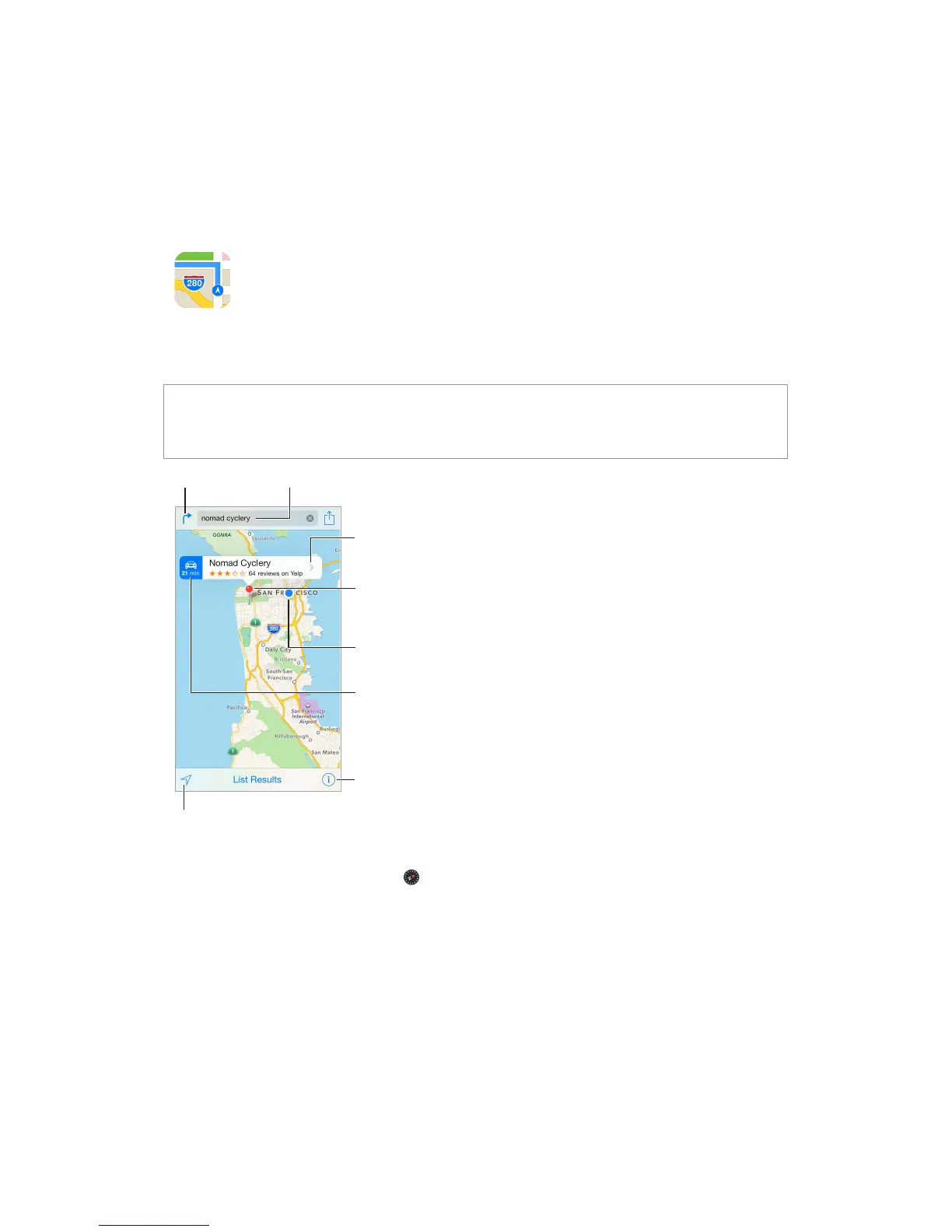
Choose the view,
drop a pin, or
show traffic.
Choose the view,
drop a pin, or
show traffic.
Tap a pin to display
the pop-up banner.
Tap a pin to display
the pop-up banner.
Quick driving
directions
Quick driving
directions
Get more info.
Get more info.
Current location
Current location
Enter a search.
Enter a search.
Show your
current location.
Show your
current location.
Get directions.
Get directions.

To return to north, tap the compass in the upper-right.
Zoom in or out. 
pinch and spread. The scale appears in the upper-left while zooming, or if you touch the screen

Search for a location. 
example:




Other manuals for Apple iPhone 5

Related product manuals