10 Preface
iPod mini and iTunes at a Glance
iTunes
Use iTunes to import music to your computer and transfer it to iPod mini, organize
music on iPod mini, and change settings on iPod mini. You can also use the iTunes
Music Store (inside iTunes) to purchase music online. The iTunes Music Store is
currently available only in the United States.
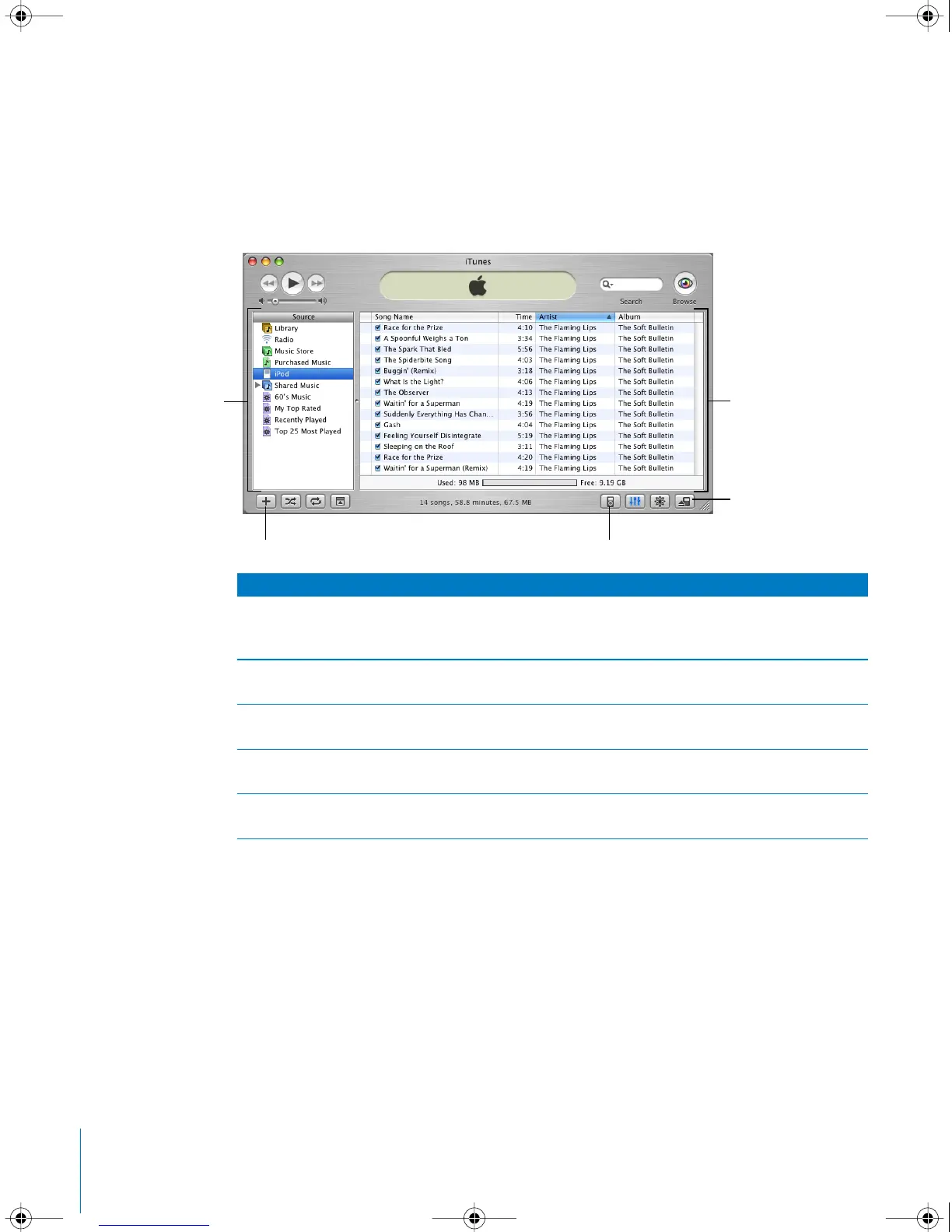
iTunes
Source list
Click items in the Source list to see your music. The Source list
shows your library, playlists, CDs, iPod mini, and the iTunes Music
Store (currently available only in the United States).
Main window
The main window shows songs from the item selected in the
Source list.
Add button
Click to add a playlist to the Source list. Click Library, then drag
songs to the playlist to add them.
Options button
Select iPod mini in the Source list, then click this button to
change settings on iPod mini.
Eject button
Select iPod mini in the Source list, then click the Eject button to
eject iPod mini before disconnecting it from your computer.
Source list Main window
Eject button
Options buttonAdd button
LL1519.book Page 10 Tuesday, February 3, 2004 6:03 PM



 To Next Page