Preface
iPod mini and iTunes at a Glance
9
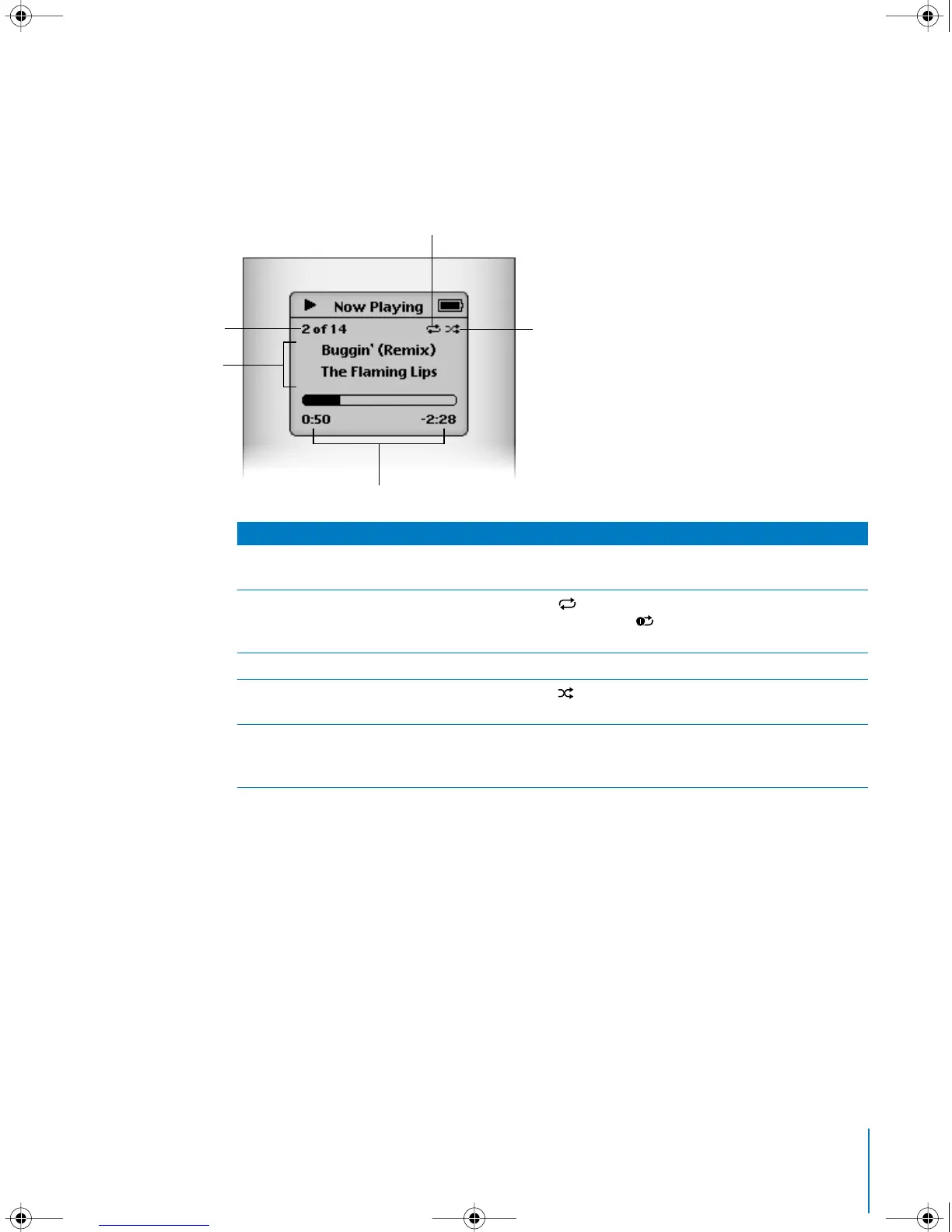
iPod mini Now Playing Screen
When a song is playing, the Now Playing screen appears. When you see the Now
Playing screen, you can use the Click Wheel to change the volume. Click the Menu
button to go back to the previous menu.
Now Playing Screen
Song number
Shows the number of the song playing within the current
sequence of songs.
Repeat icon
The Repeat icon ( ) appears if iPod mini is set to repeat all
songs. The Repeat Once icon ( ) appears if iPod mini is set to
repeat one song.
Song information
Displays the song title and the artist.
Shuffle icon
The Shuffle icon ( ) appears if iPod mini is set to shuffle songs
or albums.
Song time
Displays time elapsed and time remaining for the current song.
Press the Select button to show the scrubber bar, then use the
Click Wheel to scroll to another point in the song.
Repeat icon
Shuffle icon
Song time
Song number
Song information
LL1519.book Page 9 Tuesday, February 3, 2004 6:03 PM



 To Next Page