2 Disassembly
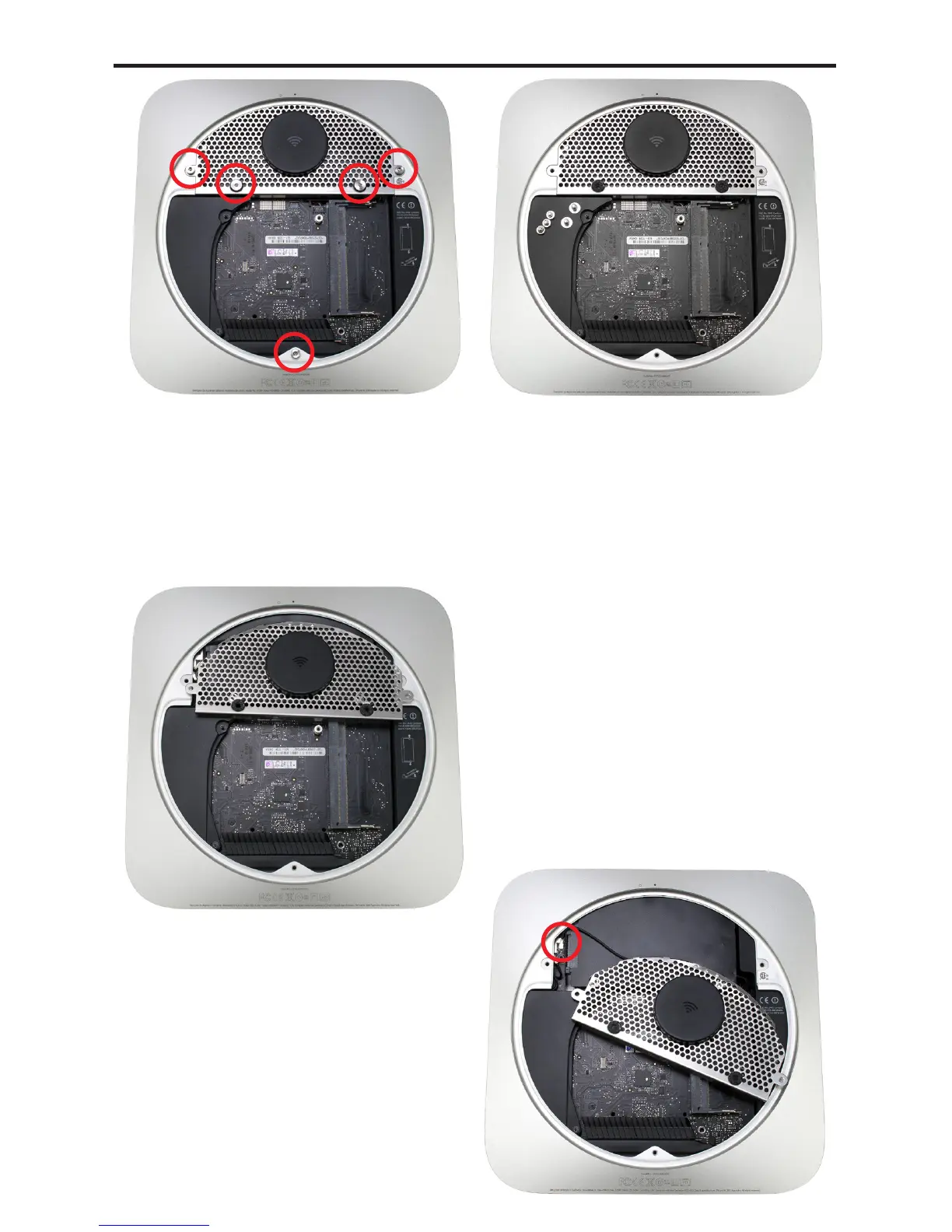
Using the Torx T8 screwdriver, remove the 3 2mm hex head (the Torx
is the same size as a 2mm or 5/64 hex bit) screws that are used to hold
the bottom cover onto the Mac mini. Do not exert too much force, Torx
drivers are not as strong and can strip if you are not careful.
Also remove the 2 Torx T8 screws opposite the Airport antenna. These
secure the bottom hard drive in place.
Gently lift up on the Airport
antenna cover from the side closest
to the logic board.
You may need to use your green
pry tool to lift up on the edge of the
cover to pop it loose as shown in
the photograph.
Pivot the Airport antenna cover
gently towards you and to the right.
The Airport antenna is attached
to the Airport card still. By pulling
it in the direction shown in the
photograph, it will slide the cable
out of the chassis so that you can
lift up and remove the antenna
from the connector safely.
Use caution - it is fragile.
⑪
⑩
⑨⑧
Mac mini 2012 Bluetooth Shielding Instructions



 To Next Page