76 Chapter 5 Last, but Not Least
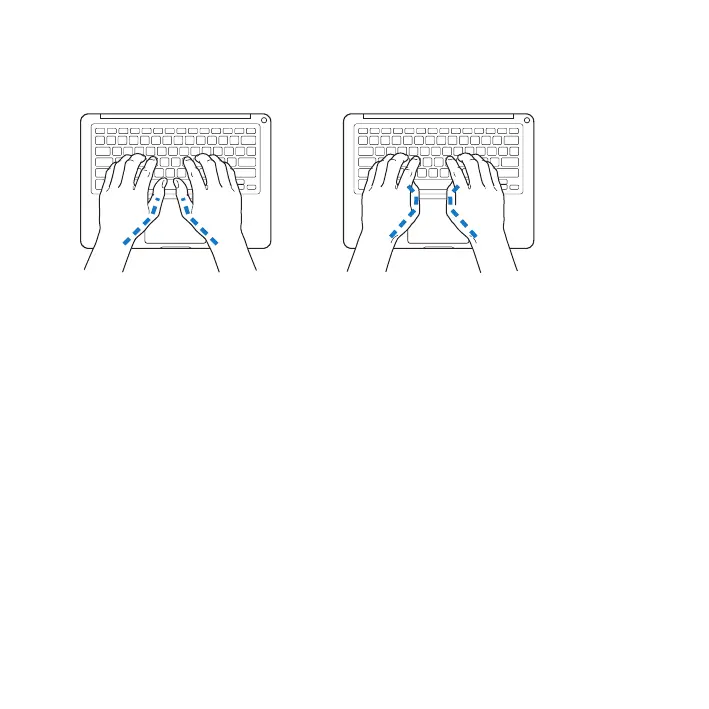
Usealighttouchwhentypingorusingthetrackpadandkeepyourhandsandngers
relaxed.Avoidrollingyourthumbsunderyourpalms.
Not this
This
Changehandpositionsoftentoavoidfatigue.Somecomputerusersmightdevelop
discomfortintheirhands,wrists,orarmsafterintensiveworkwithoutbreaks.Ifyou
begintodevelopchronicpainordiscomfortinyourhands,wrists,orarms,consulta
qualiedhealthspecialist.
External Mouse
Ifyouuseanexternalmouse,positionthemouseatthesameheightasthekeyboard
andwithincomfortablereach.
Chair
Anadjustablechairthatprovidesrm,comfortablesupportisbest.Adjusttheheight
ofthechairsoyourthighsarehorizontalandyourfeetareatontheoor.Thebackof
thechairshouldsupportyourlowerback(lumbarregion).Followthemanufacturer’s
instructionsforadjustingthebackresttotyourbodyproperly.



 To Next Page