MacBook (13-inch) Take Apart — Memory 22
Removal Procedure
Touch a metal surface inside the battery bay to discharge any static electricity.
Put on an ESD wrist strap.
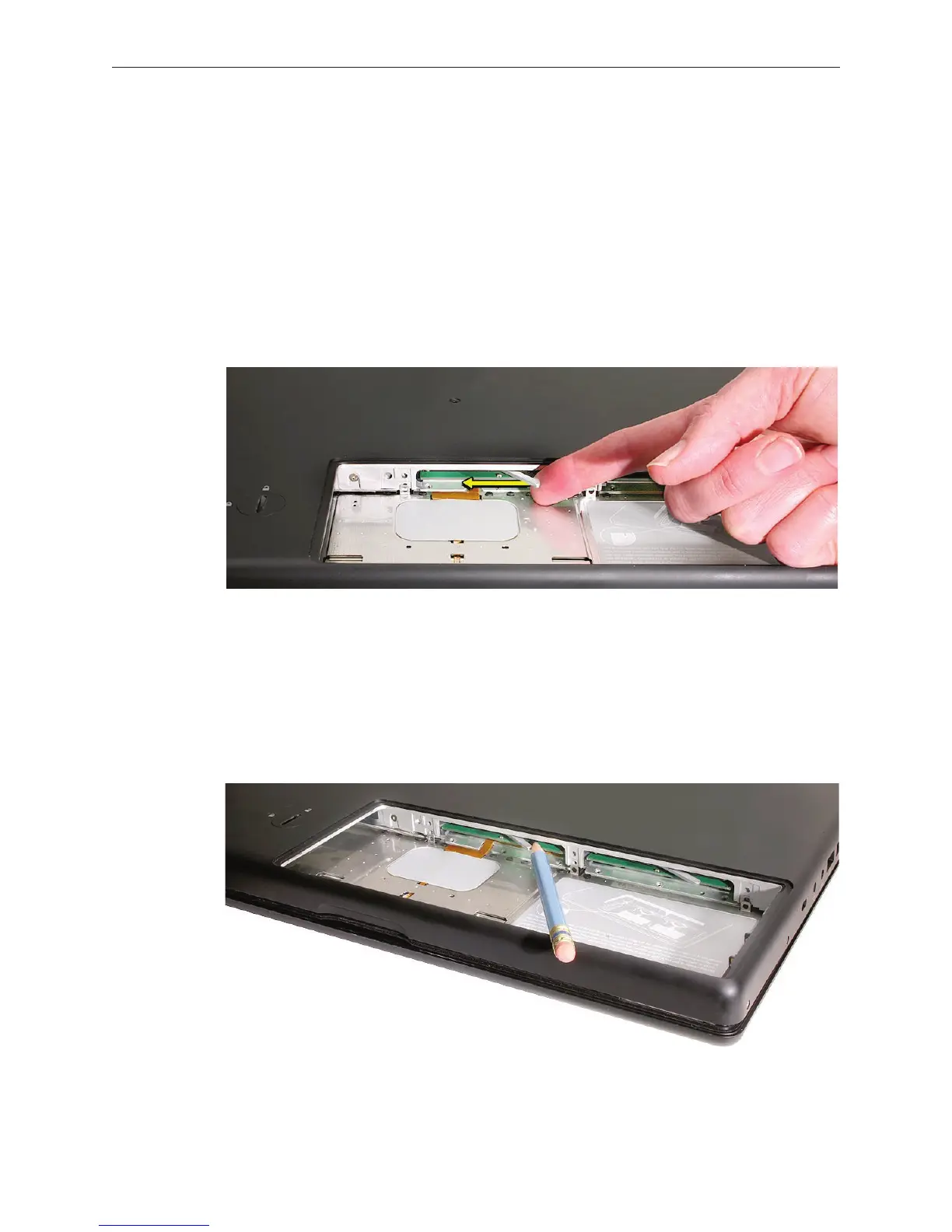
In one swift motion, use one nger to move the lever to the left and release it. This swift
motion ejects the memory card.
Caution: The memory card eject levers are on a spring hinge that operates on a side-to-side
horizontal plane. The mechanism can be damaged if the lever is forced outside of that
horizontal movement. To prevent damage to a lever, move it swiftly—in one sideways
direction only.
Note: Refer to the following if an issue occurs with a lever:
• If the lever wobbles, the lever may not be fully screwed in. Refer to “DIMM Lever Kit” in
this chapter.
• If the lever oers no resistance, the spring mechanism may be damaged. Refer to “DIMM
Lever Kit” in this chapter.
• If the lever is stuck in a completely closed position (recessed underneath the bottom
case), use a wooden pencil or black stick to gently pry it out, as shown below.
1.
2.
3.



 To Next Page