EasyManua.ls Logo

Apple Universal Dock - Page 6

Apple Universal Dock
80 pages
Print Icon
To Next Page IconTo Next Page
To Previous Page IconTo Previous Page
Loading...
6 English
English 7
To use the Dock with your iPod or iPhone:
1 Attach the cable included with your iPod or iPhone to your computer or to a USB
Power Adapter (sold separately) thats plugged into a power outlet, and connect the
other end to the Dock.
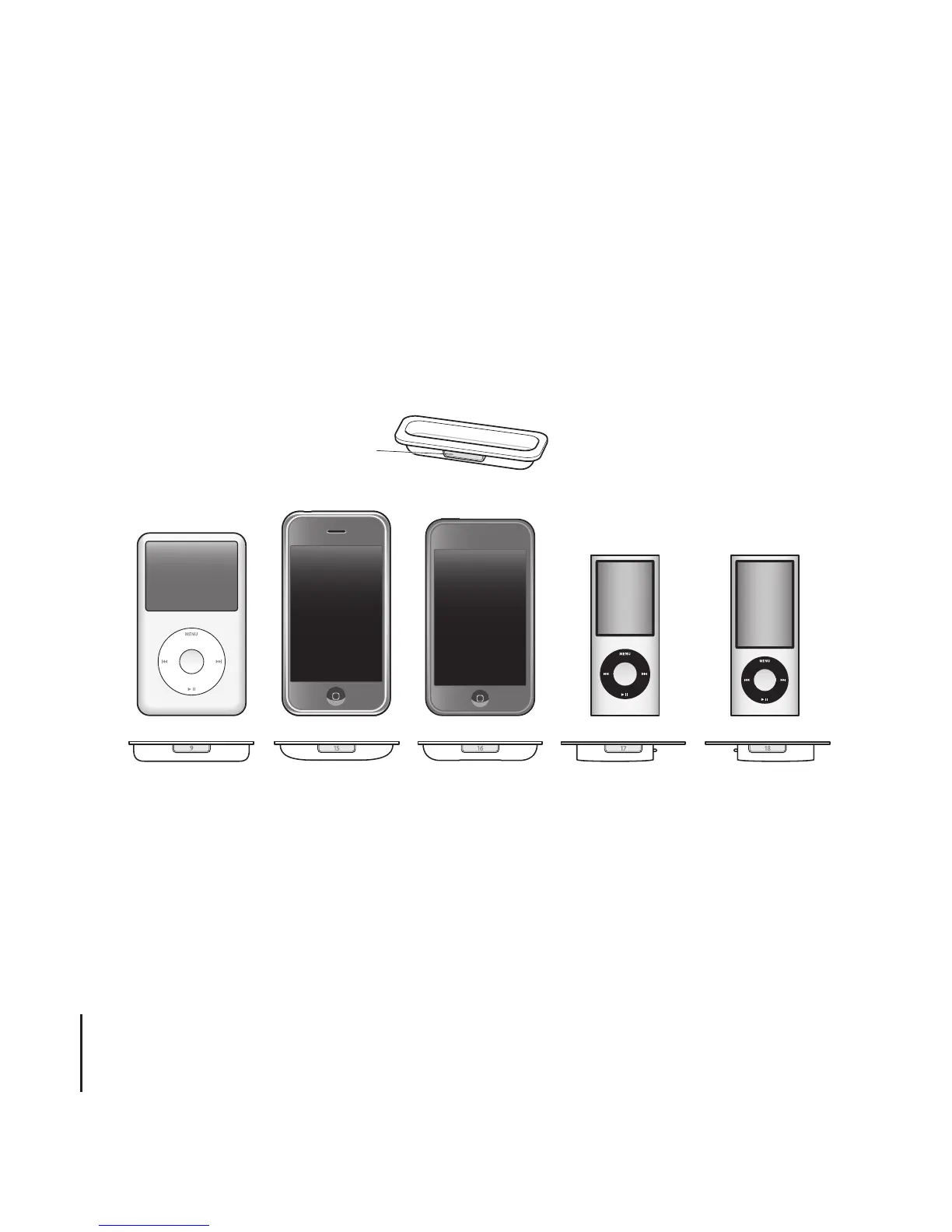
2 ChoosetheadapterthattsyouriPodoriPhone.YouriPodoriPhonetssnuglyinto
the correct adapter.
The number (918)
shows which iPod or iPhone fits
iPod nano
iPod touch
iPhoneiPod and
iPod classic
iPod nano
9
18
2nd generation 4th generation 5th generation
16
iPhone 3G
and 3GS
5th generation (30GB),
iPod classic 80GB and
12 0/160GB
15
17
Note: If a dock adapter for your iPod or iPhone model isnt included with your Universal
Dock, you can purchase one at www.apple.com/store.
6

Other manuals for Apple Universal Dock