
 Need help?
Do you have a question about the Aptoyu HWYX-01 and is the answer not in the manual?
Follow instructions, use at normal temperature, avoid water and heat sources, and do not block vents.
Details the loudspeaker host, 3.5mm audio line, MicroUSB power cord, and pouch.
Describes functions for Power, Play/Pause/Call, volume adjustment, and track selection.
Explains USB charging, AUX-IN, MicroUSB ports, and Bluetooth/battery indicators.
Details the behavior of the Bluetooth and electric quantity indicators.
Steps to search, pair, and connect to Bluetooth devices for audio playback.
Explains how the speaker automatically reconnects to the last connected device.
Lists technical details including type, battery capacity, and supported storage.
Solutions for common issues like connection failures, no sound, and power problems.
Details FCC rules, interference guidelines, and RF radiation exposure limits.
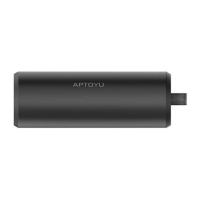
This document outlines the features and operation of the HWYX-01 Bluetooth Speaker, a portable audio device designed for ease of use and versatility.
The HWYX-01 Bluetooth Speaker serves as a portable audio output device, capable of playing music from various sources. Its primary function is to provide wireless audio playback via Bluetooth, allowing users to connect their smartphones, tablets, or other Bluetooth-enabled devices. Beyond wireless connectivity, the speaker also supports playback from a TF card, enabling users to enjoy their stored music directly from the device without the need for an external source. An AUX-IN interface further expands its compatibility, allowing for wired connections to audio sources that may not have Bluetooth capabilities. The speaker also features a USB charging port, which not only facilitates charging of the speaker itself but also offers a 5V 1A output for charging other mobile devices, making it a convenient power bank on the go.
The device is equipped with a range of controls to manage playback and calls. A dedicated "M mode key" allows users to switch between different input modes: Bluetooth, TF card (when inserted), and external-drive sound source (AUX-IN). The "Play-Pause/Call" button provides essential playback control, allowing users to pause and resume music. This button also handles call management, enabling users to pick up or hang up incoming calls with a short press, and decline calls with a long press. Navigation through tracks and volume adjustment are managed by the "Prev/V-" and "Next/V+" buttons. A short press on these buttons allows users to skip to the previous or next track, respectively, while a long press adjusts the volume down or up. The power button, requiring a 2-second press to turn on or off, ensures intentional power management.
Visual indicators enhance the user experience. A Bluetooth indicator lamp flickers when the device is searching for a connection and remains steadily lit once a connection is established. Electric quantity indicators provide a clear visual representation of the battery status, with lamps flickering during charging and indicating low battery when necessary.
The HWYX-01 Bluetooth Speaker is designed for straightforward and intuitive use. To initiate Bluetooth audio playback, users simply turn on the speaker and then enable Bluetooth on their external device. The speaker will appear as "Aptoyu-02" in the list of available devices. Once selected, a voice prompt will confirm the successful connection, and the Bluetooth indicator lamp will remain steadily lit. A convenient feature is the automatic reconnection capability: if the speaker was previously connected to a device and that device's Bluetooth remains open, the speaker will automatically reconnect to it upon power-on, eliminating the need for manual re-pairing.
For TF card playback, users need only insert a TF card into the designated slot while the speaker is powered on. The speaker will automatically detect the card and begin playing music stored on it, accompanied by a "Music" voice prompt. If multiple modes are available, the "M" button can be used to switch to the TF card mode. When using the AUX-IN interface, connecting an audio line will automatically switch the speaker to the external-drive sound source mode, allowing playback from wired devices.
The USB charging port offers dual functionality. It is used to charge the speaker itself via a MicroUSB cable connected to a DC5V power adapter or a USB port. Additionally, the USB-A output port can be used to charge other mobile phones, providing a practical solution for users who need to power their devices while on the go.
The device also incorporates safety and convenience features. A built-in reset key, accessible with a thin bar, allows users to restart the system in case of unresponsiveness or system halts, ensuring reliable operation. The speaker's design emphasizes portability, making it suitable for various environments.
Maintaining the HWYX-01 Bluetooth Speaker involves adhering to a few simple guidelines to ensure its longevity and optimal performance. Users are instructed to store and use the product in a normal temperature environment, avoiding extreme heat sources such as heat sinks, air conditioners, stoves, or amplifiers, as these can damage the internal components. It is crucial to keep the speaker away from water and liquids; the device should not be immersed, dropped, or splashed with any liquid.
To prevent damage, users should avoid blocking the loudspeaker's mouth or inserting objects into its vents or slots. In the event of damage from falling, the product should not be used. Charging should always be done with a charger that complies with the loudspeaker's power requirements. To protect hearing, users are advised to adjust the loudspeaker to an appropriate volume.
For any repairs or significant damage, it is strongly recommended to seek assistance from professional maintenance staff. Unauthorized repairs will void the product's warranty, highlighting the importance of professional intervention for complex issues.
The device also provides troubleshooting guidance for common problems. If matching is unsuccessful after multiple attempts, users are advised to close the loudspeaker and restart it. For TF card errors or format issues, checking if the TF format is FAT32 and if the document format is APE is recommended. If there is no sound during playback, users should adjust the volume and check if the loudspeaker is muted or halted. When no sound is heard after connecting via AUX, verifying the correct connection of the voice frequency line is necessary. Staccato music during playback often indicates that the connecting equipment is beyond the effective range or that there is a barrier between the speaker and the connected device. If the speaker cannot be turned on, checking the power of the built-in battery is the first step. Finally, if the loudspeaker system halts and becomes unresponsive, pressing the reset key will restart the system. These maintenance and troubleshooting tips aim to empower users to address minor issues and ensure the continued functionality of their HWYX-01 Bluetooth Speaker.
 General
| Brand | Aptoyu |
|---|---|
| Model | HWYX-01 |
| Category | Speakers |
| Audio Output Mode | Stereo |
| Charging Time | 3 hours |
| Connectivity | Bluetooth 5.0 |
| Connectivity Technology | Bluetooth |
| Special Feature | Portable |

 To Next Page