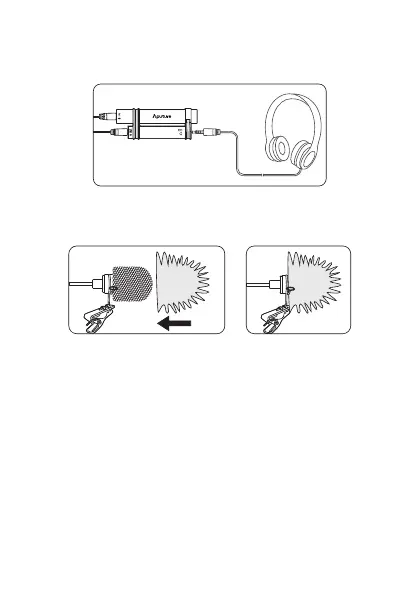
When recording with a mobile phone or tablet, you can connect headphone
through charge and monitor port to achieve playback monitor, if the recording
software support, but also to achieve real-time monitoring.
4. Recording and monitoring
The A.lav comes with a windscreen and a windshield to eliminate the noise caused
by wind or plosives while still capturing audio.
5. The use of windscreen and windshield
When in use, the steel wire clip can be xed on the belt, clothes and so on.
1. Please full charge the Aputure A.lav the rst time you use it.
2. Please avoid using this product when charging.
3. When not in use, it is recommended to save the lavalier and microphone control
module separately for saving battery power.
4. Some recording software for reasons of their own settings, you must open the
recording software rst when using, then connect the phone or tablet to record.
5.The A.lav is compatible with IOS systems and most of the android system phones
and tablets, for reasons of their own settings, some android phones
( for example : Huawei honor 6, Mate7, P8, Sony Z3 etc.) are not compatible.
6. The use of steel wire clip
When in use, you can x the microphone and wire with the supplied duct tape.
7. The use of duct tape
Tips and trouble setting
-5-


 To Next Page