15
Method 2: Scan into Bluetooth HID mode
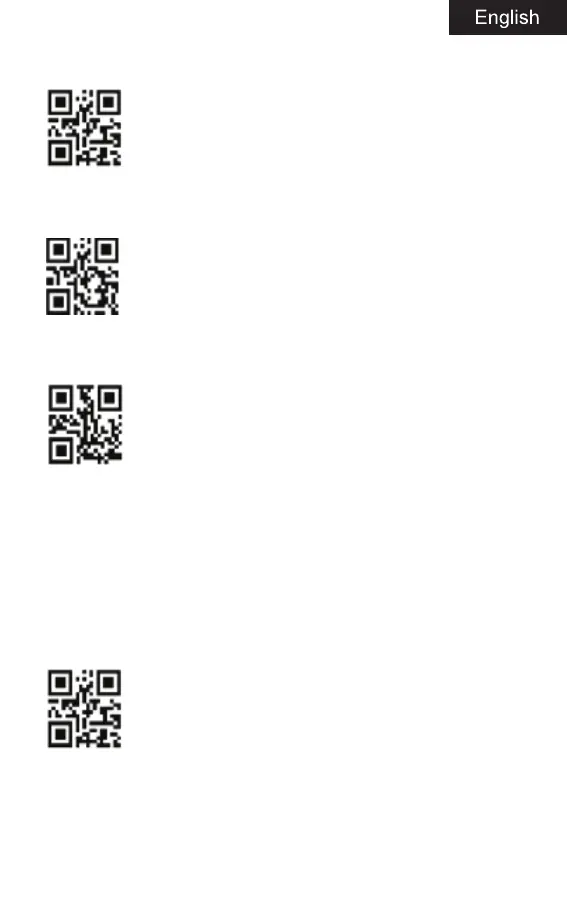
A: Start scanner, scanning “entering code”.
Enter setting mode
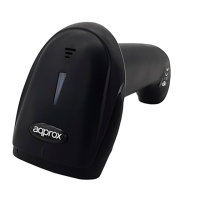
B: Scan the code of “entering bluetooth HID”.
Enter Bluetooth HID mode
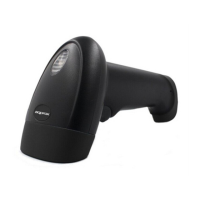
C: Scanning the below code to enter pairing mode, blue and green lights
flash alternately.
Enter pairing situation
D: Open the bluetooth in the device, search “Bar code Scanner HID”.
E: Click this bluetooth device, enter pairing.
F: Pair successfully, ”Di” one sound, and green light is on.
Bluetooth SPP/BLE mode
Android device or PC side enterprise or private customized Bluetooth
serial port software (optional).
A: Start the scanner, then scanning “enter setting mode” code.
Enter setting mode
B: Scan Bluetooth SPP mode.


 To Next Page