Cleaning
Note: Be careful not to pull the 'ON' trigger while the clear bin is open for emptying.
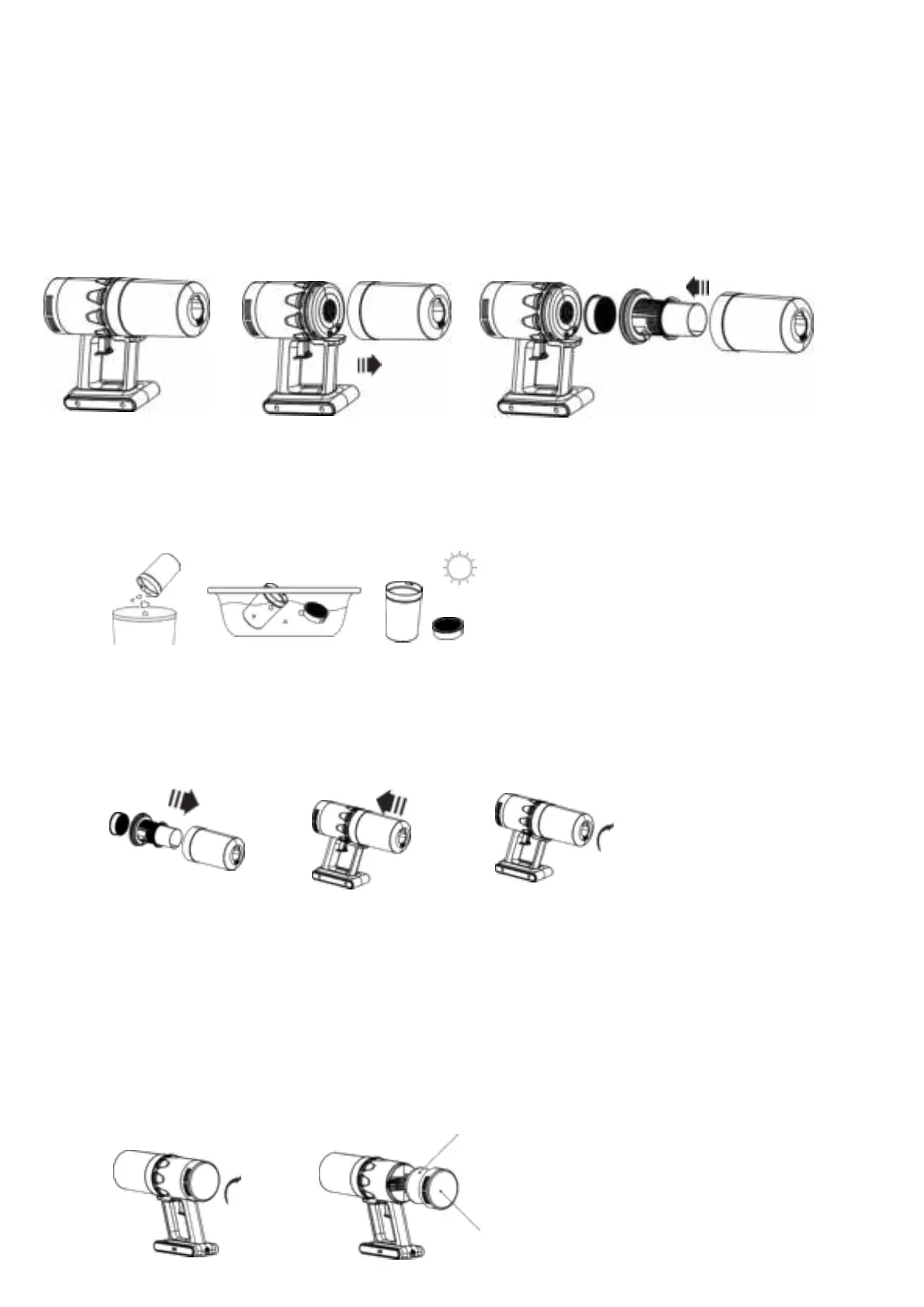
1. Hold the machine in your left hand and rotate the dust bin counterclockwise.
2. The dust bin disconnects from the vacuum cleaner.
3. Keep the dust tank upright.
4. Take out the filter and filter assembly.
5. Empty the dust bin.
6. Wash the filter and filter assembly with water. Let the filter air dry.
7. Put the filter back in the filter assembly. Push the filter assembly back in the dust bin, until you
hear a click. In case you do not hear the click, rotate the filter until the filter assembly falls in place.
8. Attach the dust bin to the handheld vacuum cleaner and turn clockwise to fasten.
Air sponge
1. Rotate the outlet cover plate clockwise.
2. Pull out the cover plate.
3. Rinse out the cover plate and the sponge with water.
4. Dry before reinstall.
5. Put back the sponge into the cover plate.
6. Rotate the outlet cover plate anti-clockwise to fasten.


 To Next Page
 Loading...