The LinQ Network Interface is a long-life network audio interface designed for high-quality digital music streaming. It connects to a Local Area Network (LAN) Ethernet, allowing users to stream music files from a NAS, server, computer, and all major streaming services. The device's modular concept ensures future upgradeability.
Function Description:
The LinQ is a highly modular device, built around a series of independent units, each optimized for a particular function. Each module has its own dedicated power supply, processor, memory, and a clock system with two high-quality quartz crystal oscillators, serving as the 'master' clock. An FPGA on each module board performs system optimizations depending on the streaming service implemented. The base platform can accommodate up to four streaming service (protocol) modules (M1, M2, M3, M4), which can be positioned in any of the four slots.
Two additional cards are always present:
- A unit supervision processor with a 32-bit ARM microcontroller, managing system operation.
- A custom-developed LAN switch board, which acts as an internal Ethernet switch. This module features galvanically isolated digital input/output connections for optimal audio performance.
An external board generates the output signals using proprietary FPGA circuitry, allowing for high performance and future upgrades. The available outputs are S/PDIF, AES, Dual-AES, and AQlink (I2S), all galvanically isolated from the internal circuitry. The LinQ prioritizes sound quality and does not use a USB interface, instead relying on AQlink, aqua's proprietary I2S connection, to avoid any sound quality losses associated with USB.
Important Technical Specifications:
- Type: Modular multi-processor network streaming equipment.
- Architecture: User-configurable with up to four service-dedicated streaming processors on interchangeable slots of the main-board. Includes an internal custom-developed LAN switch, dedicated power supply for every slot, and a separate microcontroller for supervisory control and user interface.
- Input: 1 standard RJ-45 connector for the ETHERNET network. No network configuration is required, as the IP address is automatically assigned via DHCP.
- Outputs:
- AQlink I2S: 1 Ethercon RJ-45 connector (PCM 32 bit 384kHz / DSD128 max). Designed for high-quality connection to aqua DACs (La Voce S3, La Scala MkII Optologic, Formula xHD). Recommended cable: high-performance CAT5, CAT6, or CAT7 with RJ45 or Neutrik Ethercon terminations.
- Dual-AES/EBU (IEC 60958): 2 XLR 110 ohm connectors (PCM 24 bit 384kHz / DSD128 max). Uses two shielded 110 ohm impedance cables. Automatically activates when sampling frequency is 88.2 kHz or greater, enabling reproduction of musical files up to 384 kHz.
- AES/EBU (IEC 60958-4): 1 XLR 110 ohm connector (PCM 24 bit 192kHz / DSD64 max). Uses shielded 110 ohm impedance cable.
- S/PDIF (IEC 60958-1): 1 BNC 75 ohm connector (PCM 24 bit 192kHz / DSD64 max). Uses a coaxial 75 ohm impedance cable.
- S/PDIF (IEC 60958-3): 1 RCA connector (PCM 24 bit 192kHz / DSD64 max). Uses a RCA coaxial cable for digital audio.
- RS-232 Serial Interface: 9-pin DB-9 connector. Parameters: 9600,n,8,1. Commands are 4 characters preceded by '*' and followed by '#'. Minimum 100mS delay between commands (1 Sec for power-on). Communication is two-wire (tx, rx) type, without handshaking. Maximum cable length: 20 meters with good quality cable.
- User Interface: 2x20 character OLED display showing activated streaming service, sampling frequency, and word bits (16/24). Front panel keyboard (seven keys). IR remote command available on request.
Usage Features:
- Installation: Install on a stable, vibration-free base. Avoid placing on top of heat-emitting devices. Connect to electrical mains and Ethernet LAN. Outputs connect to a DAC via AQlink (I2S), AES (or Dual/AES), or S/PDIF. No configuration is required; the unit is ready for use.
- Operation:
- Power key: Power-on/power-off. Displays "Testing" briefly, then activates the last selected module.
- Display key: Disables/enables the OLED display. Re-enables briefly if keyboard is used while disabled.
- M1, M2, M3, M4 keys: Select the desired module (A, B, C, or D) for listening.
- FUNC key: Displays module name and type on first and second press. Holding down displays firmware release numbers for the supervision microcontroller and selected module.
- Display Information: Shows selected module, signal type (PCM/DSD), audio samples bit number (16/24), and sampling frequency (real-time measurements). Also indicates 'no LAN' (absence of network connection) or 'no module' (selected module not present).
- Remote Control: An optional IR RC5 remote control replicates front panel key behavior.
- System Update:
- Check firmware release using the FUNC key (hold on). Each module is updated separately.
- Remote mode ('web'): Unit must be connected to the internet. Press M1 to start. Takes 2-4 minutes. Unit powers off automatically upon completion.
- Local mode ('loc'): Unit must be connected to your LAN. Download the update file from the website or provided by aqua. Press M2. The display shows the unit's IP address (e.g., 192.168.1.7:8080). Connect to this IP address via a web browser (Chrome, Firefox, Safari, Edge, Internet Explorer) and follow on-screen instructions. Unit powers off automatically upon completion.
- RS-232 Commands:
*PWR1#: power-on*PWR0#: power-off*MOD1# to *MOD4#: module 1 to 4 select*DIS0#: display OFF*DIS1#: display ON*FUNC#: replicates front panel 'FUNC' key*STAT#: transmits current status (power, selected module, LAN presence, audio signal type, bit number, sampling frequency, display status).
Maintenance Features:
- Nextel Coating: The Nextel coating is an anti-resonant treatment. Clean without chemical products. Avoid placing other electronics on top to prevent marks and scratches.
- Safety Notices:
- Do not operate in explosive atmospheres or with flammable gases/fumes.
- Replace line fuse(s) only with fuses of the same voltage, current rating, and type.
- Do not remove equipment covers or shields; this should only be done by service-trained personnel.
- Do not operate damaged equipment. Remove power and do not use until safe operation is verified by service-trained personnel.
- Do not service or adjust alone; ensure a person capable of rendering first aid is present.
- Do not substitute parts or modify equipment. Return to aqua for service/repair to maintain safety features.
- Warranty:
- Warranty service is typically obtained from the importing distributor or retailer.
- Manufacturer's warranty is one year from the original shipping date from aqua.
- Warranty covers materials and labor for defects. Aqua may replace the product or refund the purchase price.
- Warranty does not cover damage from accident, abuse, misuse, misapplication, unauthorized changes/modifications/repairs, altered/absent serial number, or inadequate packaging for shipping.
- Vacuum tubes are warranted for 90 days. NOS (New Old Stock) components are excluded.
- Warranty is for the original purchaser only and terminates upon ownership transfer.
- Shipping charges and tax/duty for repairs are at the owner's expense.
- Aqua reserves the right to charge for service if the product is found to be operating correctly.
- Repair Procedure:
- Contact Aqua via email at support@aquahifi.com, describing the problem.
- If repair is needed, Aqua will provide an RMA (Return Merchandise Authorization) number.
- Units received without an RMA number will be returned to the sender.
- Write the RMA number clearly visible on the outside of the package.

 Need help?
 General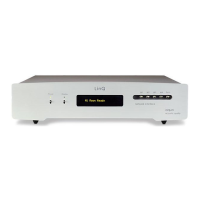

 To Next Page