frequency. As the names indicates, the transmission is made using two XLR cables, connecting
the LinQ and a DAC equipped with this type of input.
When a sampling frequency equal to or greater than 88.2 kHz is detected, the dual-AES output
is automatically activated.
Note that the unit inserts on the AES channel status data the appropriate codes defined in the
AES/EBU interface standard. In this way a DAC connected to the LinQ output can automatically
control the single/dual-AES switching during the reproduction (if the feature is implemented in
the DAC).
If the dual-AES is in the activated state, the output signal continues to be present on the S/PDIF
connector and on the single AES connector, provided that it does not exceed 192kHz as
sampling frequency.
If the dual-AES is in the disabled state, the same signal that is on the single-AES/EBU connector
is present also on the two XLR dual-AES connectors.
- AES/EBU (IEC 60958-4) | n. 1 XLR 110 ohm connector (PCM 24 bit 192kHz / DSD64 max). Use
shielded 110 ohm impedance cable for AES/EBU type connections.
- S/PDIF (IEC 60958-1) | n. 1 BNC 75 ohm connector (PCM 24 bit 192kHz / DSD64 max). Use a
coaxial 75 ohm impedance cable
- S/PDIF (IEC 60958-3) | n. 1 RCA connector (PCM 24 bit 192kHz / DSD64 max). Use a RCA coaxial
cable for digital audio
For all input/output connections we recommend using good quality cables. Pay special attention to
the cable connectors.
4. Operation
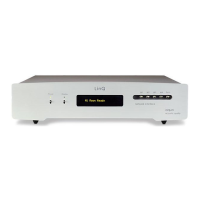
The user interface consists of a six-keys keyboard and a 2x20 characters OLED display.
Keyboard:
Power key: power-on / power-off
When the power is turned on, the word "Testing" is displayed for a short time. Afterwards, the
unit automatically activates the module that has been selected before the last shutdown (at
power-off, the unit saves the last module selection). When the name of the module appears on
the display, the unit is ready to stream music.
Display key: disables / enables the OLED display. If the keyboard is used when the display is in
the disabled state, it is re-enabled for a short time.
The M1, M2, M3, M4 keys are used to select the module you want to listen to: M1 for the
module A, M2 for the module B, M3 for the module C and M4 for the module D


 To Next Page
 Loading...