18
9
10
11
12
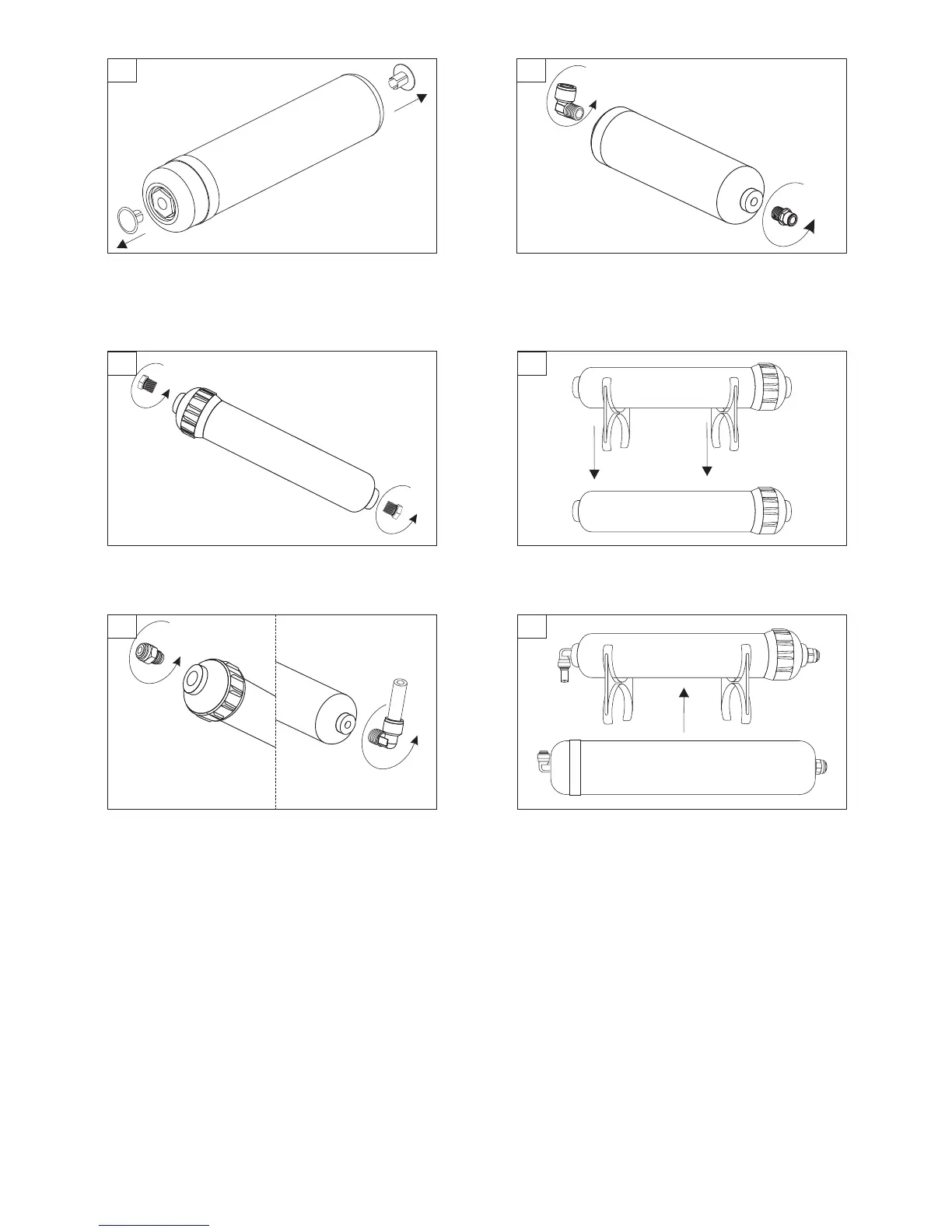
Screw-in connectors into new UF membrane housing.
CAUTION! Don't backtrack during screwing in the
connectors. Backtracking connectors may result in
compromising the connection seal and water leaks.
Unpack UF membrane and remove plug-ins.
Unpack new filter cartridge AIFIR1000 and remove plug-ins
from the inlet and outlet.
Move mounting clips from old to the new filter cartridge
AIFIR1000.
13
14
Screw in connectors into new filter AIFIR1000 housing.
CAUTION! Connect inlet connector (with tubing) to the
cartridge inlet. Next, connect outlet connector (without
tubing) to the cartridge outlet. CAUTION! Don't
backtrack during screwing in the connectors.
Backtracking connectors may result in compromising
the connection seal and water leaks.
Attach hollow fiber membrane with mounting clips which are
installed om AIFIR1000 filter cartridge. CAUTION! During
the installation pay special attention to correct water
flow direction. Correct water flow direction is indicated
by an arrow placed on the sticker of the cartridge.


 To Next Page
 Loading...