15
17
16
18
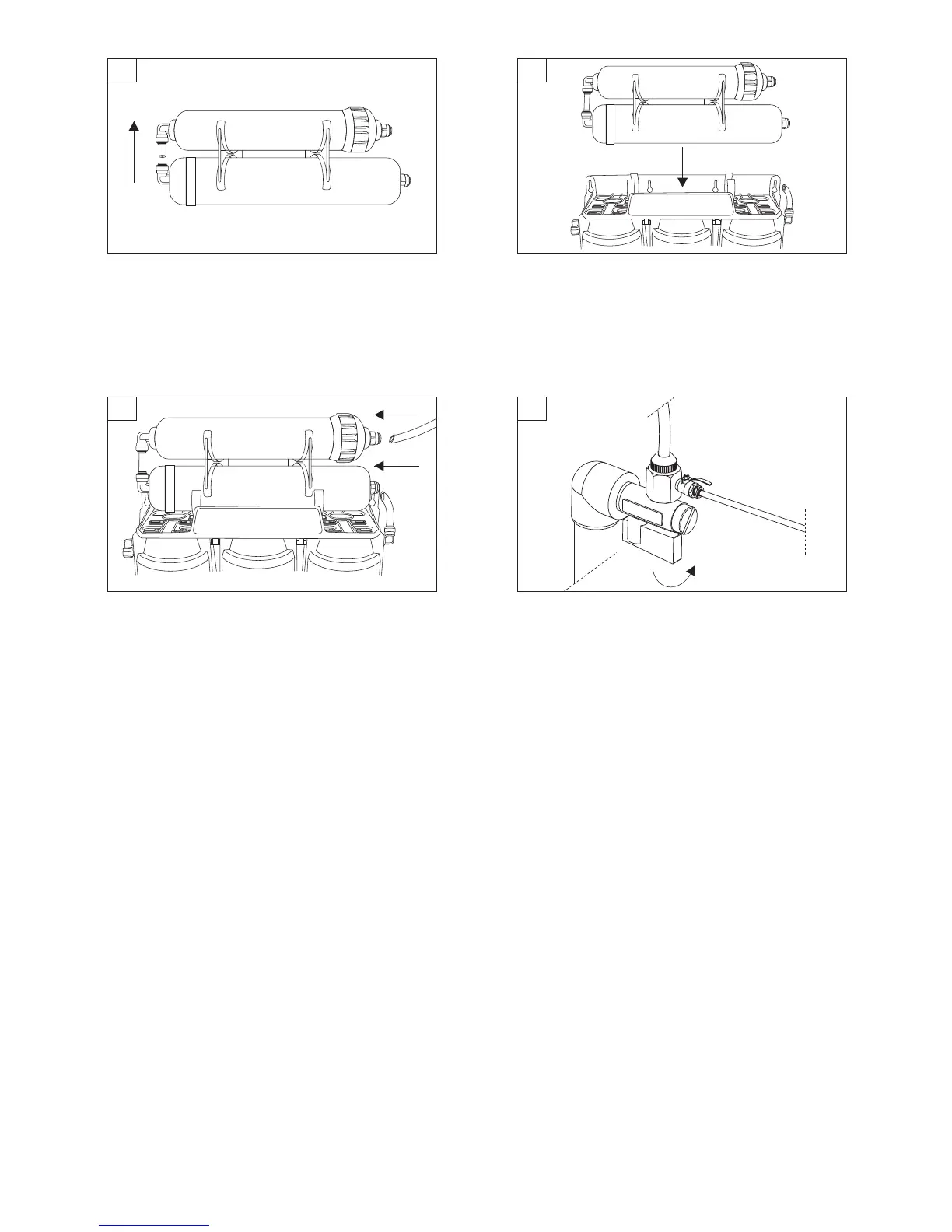
Connecting filter cartridge AIFIR1000 and UF membrane.
First, connect tubing coming out of AIFIR1000 inlet with UF
membrane outlet connector. CAUTION! During the
installation pay special attention to the tubing, prevent it
from being bended or damaged.
Connect filter cartridge AIFIR1000 and UF membrane by
placing UF membrane into mounting clips, which are already
installed on the system mounting bracket. CAUTION!
During the installation pay special attention to correct
water flow direction. Correct water flow direction is
indicated by an arrow placed on the sticker of the
cartridge.
Using tubing connect elbow connector OUT of the filtration
system with inlet connector of UF membrane. Connect filter
faucet tubing with AIFIR1000 connector. CAUTION! During
the installation pay special attention to the tubing,
prevent it from being bended or damaged.
Open water supply valve.
19


 To Previous Page
 Loading...