EasyManua.ls Logo

AquaIllumination Nero 3 - User Manual

AquaIllumination Nero 3
2 pages
Print Icon
To Next Page IconTo Next Page
Loading...
Plug the AC adapter into the
Integrated Controller.
Press the button on the
Driver to cycle through
speeds ( 1%, 20%, 40%, 60%,
80%, 100% ).
Plug the AC adapter into a
wall outlet.
Attach the correct plug
adapter to the AC adapter
before attempting to
plug in.
3. 4. 5.
Place the Nero® pump
inside the tank against the
wet-side magnet. Tilt as
desired.
Place the wet-side magnet
on the inside of the tank in
the position where you’d like
the pump to be. Secure with
dry-side magnet.
Setup
1. 2.
Quick Start Guide
Nero
®
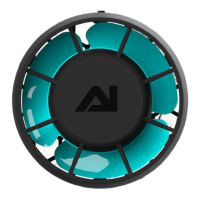
Nero® Submersible
Pump with
Integrated Driver
Dry-side / Wet-side
Magnets
AC Adapter with
Universal Plug
Adapter Set
Feed Mode
The Nero® will spin very slowly for 10 minutes (default setting) and then resume it’s set mode.
1. Hold the button on the Driver for 2-5 seconds until the LED blinks white. The button LED will blink
white while in feed mode.
All O
All connected Nero® pumps will stop.
1. Hold the button on the Driver for 6+ seconds until the LED fades out. The button LED will pulse white
while pumps are o.
To resume:
1. Press the button once.
Soft Reset
A soft reset restarts the device but retains the schedule and settings. To perform a soft reset:
1. Unplug from power.
2. Reapply power.
Button Modes & Resets
Question and Answer IconNeed help?

Do you have a question about the AquaIllumination Nero 3 and is the answer not in the manual?

Summary

Nero Pump Setup

Attach AC Adapter Plug

Attach the correct plug adapter to the AC adapter before attempting to plug in.

Connect to Wall Outlet

Plug the AC adapter into a wall outlet.

Connect to Integrated Controller

Plug the AC adapter into the Integrated Controller.

Position Pump Magnet

Place the Nero® pump inside the tank against the wet-side magnet.

Secure Wet-Side Magnet

Place the wet-side magnet on the inside of the tank.

Nero Button Functions

Activate Feed Mode

Hold button for 2-5 seconds until LED blinks white to enter feed mode.

Turn All Pumps Off

Hold button for 6+ seconds until LED fades out to stop all pumps.

Perform Soft Reset

Unplug, hold button, reapply power, release to restart without losing settings.

Device Resets

Connected Reset Procedure

Restart device, retain connection settings. Unplug, hold button, reapply power (LED blinks green), release.

Factory Reset Procedure

Restart device, remove all settings. Unplug, hold button, reapply power (LED blinks red), release.

Safety, Compliance & Warranty

General Safety Statements

Important warnings regarding electrical shock, water exposure, handling, and maintenance.

Regulatory Compliance

FCC and Industry Canada compliance statements, RF exposure information.

Disposal and Declarations

Information on product disposal, CE conformity, and original declaration of conformity.

Limited Warranty and Registration

Details on limited warranty terms, conditions, and the importance of product registration.

AquaIllumination Nero 3 Specifications

General IconGeneral
BrandAquaIllumination
ModelNero 3
CategoryWater Pump
LanguageEnglish