EasyManua.ls Logo

AQUALEAK WG1 - User Manual

AQUALEAK WG1
22 pages
Print Icon
To Next Page IconTo Next Page
Loading...
AQUALEAK DETECTION LTD
11 Forest Gate, Pewsham, Chippenham, Wiltshire SN15 3RS
Tel: +44(0)1249 715698 F:+44(0)1249 431363
Our full range of Water Leak Detection Systems, Oil Leak Detection, Overtemperature & Environmental Alarms,
Telephone Autodial Units can be seen at : http://www.aqualeak.com
www.aqualeak.com
Installation and Operation Instruction Manual
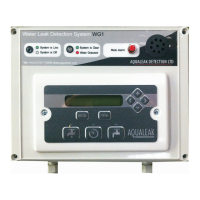
WG1 Major Water Leak Detection System
The WG1 system meets and exceeds the requirement for BREEAM 2011 Section WAT03. It is a Major
Leak Detection System which covers all mains supplies both in and outside the building. It is
programmable, has an audible alarm and can identify different flow rates. It also complies with
BREEAM W02 as the system uses water meters with pulsed outputs and a pulse splitter that can
connect to a BMS.
The standard one zone WG1 system comprises a WG1 Control Unit for monitoring the internal pipe
work.
Connected to this is one pulsed output water meter. This water meter is installed inside the building
just after the stopcock, and will monitor for internal leaks.
Question and Answer IconNeed help?

Do you have a question about the AQUALEAK WG1 and is the answer not in the manual?

Summary

WG1 Panel Overview

Panel Interface Components

Describes LEDs, Mute Button, Sounder, and display.

Water Meters

Types of Water Meters

Details screw and flanged meter types and their pulse readers.

Connecting Water Meters

Wiring and Connection Details

Explains cable types, braiding, junction boxes, and older system differences.

Connecting Latching Valves

Valve Wiring and Specifications

Details connection, voltage requirements, and shared wiring.

Connecting to a BMS

BMS Pulse Output Connection

Explains pulse output for consumption monitoring by BMS.

Connecting Power Supply

Power Requirements and Fuses

Details the required 230VAC supply and fuse specifications.

Navigating the Menus

Control Panel Operations

Explains display, navigation buttons, setup, and special functions.

Guard Menu Modes

Understanding Mode Types

Describes Permanent, Daily, 7 Day, and Weekend modes.

Hi Guard Setting

Configuring High Guard Levels

Explains Hi Guard relation to water flow and setting procedure.

Lo Guard Setting

Configuring Low Guard Levels

Explains Lo Guard usage and setting procedure.

Permanent Mode Configuration

Setting the Permanent Guard Mode

How to set the system to use a constant guard level.

Daily Mode Configuration

Setting Mode, Hi;Lo Guards, and First High Use Time

Configures mode, Hi/Lo guards, and initial occupied period start time.

Daily Mode Configuration Steps

Setting Low Use and Additional High;Low Use Times

Configures unoccupied periods and additional occupied/unoccupied times.

7 Day Mode Configuration

Setting Mode, Hi;Lo Guards, and First High Use Time on Sundays

Configures mode, Hi/Lo guards, and Sunday's initial occupied period start time.

7 Day Mode Configuration Steps

Setting Sunday Low Use and Additional High;Low Use Times

Configures unoccupied periods and additional occupied/unoccupied times for Sundays.

Setting Other Days of the Week

Instructions to repeat the process for Monday to Saturday.

Weekend Mode Configuration

Setting Mode, Hi;Lo Guards, and First High Use Time on Sundays

Configures mode, Hi/Lo guards, and Sunday's initial occupied period start time.

Weekend Mode Configuration Steps

Setting Sunday Low Use and Additional High;Low Use Times

Configures unoccupied periods and additional occupied/unoccupied times for Sundays.

Setting Parameters for Weekdays

Instructions to repeat the process for Monday to Friday.

Settings Menu

Configuring Keylock, Date, and Time

Details how to set up Keylock, Date, and Time parameters.

Settings Menu Options

Configuring Timeout and Buzzer

Details how to set the Timeout and Buzzer Enable/Disable parameters.

Log Menu and Alarms

Accessing Log Data

Explains how to view Last Valve Closed and Last Time Out information.

In the Event of an Alarm

Describes what happens during an alarm and initial investigation steps.

Troubleshooting Guide

Common Problems and Solutions

Lists common issues like false alarms and no pulses with their resolutions.

AQUALEAK WG1 Specifications

General IconGeneral
BrandAQUALEAK
ModelWG1
CategorySecurity Sensors
LanguageEnglish

Related product manuals