ULTIMA Advanced Water Treatment Controllers
The ULTIMA Advanced Water Treatment Controller is a sophisticated device designed for managing and optimizing water treatment programs in cooling towers and HVAC equipment. It integrates a range of control and monitoring features to ensure efficient and safe operation.
Function Description
The ULTIMA controller provides comprehensive control over various aspects of water treatment, including:
- TDS/Conductivity Control: Monitors and regulates the total dissolved solids or conductivity of the water, which is crucial for preventing scale formation and corrosion.
- Inhibitor Timer Control: Manages the timed dosing of corrosion inhibitors to protect system components.
- Oxidizing Biocide Control (ORP): Utilizes Oxidation-Reduction Potential (ORP) measurements to control the dosing of oxidizing biocides, effectively managing microbial growth.
- Non-Oxidizing Biocide Control (Timers): Employs timers for the scheduled dosing of non-oxidizing biocides.
- Single and Dual pH Control: Offers flexible pH control options, including single-point control or dual-point control for managing pH between two limits using both acid and base.
- Dispersant Dosing Control: Regulates the dosing of dispersants to prevent fouling and maintain system cleanliness.
- Temperature Monitoring: Continuously monitors water temperature, providing essential data for system performance and chemical efficacy.
- Comprehensive Timers: Features a robust set of timers to regulate various dosing schedules and operations, including accessory timers for enhanced performance of individual dosing programs.
- On-Board Data Logging: Records operational data, allowing for historical analysis of system performance and compliance.
- High and Low Alarms: Provides alerts for out-of-range pH, ORP, and TDS values, ensuring prompt attention to critical conditions.
- Extensive Internet Communication: Supports various communication options such as Modem, Wi-Fi, and Ethernet for remote monitoring and control.
Important Technical Specifications
The ULTIMA controller is housed in a durable enclosure, designed for wall mounting. Key specifications include:
- Model: ULTIMA3P (example, specific models may vary in pump and solenoid configuration).
- IP Rate: 24 (indicating protection against solid objects over 12.5mm and splashing water).
- Voltage: 230V 50Hz.
- Power: 1200W.
- Pressure: 360kPa.
- Operation: Continuous.
- Safety: Double Insulated Water Circuit.
- Display: 7-inch touch screen for intuitive navigation and control.
- Connectivity: USB connectors (x2) on the motherboard for data import/export.
- Outputs:
- GPO plugs 1 to 4 (240V, 5A/250VAC 20x5mm fuse) for general purpose outputs.
- Outputs 5 to 7 for special orders hard-wired to external relays or components.
- Output 8 for special orders hard-wired to an inbuilt 10-15A relay (e.g., chlorinators, large pumps).
- Outputs 9 to 13 (low power, up to 50V/0.5A/10W peak) for switching dosing pumps or similar applications.
- Inputs:
- BNC pH connector (if fitted).
- BNC ORP connector (if fitted).
- Combination Probe (PR_PHRG) connector.
- FCT probe (PR_FCT) connector for Conductivity, Flow, and Temperature.
- FAC probe connector.
- Dip switches for FAC Probe Gain regulation.
- 4-20mA connector and Water meter connector.
- 5 x Analogue inputs.
- 3 x 5V DC and 2 x 12V DC power supply connectors.
- 5 x jumpers for tank alarm sensors connected to analogue inputs.
- Fuses:
- Equipment fuse F1: Output fuse: 5A/250VAC 20 x 5mm.
- Relay fuse F2: (Only if additional relay for output 8 is installed).
- Control fuse F3: 0.125A/250VAC Time-delay 20 x 5mm.
Usage Features
The ULTIMA controller is designed for user-friendly operation with its 7-inch touch screen interface, similar to a smartphone.
- Main Screen: Displays key parameters (TDS, ORP, pH, Inhibitor, Timers, Temperature) with current values, setpoints, and status indicators (e.g., power icon for relay ON, red padlock for lockout, flashing red for alarm).
- System Configuration: Accessed via the SYSTEM icon, allowing users to set preferences, date/time, language, and communication options (NONE, ETHERNET, WI-FI, MODEM).
- Screen Lock Password: Provides security by allowing password protection for controller access, with an option for Read Only mode.
- Import/Export Settings and Data: Facilitates easy transfer of settings and logged data to/from a USB drive.
- Component Settings: Each parameter (TDS, ORP, pH, Inhibitor, Dispersant, Timers, Outputs) has a dedicated screen for configuration, including:
- Control Mode: Selection of control strategies (e.g., TDS or Conductivity mode).
- Setpoint: Target values for controlled parameters.
- Pump Duty: Percentage of time the pump operates.
- Mode: Various operational modes (Disabled, Bleed, Continuous, Flow, Water Meter, Corrosion, etc.).
- Dose Type: Selection of dosing chemicals (e.g., Acid).
- Alarm Mode & Range: Configuration of alarm triggers and thresholds.
- Lockout Delay: Time delay before a component enters lockout mode.
- Dose Period: Frequency of dosing.
- Output Assignment: Ability to assign specific outputs to different components.
- Calibration: Supports both QUICK (using known pre-measured values) and PRECISE (using calibration solutions) methods for sensors (TDS, ORP, pH).
- Performance Chart: Provides historical data visualization (current day, week, or month) for component performance and dosing duty values.
- Timers: Six independent timers can be configured with names, assigned outputs, and various modes (Disable, Timer, Timer and Flow, Timer and Probe, Timer, Probe and Flow) for precise scheduling. Accessory timers allow for advanced sequencing (e.g., Pre-Bleed, Stop ORP, Bleed Lock out).
- Manual Dosing: Allows temporary manual override of outputs for priming pumps or testing, with countdown timers indicating remaining manual dose time.
Maintenance Features
The ULTIMA controller is designed for ease of maintenance, with clear guidelines for routine checks and sensor care.
- Sensor Cleaning and Calibration:
- Flow/Conductivity/Temp Sensor: Regular cleaning by abrading the sensor surface with wet-and-dry paper and ensuring the flow paddle is free from debris. Calibration is performed using pre-measured values or certified solutions, with temperature calibration recommended first.
- pH/ORP Sensor: Regular cleaning by rinsing with fresh water, gentle scrubbing, and soaking in Electrode Cleaner solution (AS9500). Precise calibration is recommended monthly and upon new probe installation, using buffer solutions (e.g., pH 4, pH 7) and ORP solutions (e.g., 250 mV, 475 mV).
- Routine Testing: The system's automatic dosing and control functions should be routinely serviced and chemically tested, with results logged, to ensure optimum performance and accuracy.
- Regular Inspections: Monthly inspections are recommended for:
- All sensors (inspection, cleaning, calibration).
- Flow sensors and wire strainers (checking for correct operation and debris removal).
- Injection non-return valves and pumps (cleaning and checking).
- Chemical suction and discharge tubes (inspection and replacement as necessary).
- Peristaltic Pump Maintenance:
- Squeeze tubes and roller blocks should be checked annually and replaced every 12-24 months. More frequent checks may be needed for higher pumping rates.
- Service kits (AP_PERI_S_KIT) and overhaul kits (AP_PERI_O_KIT) are available for pump maintenance.
- Chemical Injector Cleaning: Sodium Hypochlorite can cause scale formation, requiring frequent acid cleaning of dose injectors.
- Electrical Safety: The hazardous voltage area is protected by a cover. Only certified electricians or Aquarius Approved Service Technicians should remove the cover after disconnecting power. Fuses are easily accessible for replacement.
- O-ring Maintenance: Ensure the O-ring on the front lid is in good condition and properly seated to maintain the enclosure's integrity.

 Need help?
 General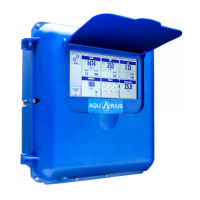

 To Next Page

