9
3.3 Control box connection to the hydraulic control unit (Fig. 3)
Connect the box to the hydraulic control unit by means of the section control termination cables (to
be purchased separately - Ref. ARAG general catalog).
• Open connector slide (1 in Fig. 3).
• Position connector (2) and insert it inside socket, then press: during this operation, take care
not to bend the electric contacts.
• Close slide (3) until it locks in place.
To avoid short-circuits, connect the power cable only after completing installation.
4 USE
Depending on the control box model you have purchased, some functions could not be
available.
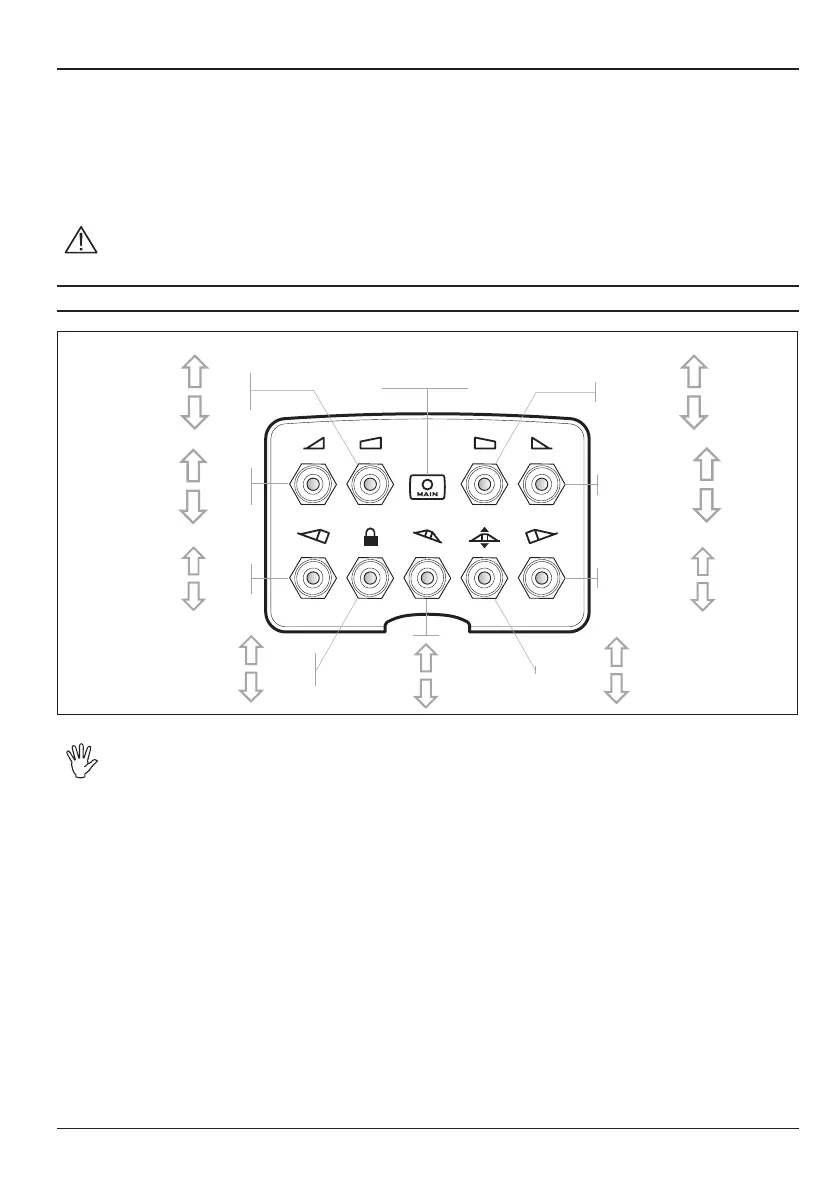
opening
closing
RH rst section
Opening/Closing
opening
closing
LH rst section
Opening/Closing
unlocking
locking
Boom unlocking/
locking
opening
closing
RH second section
Opening/Closing
opening
closing
LH second section
Opening/Closing
lifting
lowering
RH boom variable
geometry control
lifting
lowering
LH boom variable
geometry control
lifting
lowering
Boom height
inclination
to the left
inclination
to the right
Boom
leveling
LED signaling that
function is enabled



 To Next Page