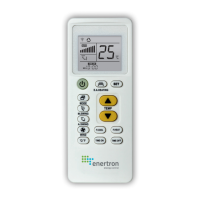
Telecomando universale
per climatizzatori
Universal A/C remote
Control remoto
universal de A/C
ARBO S.p.A.
Via Toniolo, 23 - 60132, Fano (PU)
Tel +39 (0)721 855 706 - Fax +39 (0)721 855 709
www.arbo.it - info@arbo.it
ALCUNI MARCHI NON RICHIEDONO LA SINTONIZZAZIONE
Il telecomando è impostato nella modalità predefinita e codice di produzione funziona direttamente
con quasi tutti i modelli di climatizzatori Gree e Midea nel mercato e non richiedono il codice d’abbina-
mento! (Alcuni modelli potrebbero non funzionare con il codice di fabbrica impostato, quindi impostare
il codice del telecomando seguendo il metodo A / B / C / D.).
MOLTEPLICI MODALITÀ DI ABBINAMENTO DISPONIBILI
È possible scegliere uno dei seguenti metodi di abbinamento codici: A/B/C/D.
A) PULSANTE MARCHIO (VEDI FIG.1)
1 Accendere l’alimentazione A/C e puntare il telecomando verso la spia di ricezione del segnale.
2 Premere il pulsante “codice” della marca corrispondente e tenerlo premuto (ad esempio, il pulsante
“MODE” corrisponde a LG/SAMSUNG) fino a quando l’A/C non si avvia con un segnale acustico
3 Verificare i pulsanti del telecomando. Se funzionano correttamente, indica che l’installazione è riu-
scita; in caso contrario, ripetere i passaggi 2-3.
B) RICERCA AUTOMATICA
1 Accendere l’alimentazione A/C e puntare il telecomando verso la spia di ricezione del segnale.
2 Premere il pulsante “SET” e tenerlo premuto per circa 6 secondi. Quando il codice lampeggia nel
display, prestare attenzione al proprio A/C e se si accende rilasciare immediatamente il pulsante
3 Verificare i pulsanti del telecomando. Se funzionano correttamente, indica che l’installazione è riu-
scita; in caso contrario, ripetere i passaggi 2-3.
C) INSERIMENTO MANUALE DEL CODICE (VEDI LISTA CODICI)
1 Individuare il modello corrispondente del tuo A/C e il suo primo codice dalla “LISTA CODICI” (ad
esempio, Haier: 0001) . Accendere l’alimentazione A/C e puntare il telecomando verso la spia di
ricezione del segnale.
2 Tenere premuto il pulsante “SET”, quindi premere il pulsante “ON/OFF” finché il codice del modello
non lampeggia nel display. Quindi rilasciare i due pulsanti e premere “TEMP
▲
“ o ”TEMP
▼
“ finché il
codice corrispondente non lampeggia nel display.
3 Premere il pulsante “SET” per uscire e verificare i pulsanti del telecomando. Se funzionano corretta-
mente, significa che l’installazione è riuscita; in caso contrario, ripetere i passaggi 1-3 per impostare
il codice successivo
D) RICERCA MANUALE DEL CODICE
1 Accendere l’alimentazione A/C e puntare il telecomando verso la spia di ricezione del segnale.
2 Tenere premuto il pulsante “SET”, quindi premere i pulsanti “ON/OFF” finché il codice del modello non
lampeggia nel display.
3 Premere “TEMP
▲
“ o ”TEMP
▼
“ per aumentare o ridurre il codice del modello di 1 ad ogni pressione.
Nel frattempo, prestare attenzione allo stato del condizionatore.
4 Dopo l’avvio automatico dell’A/C, premere immediatamente “SET” per uscire. Se funzionano corret-
tamente, significa che l’installazione è andata a buon fine; in caso contrario, ripetere i passaggi 1-3.
ISTRUZIONI PER FUNZIONI AGGIUNTIVE
1 BLOCCO BAMBINI
Blocco: Tenere premuto il pulsante “SET”, quindi premere il pulsante “M.SWING“, l’icona apparirà
sullo schermo del display.
Sblocco: Tenere premuto “SET” e quindi premere il pulsante “M.SWING“, l’icona
scomparirà dallo
schermo del display.
2 OROLOGIO
1 Tenere premuto il pulsante “SET” e quindi premere il pulsante “MODE”, il telecomando entrerà in
modalità orologio, con le cifre dell’ora corrispondenti che iniziano a lampeggiare.
2 Premere il pulsante “TEMP
▲
“ per aumentare (o ”TEMP
▼
“ per diminuire) 1 ora a ogni pressione.
Tenere premuto per 2 secondi per aumentare o diminuire in modo continuo.
3 Premere il pulsante “SET” per completare l’impostazione dell’ora appropriata.
4 A questo punto iniziano a lampeggiare le cifre dei minuti corrispondenti; utilizzare il pulsante
“TEMP
▲
“ o ”TEMP
▼
“ per impostare i minuti appropriati.
5 Dopo aver impostato i minuti, premere il pulsante “SET” per uscire dalle impostazioni dell’orologio.
3 TIMER ON/OFF
Questa funzione può essere efficace solo quando il telecomando originale dispone della funzione timer.
Dopo aver premuto i pulsanti “Time ON“ o “Time OFF“, viene visualizzato l’indicatore del timer e il
condizionatore è ora in stato di timer.
4. RAFFREDDAMENTO RAPIDO E RISCALDAMENTO RAPIDO
Raffreddamento rapido: premere il pulsante “F. COOL“ per impostare la modalità di raffreddamento,
21 °C, aria forte e direzione dell’aria automatica;
Riscaldamento rapido: premere il pulsante “F. HEAT” per impostare la modalità di riscaldamento, 27 °C
gradi, aria forte e direzione dell’aria automatica.
* In modalità riscaldamento, premere il pulsante “E.A. HEATING“ per avviare la funzione di riscaldamen-
to elettrico. Questa funzione è adatta per alcuni modelli.
5. FUNzIONE CELSIUS / FAHRENHEIT (C/F)
Premere il pulsante “°C / °F“per passare da “Celsius“ a ”Fahrenheit“.
6. MEMORIA PER LA SOSTITUzIONE DELLA BATTERIA
Il chip del telecomando ha una funzione di memoria incorporata, che assicura la non necessità di
resettare per uno spegnimento a breve termine come la sostituzione della batteria, ecc.
RIPRISTINO DELLE IMPOSTAZIONI DI FABBRICA
Tenere premuto il pulsante “SET” e quindi premere un pulsante “WIND“per circa 3 secondi per ripristi-
nare le impostazioni di fabbrica.
IT
FIG.1
CORRISPONDENZE PULSANTI E CODICI MARCHI
BRAND CODE CORRESPONDING BUTTON
COINCIDENCIAS DE BOTONES Y CÓDIGOS DE MARCA
GREE / HUALING
HISENSE
DAIKIN / FUJITSU
CARRIER
LG
SAMSUNG
HITACHI
PANASONIC
SANYO / SHARP
HAIER / MITSUBISHI
SHINCO
AUCUMA / AUX
MIDEA / CHANGHONG
CHUNLAN
CHIGO / TLC
KELON
FRESTECH
YAIR
SOME BRANDS REQUIRE NO PAIRING
The remote control is set to default mode prior to delivery, and factory-set code works directly with
almost all Gree and Midea air conditioner models in the market and do not require code matching!
(Some models may not work with the factory-set code, so please set the code of your remote control
by following A/B/C/D method.)
MULTIPLE PARING MODES AVAILABLE
You can choose one of the following A/B/C/D methods to match the code.
A) BRAND BUTTON (SEE FIG.1)
1 Switch on the A/C power and aim the remote control at the A/C’s signal receiving window.
2 Press the corresponding brand’s “code” button and hold (for example, “MODE” button corresponds to
LG/SAMSUNG) until the A/C starts up with a beep.
3 Check remote control buttons. If they work properly, it indicates setup is successful; if not, please
repeat steps 2-3.
B) AUTOMATIC SEARCH
1 Switch on the A/C power and aim the remote control at the A/C’s signal receiving window.
2 Press the “SET” button and hold for about 6 seconds. After the code flashes in the display window,
pay attention to your A/C and release the button immediately after the A/C starts up automatically.
3 Check remote control buttons. If they work properly, it indicates setup is successful; if not,please
repeat steps 2-3.
C) MANUAL CODE INPUT (SEE CODES LIST)
1 Look for the corresponding model of your A/C and its first code from the “CODES LIST” (for example,
Haier: 0001). Switch on the A/C power and aim the remote control at the A/C’s signal receiving
window.
2 Press and hold the “SET” button and then press “ON/OFF” buttons until the model’s code flashes in
the display window. Then release the two buttons and press “TEMP
▲
“ or ”TEMP
▼
“ until the corre-
sponding code flashes in the window.
3 Press “SET” button to quit, and check remote control buttons. If they work properly, it indicates setup
is successful; if not, please repeat steps 1-3 to set the next code.
D) MANUAL CODE SEARCH
1 Switch on the A/C power and aim the remote control at the A/C’s signal receiving window.
2 Press and hold the HSFT button and then press “ON/OFF” buttons until the model’s code flashes in
the display window.
3 Press “TEMP
▲
“ or ”TEMP
▼
“ to increase or reduce the model code by 1 at each press.While doing so
, pay attention to the A/C’s status.
4 After the A/C automatically starts , press “SET” immediately to exit.
*Check remote control buttons . If they work properly , it indicates setup is successful;if not, please
repeat steps 1-3.
INSTRUCTION FOR ADDITIONAL FUNCTIONS
1 CHILD LOCk
Lock: Press and hold “SET” button and then press “M.SWING“ button, the icon will appear on the
display screen.
Unlock: Press and hold “SET” and then press “M.SWING“ button, the
icon will disappear from the
display screen.
2 CLOCk
1 Press and hold “SET” button and then press “MODE” button, the remote control will enter into a clock
mode, with corresponding hour digits starting to flash.
2 Press “TEMP
▲
“ button to increase (or ”TEMP
▼
“ to decrease) 1 hour at each press. Hold for 2 seconds
to increase or decrease continuously.
3 Press “SET” button to complete setting the appropriate hour.
4 At this point, the corresponding minute digits begin to flash; use the “TEMP
▲
“ or ”TEMP
▼
“ button
to set appropriate minutes.
5 After setting minutes, press “SET” button to quit clock settings.
3 TIMER ON/OFF
This function can be effective only when the original remote control has timer function. After pressing
“Time ON” or “Time OFF” buttons, the timer indicator is displayed, and the A/C is now in timer state.
4 FAST COOLING AND FAST HEATING
Fast cooling: Press “F. COOL“ button to set cooling mode, 21 °C, strong wind and auto wind direction;
Fast heating: Press “F. HEAT” button to set heating mode, 27 °C degree, strong wind and auto wind
direction.
*ln the mode of heating , press the “E.A. HEATING“ button to start the electrical heating function. This
function is suitable for some models.
5 CELSIUS / FAHRENHEIT FUNCTION (C/F)
Press ,”C/F” button to switch between “Celsius” and “Fahrenheit”.
6 BATTERy REPLACEMENT MEMORy
The remote control’s chip has a built-in memory function, ensuring that there is no need reset for a
short term power off like battery replacement etc.
RESTORE TO FACTORY SETTINGS
Press and hold the “SET“ button and then press a “WIND“ button for about 3 seconds to restore to
factory settings
EN


 To Next Page
 Need help?
 General