
 Need help?
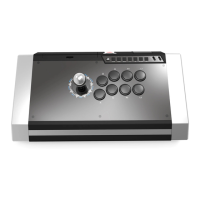
Do you have a question about the ARCADE SHOCK QANBA OBSIDIAN and is the answer not in the manual?
Lists the components included in the Obsidian Hit Box conversion kit, including the metal panel and conversion cable.
Outlines the necessary tools for the conversion process, such as screwdrivers and cutting tools.
Undo the six bottom screws to open the arcade stick body for modification.
Carefully unplug wiring, uninstall buttons, and unscrew the plexi top.
Unscrew the bare metal panel and align the new Obsidian Hit Box metal panel in place.
Mark and trim plastic for the 30mm button (up direction) to fit the panel.
Secure panels with screws, re-order joystick harness wires, and connect the conversion cable.
Reassemble the bottom lid and confirm the Obsidian Hit Box is fully functional.
Gather a heated glue gun, microfiber cloth, and isopropyl alcohol for cover application.
Apply hot glue to recessed screws and affix metallic covers for a flush, refined look.
 General
| Brand | Qanba |
|---|---|
| Model | Obsidian |
| Type | Arcade Fight Stick |
| Touchpad | Yes |
| Headphone Jack | Yes |
| Connectivity | Wired USB |
| Compatibility | PlayStation 4, PlayStation 3, PC |
| Buttons | 8 Sanwa Denshi Buttons |
| Joystick | Sanwa Joystick |
| Construction | Metal |
| Weight | 6.6 lbs |
| LED Lighting | Yes |

 To Next Page