14 / EN
Coffee Machine / User Manual
end the process and pour the
water n the cookng pot nto
your cup.
4. If the water you have poured
nto your cup s too lttle or too
much, adjust the water amount
as follows.
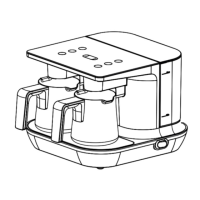
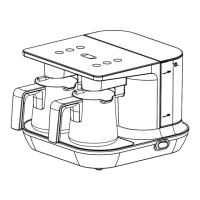
5. To change the water amount,
take out the cookng pot from ts
seat. Press and hold the coffee-
makng button for two servngs
(4) for 3 seconds to enter the
water adjustment mode.
C
The status lght,
whch comes on
when you enter the
water adjustment
mode, wll show the
water level to whch
the product s set.
6. Once you have entered the
water adjustment mode, press
the button that s approprate
for your cup wthn 3 seconds.
3 Use
The status lght of the button
pressed wll lght n blue for 1
second and the water level wll
change.
- Button for 1 servng: Small cup.
55 ml on average.
- Button for 2 servngs: Medum
szed cup. 65 ml on average.
- Button for 3 servngs: Large
cup. 75 ml on average.
A
WARNING: When
you are n the water
adjustment mode, f
you do not press the
button that s app-
roprate for your cup
wthn 3 seconds, the
product wll ext the
water adjustment
mode and reman n
the old settng.



 To Next Page