4
5
Ports, Buttons and Connections
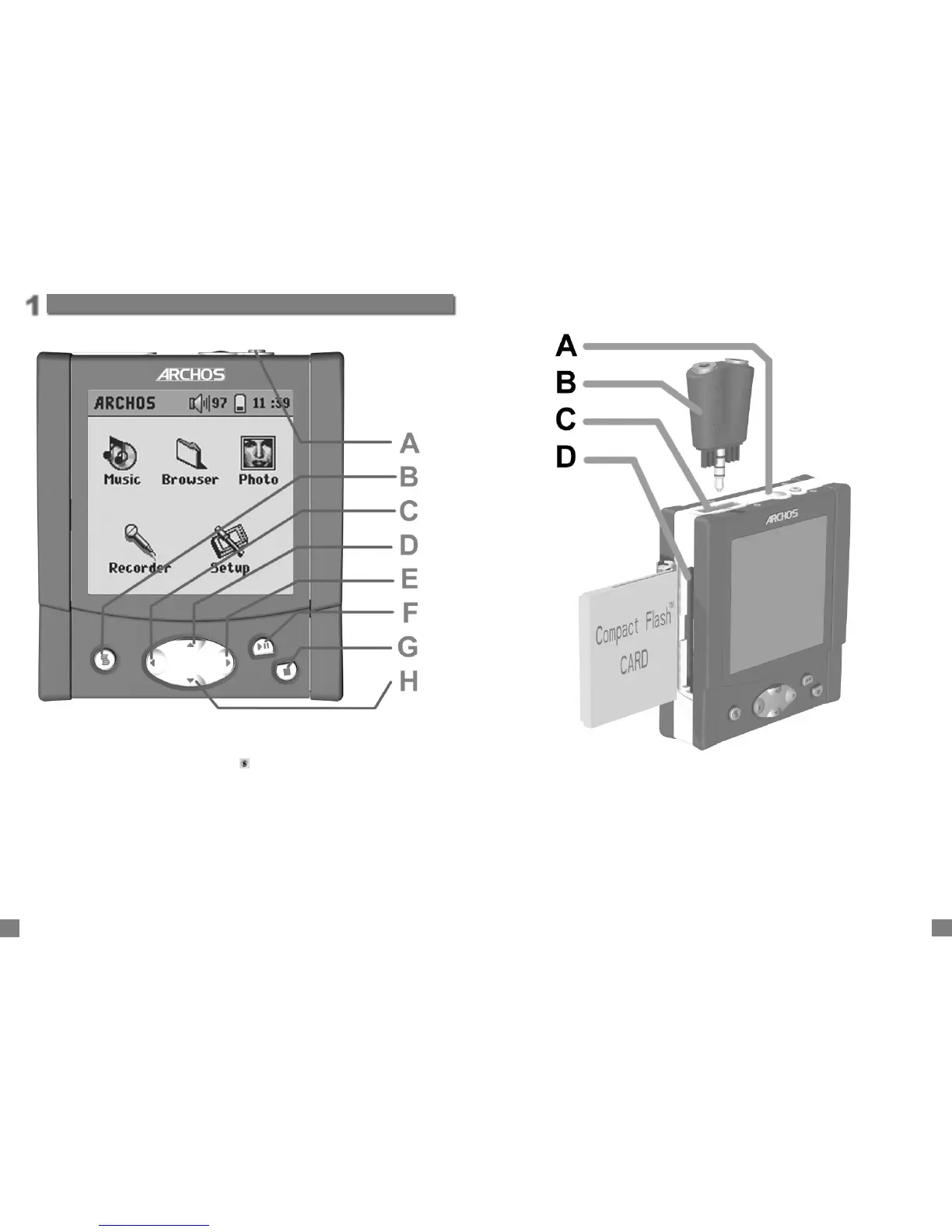
A Power button - Hold down for a few seconds and the Gmini will start up.
B Contextual Menu - When the menu icon appears in top left of screen, a menu is
available.
C Move Left - also decreases recording gain
D Move Up - also, increases playing volume
E Move Right - also increases recording gain
F Play/Pause/Enter - Play current item, pause, play again. Enter value.
G Stop/Esc button - Stop playing current fi le or escape from current screen.
H Move Down - also decreases playing volume
Ports, Buttons and Connections
1
Ports, Buttons and Connections
A Built-in microphone
B Multi-connect Adapter Plug - allows for Line-In and Line-Out connections
C Headphone Multi-connect jack - To connect headphones, FM remote control, or
adapter plug.
D Photo Wallet Port (CompactFlash™ type I & II)



 To Next Page