ON
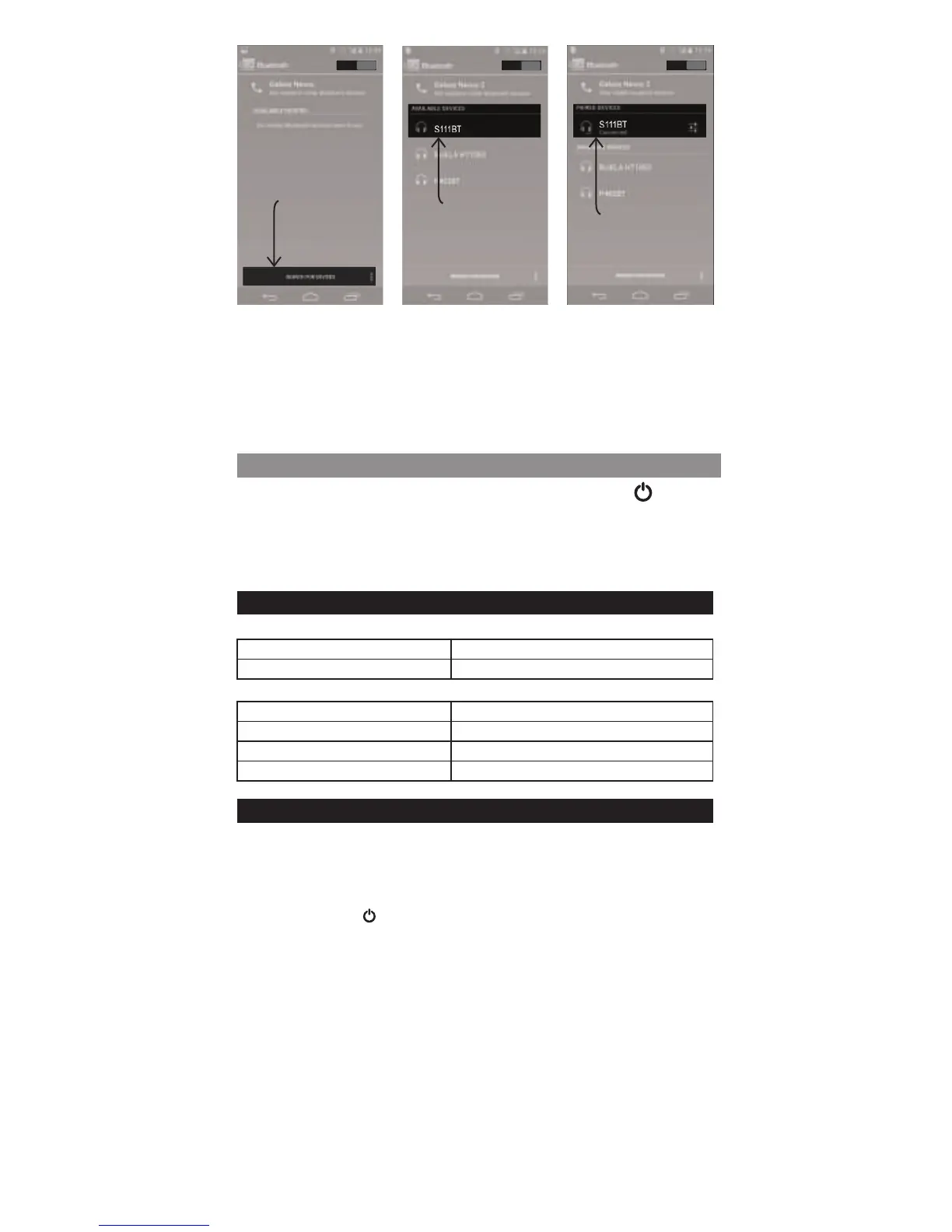
Click Search
for Devices
ON
Select S111 BT
ON
Now Connected
B. Connect via Cable
1. Turn on S111 BT by short press the power button .
2. Insert one end of the 3.5mm audio cable into the speaker
and the other end into your mobile device headphone's
output.
3. Enjoy your music !
Notes:
Ÿ Pairing mode will last up to five minutes or until a device is
found, the speaker will automatically turn off without
successful pairing within this period.
Ÿ If you exceed the effective range of approx. 10M (33ft) the
speaker will disconnect and will automatically reconnect if the
speaker re-enters the effective range within five minutes.
LED Light Signals
While S111 BT is off and connected to charger:
Red
Blue
Charging
Fully charged
While S111 BT is on:
Blue and red fast flashing
Blue
Pairing mode
Battery >75%, connected
Purple (almost blue)
Purple flashing
Battery ~50%, connected
Battery ~25%, connected
Reconnection
Via Bluetooth
1. Turn on Bluetooth on phone.
2. If your device was the latest one to be paired with the S111
BT it will connect automatically otherwise short press the
power button once again.
3. If the S111 BT is still not paring, please repeat pairing section.


 To Next Page