8
Troubleshooting
Maintenance
The high quality ceramic hob is easy to clean.
Always disconnect the power supply cable from the power outlet before cleaning the device and wait for the fan
to turn o and let the device cool down completely.
In order to clean the appliance, use a soft or slight damp cloth.
Never use abrasives or chemical solvents.
NEVER IMMERSE THE APPLIANCE INTO THE WATER.
It is recommended to check periodically that the cable does not have cuts or burnings due to the nearnes of
the plate.
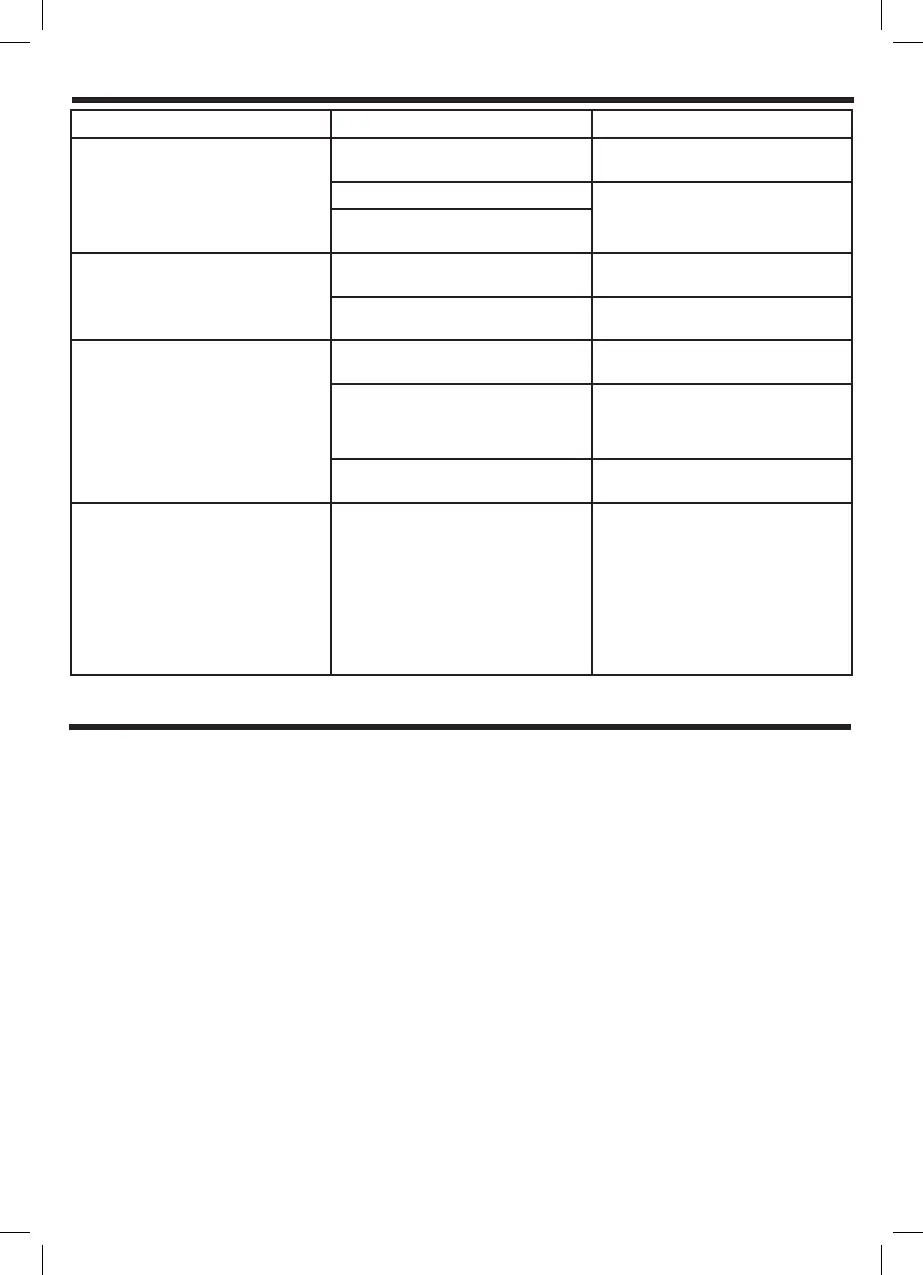
Fault Check Remedy
The device does not work after
connecting the power supply and
pressing the ON key
There is no power supply Check and restore the power
supply
The plate is not working Check the causes carefully.
If the problem cannot be solved,
contact the support centre.
Check that the cable is correctly
plugged into the power outlet
Heating is interrupted during
normal use and a warning “Beep”
is heard.
Are you using incompatible pots or
dishes?
Swap them for pots that are
suitable for induction cooking.
Are the pots correctly positioned in
the centre of the hot plate?
Place the pots in the centre of the
hot plate.
It is not possible to change
function during heating
Are the pots empty or is the
temperature too high?
Check to see if the device is being
used incorrectly.
Is the extraction/exhaust opening
clogged or is there an accumulation
of dirt?
Clear the air inlet/vent of any
blockages.
Turn the device on again after it
has cooled down.
Has the device been operating for
over 2 hours?
Reset the cooking mode or use the
timer function.
Error codes E0 No pots or incompatible pots
used
E1 IGBT sensor open circuit/short
circuit
E2 Internal overheating
E3 Overvoltage
E4 Undervoltage
E5 Upper plate sensor open/short
circuit
E6 Upper plate overheating.
When the error signals E0, E2 and
E6 are displayed, check to see if
the pot is incompatible or allow
the device to cool down naturally
before switching it on again.
If E1, E3-E5 errors are displayed,
contact the support centre for
inspection and repair.


 To Next Page
 Loading...