7
Technical informations
Instructions for use
The appliance can dehumidify the ambient collecting approx 220ml/day
(30°C, 80% humidity). To turn On the product plug the adaptor to the
appliance and plug the adapter into the socket. Push On/O pushbutton
to turn on/o the appliance; the indicator light will turn on (blu color) to
indicate that appliance is working. If the water level reach the maximium
level the indicator light turn into red color to indicate that water tank
must be emptied. N.B: when the indicator light is red the appliance is
not working. To empty the water tank turn o the product, take out water
tank, open the drain cover and pull out the water. Use a soft and clean
cloth to wipe the water tank and the dehumidier. Put the water tank back
to the dehumidier.
Make sure that the appliance is completely dried before storing it in the
box.
Maintenance
This appliance does not require any special maintenance.
Disconnect the plug from the socket and let the appliance cool down well
before cleaning it.
In order to clean the appliance, use a soft or slight damp cloth.
Never use abrasives or chemical solvents.
Do not use very wet substances, liquids or cloths to prevent water from
entering into the apparatus and irreparably damaging it.
NEVER IMMERSE THE APPLIANCE INTO THE WATER.
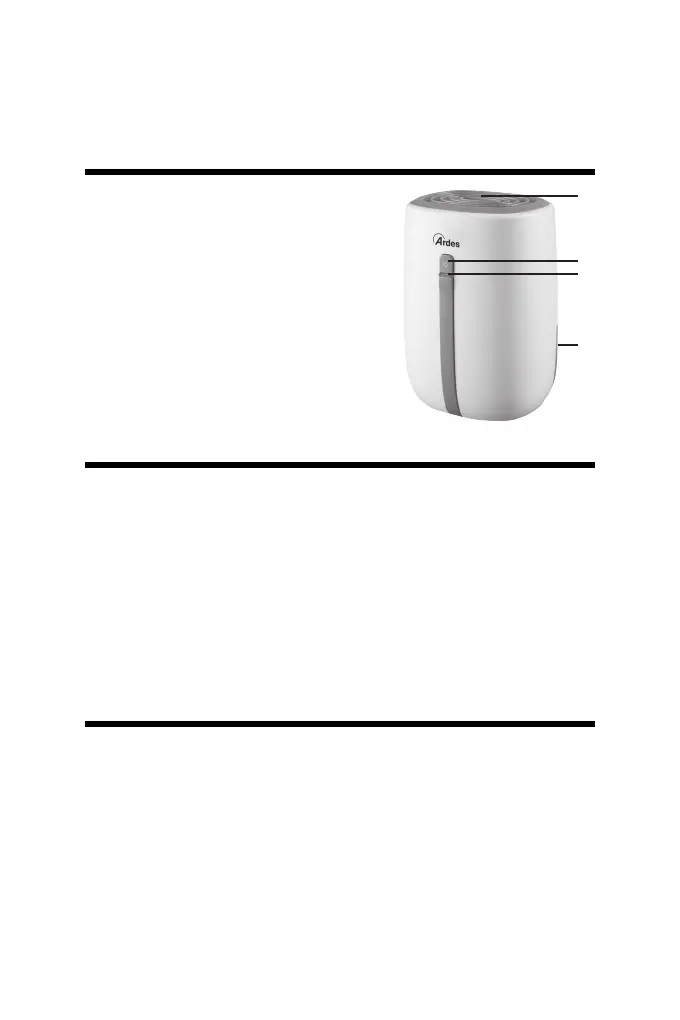
1 - Air outlet
2 - On/O pushbutton
3 - Indicator light
4 - Water tank
1
2
3
4


 To Next Page