461306971 (RS-000)
8
C C
F F
E
GB
FUNCTIONS SELECTOR KNOB FOR
MULTIFUNCTIONAL OVEN (ref. C)
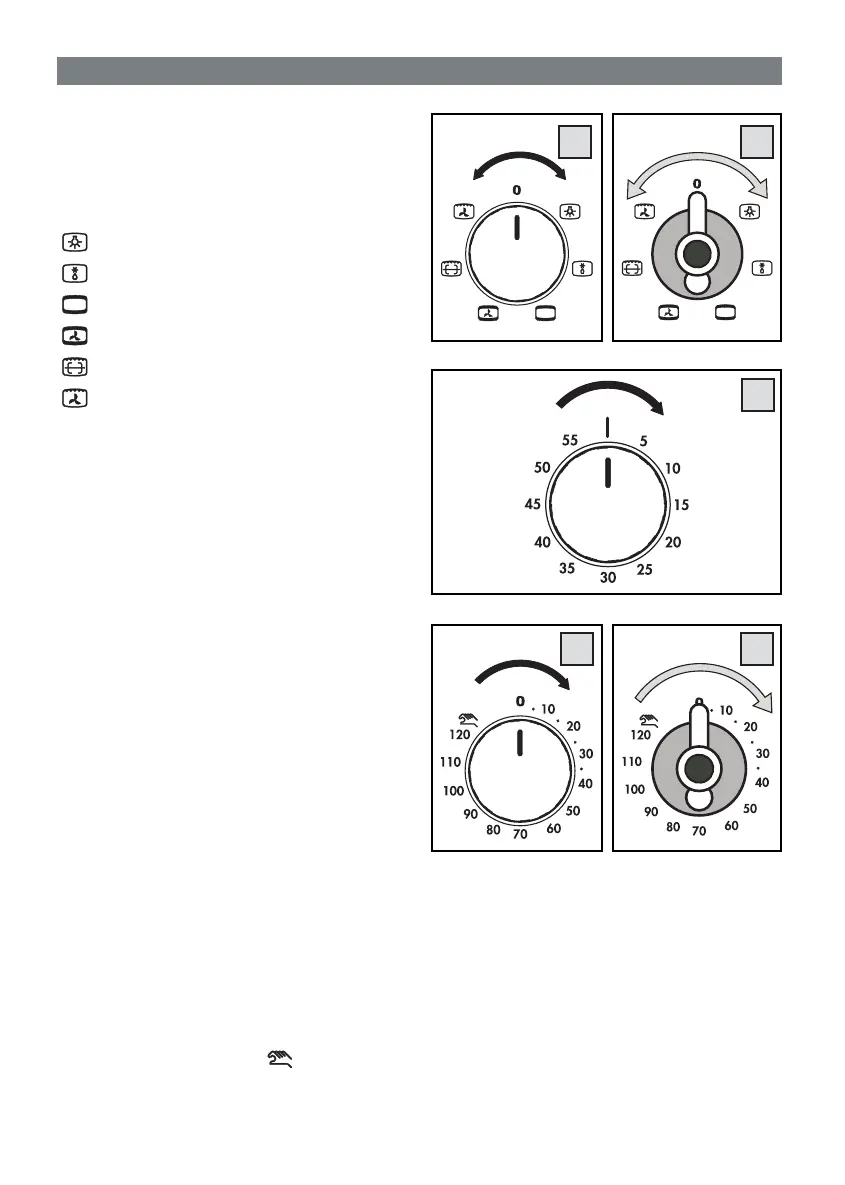
Turning the oven knob either clockwise or anti-clockwise,
the following function symbols are available:
0
= Oven off
= Oven lights on (stays lit with all functions)
= Fan on
= Top and bottom heating elements on
= Top and bottom heating elements on plus fan
= Grill + spit heating element on (*)
= Grill heating element on plus fan
(*) Available only on certain oven models.
WARNING LIGHT INDICATING THERMOSTAT
ACTIVATION (ref. D)
When lit it indicates that the oven or the grill is in use.
During cooking time the warning turns off each time
the temperature set is reached. It is therefore common
that the warning /yellow light turns on and off several
times according to re-heating process.
TIMER KNOB (ref. E)
To set cooking time, fi rst wind the timer up by turning it
completely once from left to right and then back to the
number of minutes you want. The timer will ring when
the set time has elapsed.
TIMER WITH COOKING TIME (ref. F)
This accessory has a dual function: it signals how
much cooking time has elapsed and it also turns the
oven off automatically. N.B.: When the pointer of the
knob is on «
•
» position, the oven cannot work.
If you use the oven without any programming,
check that the timer is on the manual position.
Semi-automatic operation
After having selected a cooking, to set cooking time,
fi rst wind the timer up by turning it completely once from
left to right and then back to the number of minutes you
want, from 0 to 120 minutes: the oven will switch on.
Once the programmed time has elapsed the buzzer will
ring and the end of cooking time device triggers.
Manual operation
It the cooking time is more than 2 hours, or if you want
to use the oven without the timer, turn knob from right
to left until the pointer is on the
symbol.
When the food is cooked do not forget to move the
knob pointer round to position «
•
».
2. DESCRIPTION OF THE APPLIANCE


 To Next Page
 Loading...