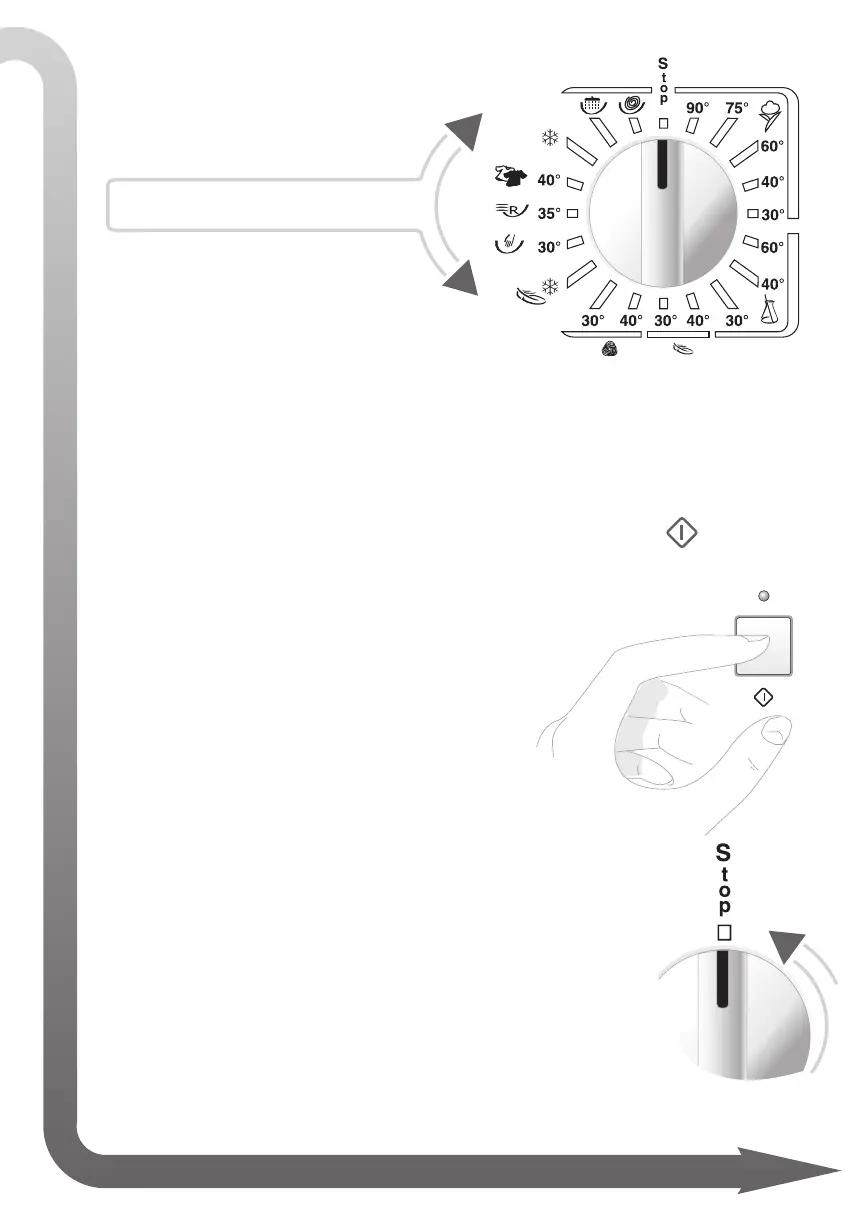
PROGRAMME SELECTOR
Select the programme and
required temperature.
For more information, see:
“PROGRAMME TABLES”
• The wash options must be programmed by pressing the appropriate but-
tons before starting the wash and before pressing the START button.
• To start the drying cycle, press the “START” button. The relative indi-
cator light will light up after approximately 2 -3 seconds
to indicate that the door is locked and the wash pro-
gramme has started.
• At the end of the wash, the START LED with either switch off or fl ash.
(according to the model)
• Rotate the programmer knob to “
STOP”.
• Before opening the washing machine door, remove the
plug from the mains electricity socket using dry hands.
• To interrupt the wash cycle, move the selector to the Stop position:
Wait for the end of wash signal.
model name
NB: Before openi
n
g
t
h
e
d
o
or, wait 2 minutes for the locking mechanism to release.



 To Next Page