461307409 (RS-000)
8
GB
DESCRIPTION OF THE PROGRAMMING BUTTONS
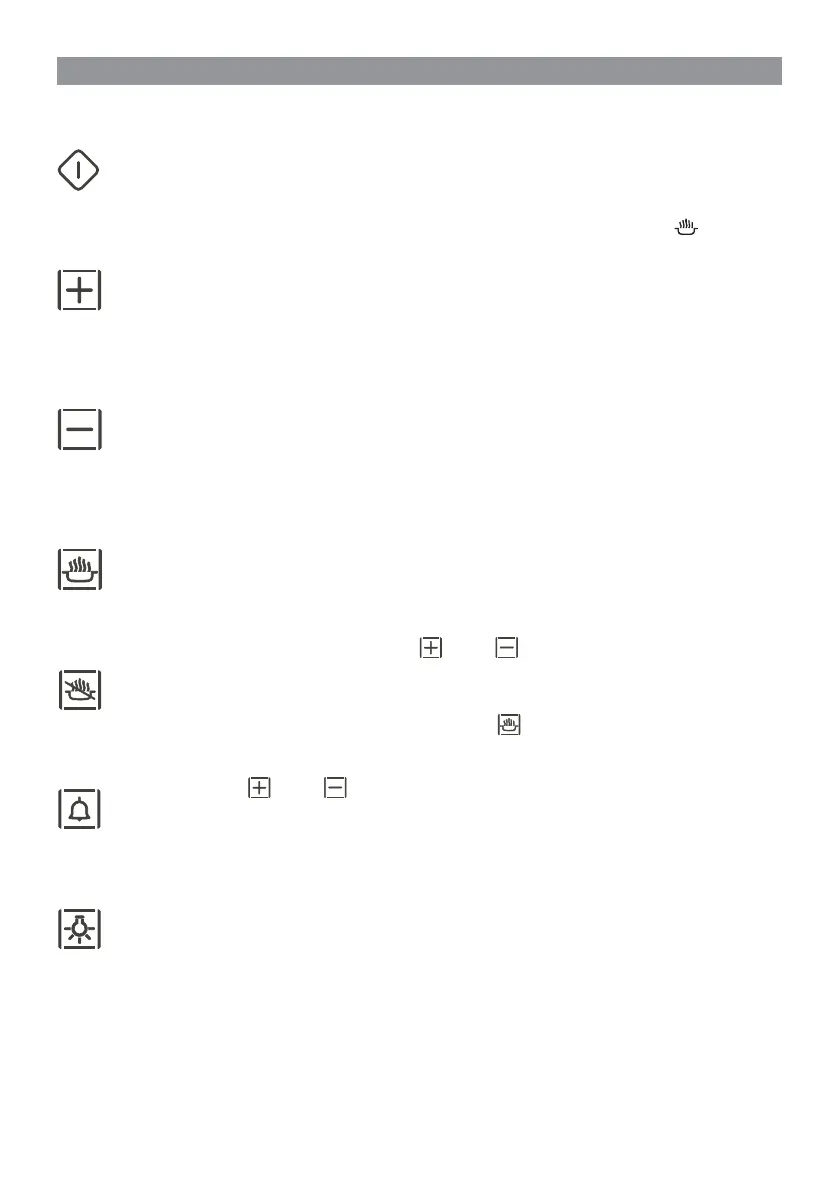
ON/OFF BUTTON
Active only after a cooking function has been selected. Initially keep it pressed for about 3 seconds.
Press to activate all programmes. The relative symbol appears on the display once confi rmed
.
Keep it pressed for about 2 seconds to turn all programmes off.
INCREASE TIME SETTING BUTTON
Not active
when only the clock is displayed and when the programme has fi nished.
It normally increases the temperature set or the numbers fl ashing on the display.
It optimises the visual from the top when in the Contrast Adjust mode.
Press and hold for approximately 1 seconds to increase value more rapidly.
DECREASE TIME SETTING BUTTON
Not active when only the clock is displayed and when the programme has fi nished.
It normally reduces the temperature set or the numbers fl ashing on the display.
It optimises the visual from the top when in the Contrast Adjust mode.
Press and hold for approximately 1 seconds to decrease value more rapidly.
COOKING TIME BUTTON
Active when a cooking function is selected.
Press once to select (fl ashing value) the cooking time, press again to deactivate. While the numbers are
fl ashing,the cooking time may be adjusted by pressing
and/or .
STOP COOKING BUTTON
Activated only after setting the cooking time with the relative button
.
Pressing the button sequentially cycles through the following: fl ashing hours, fl ashing minutes, no values fl ashing.
The fl ashing value may
now be adjusted by pressing
and/or .
CLOCK + TIMER BUTTON
Active in any condition except for when cooking with a set time.
Press and hold for 2 seconds to select SET CLOCK mode. This function is described later.
Pressing the button briefl y selects TIMER mode, described later.
OVEN LIGHT BUTTON
It is always active. Press to turn the oven light on and off.
USER INSTRUCTIONS


 To Next Page
 Loading...