461307409 (RS-000)
9
GB
SET TIME
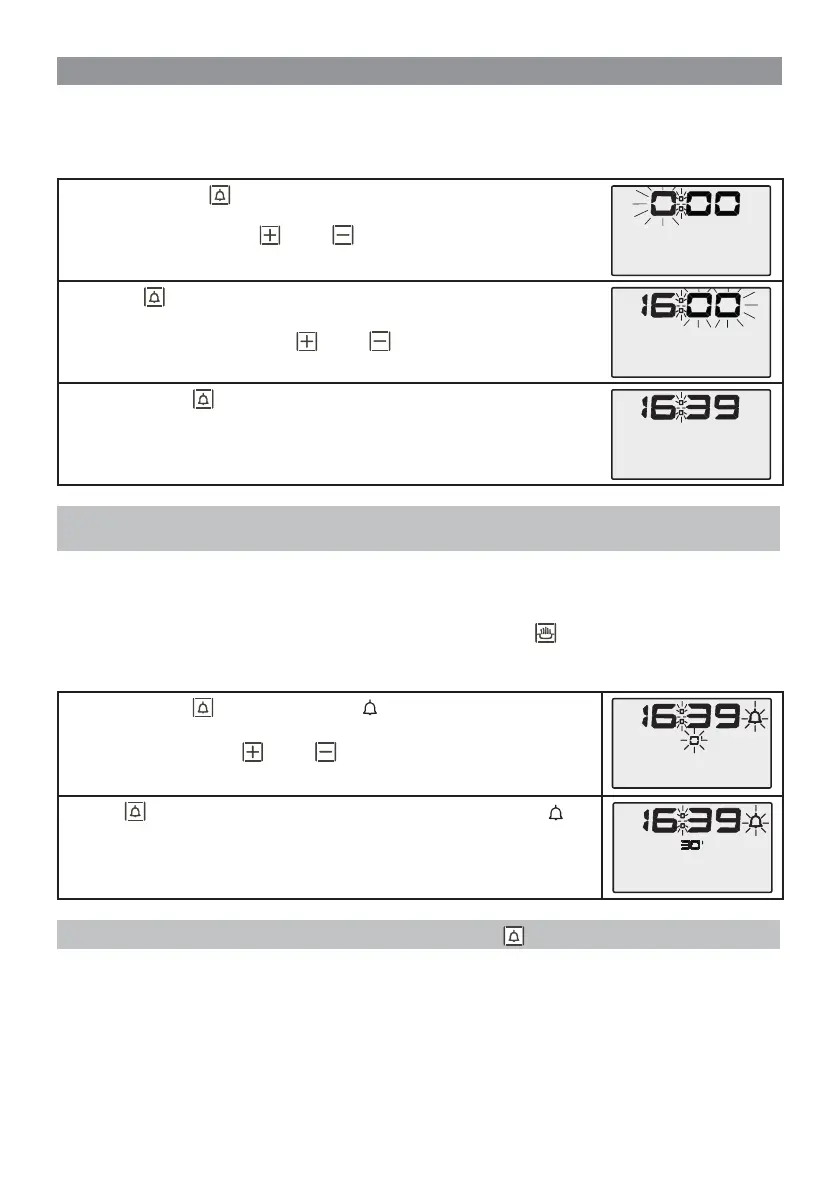
The oven is equipped with a digital clock indicating hours and minutes. After connecting the oven to the mains,
and if no cooking programme is selected, set the current time as follows:
• Press and hold the button for per a few seconds until a beep is heard. The
hour value starts fl ashing when the button is released.
• Set the hour value with the
and/or buttons.
• Press the
button againThe minutes value starts fl ashing when the button is
released
• Adjust the minutesvalue with the
and/or buttons.
• Press the button
again to confi rm. The display now shows the set hour and
minute values with a fl ashing cursor to indicate that the operation has been
completed successfully.
N.B. The above procedure must be started within 7,5 seconds, after which the values stop fl ashing and
the oven exits SET TIME mode.
SET TIMER
The timer can be set in all modes, except during programmed cooking, as the values used for the timer are the
same as the COOKING TIME setting.
For this reason if the TIMER is set it will be cancelled as soon as the
button is pressed. The TIMER is
completely separate from cooking modes so it can also be used as an “alarm clock” or to show the time (e.g. for
cooking pasta on the gas ring).
• Press the button . The relative symbol and the “0” value for the minutes
start fl ashing
• Set the minutes with the
and/or buttons (max 199).
• Press again to confi rm. The display now shows only the symbol and
a countdown timer starts from the set minute value. Once the set time has
elapsed, a beeper sounds for 1 minute. Press any button to mute the beeper.
N.B. The TIMER may be deactivated ahead of time by pressing .
USER INSTRUCTIONS


 To Next Page
 Loading...