4 Board Operation
4.1 Getting Started - IDE
I
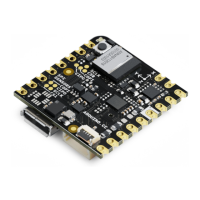
f you want to program your UNO Mini LE while o
ffl
ine you need to install the Arduino Desktop
I
DE [1] To connect
the UNO Mini LE to your computer, you
’
ll need a Micro-C USB cable. This also provides power to the board, as
indicated by the LED.
4.2 Getting Started - Arduino Cloud Editor
All Arduino boards, including this one, work out-of-the-box on the Arduino Cloud Editor [2], by just installing a
simple plugin.
The Arduino Cloud Editor is hosted online, therefore it will always be up-to-date with the latest features and support
for all boards. Follow
[3]
to start coding on the browser and upload your sketches onto your board.
4.3 Getting Started - Arduino Cloud
All Arduino
I
oT enabled products are supported on Arduino Cloud which allows you to Log, graph and analyze
sensor data, trigger events, and automate your home or business.
4.4 Sample Sketches
Sample sketches for the Arduino UNO Mini can be found either in the
“
Examples
”
menu in the Arduino
I
DE or in
Arduino Docs [4].
4.5 Online Resources
Now that you have gone through the basics of what you can do with the board you can explore the endless
possibilities it provides by checking exciting projects on Arduino Project Hub
[5]
, the Arduino Library Reference
[6]
and the online store
[7]
where you will be able to complement your board with sensors, actuators and more


 To Next Page
 Loading...