EasyManua.ls Logo

Arenti INDOOR 1 - Device Setup and Operation; Notice: Reset and Indicator Lights; Camera Configuration Steps

Arenti INDOOR 1
38 pages
Print Icon
To Next Page IconTo Next Page
To Previous Page IconTo Previous Page
Loading...
EN
Notice
To
reset
the
device
,
press
and
hold
the
reset
button
for
5
seconds
.
The
camera
beeps
when
the
operation
is
complete
.
Flashing
red
light
(
slow
)
Waiting
configuration
Flashing
red
light
(
fast
)
Searching
WiFi
network
Fixed
blue
light
Camera
connected
to
WiFi
Flashing
blue
light
Access
point
mode
3
.
Camera
configuration
Step
1
Turn
on
your
camera
by
plugging
in
the
power
adapter
.
Step
2
Connect
your
smartphone
to
the
Wi
-
Fi
network
.
Step
3
Download
Arenti
app
from
the
App
Store
or
Google
Play
depending
on
your
device
.
Step
4
Launch
Arenti
app
and
sign
up
for
the
first
use
.
Step
5
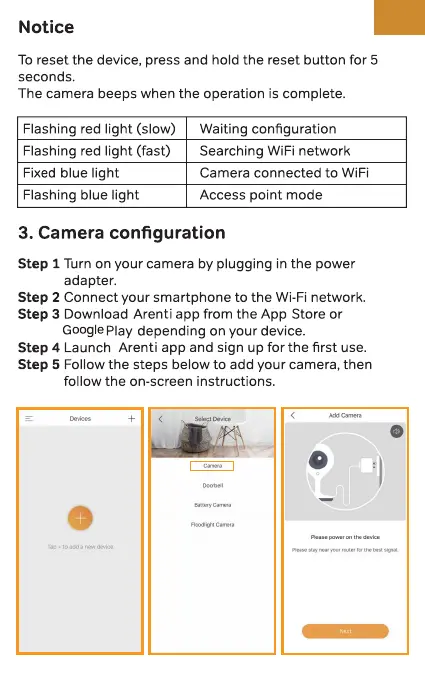
Follow
the
steps
below
to
add
your
camera
,
then
follow
the
on
-
screen
instructions
.
=
_
Devices
-
f
-
<
^
Select
Device
<
Add
Camera
0
o
|
Camera
|
Doorbell
Battery
Camera
O
Floodlight
Camera
Please
power
on
the
device
Please
stay
near
your
router
for
the
best
signal
.

Related product manuals