EasyManua.ls Logo

Ares 10020 - User Manual

Ares 10020
2 pages
Print Icon
To Next Page IconTo Next Page
Loading...
6” STAINLESS STEEL DIGITAL CALIPER
OPERATIONS MANUAL
STORE THIS MANUAL IN A SAFE PLACE FOR FUTURE REFERENCE
1
10020
SPECIFICATIONS:
Measurement Range
Resolution
Battery Specification
Operating Temperature Range
Storage Temperature Range
Screen Size
0.00” – 6.0” (0.0mm – 150mm)
0.0005” / 0.01mm
1x CR2032 3v Coin Battery
32 – 104°F (0 – 40°C)
-4 – 158°F (-20 – 70°C)
1.85” x 0.80”
4
10020
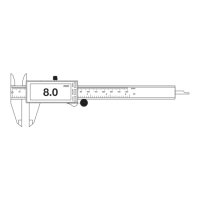
1. Step Measuring Face 7. Depth Measuring Probe
2. Internal Jaws 8. Power on/off Button
3. Display Housing 9. Units Inch / MM / Fraction Button
4. LCD Display 10. Zero Setting / Rest Button
5. External Measuring Jaws 11. Scale
6. Slider locking knob 12. Slider adjustment knob
For Battery removal and replacement flip calipers over LCD screen side facing down
to access battery panel.
6” STAINLESS STEEL DIGITAL CALIPER
WARRANTY
0
10 20 30 40 50 60 70 80 90 100 110 120 130 140 150
1 2 3 4 5 6
mm
in
Inch/MM/F
ON/OFF
mm
ZERO
8.0
1
3
4
6
8
10
11
12
7
9
2
5
0
10 20 30 40 50 60 70 80 90 100 110 120 130 140 150
1 2 3 4 5 6
mm
in
in/mm ON/OFF
mm
ZERO
8.0
battery
G3 MADE IN CHINA
HECHO EN CHINA
FABRIQUÉ À CHINA
ALWAYS WEAR EYE
PROTECTION THAT COMPLIES
WITH ANSI STANDARD
WARNING:
Cancer and Reproductive Harm-
www.p65Warnings.ca.gov
2
YEAR
Warranty
PERFORMANCE ASSURANCE
You are backed by the ARES Tool Performance Assurance!
ARES TOOL warrants this product to be free from defects and deficiencies in materials and
workmanship under normal use and service. A defective product may be returned for a free
replacement within 2 Years from the date of purchase, provided that product is returned
immediately after discovery of defect. This warranty shall be valid only when proof of purchase
(receipt) showing the date of purchase accompanies the defective product.
Exclusions:
This warranty excludes blades, bits, bit sockets, carrying cases, pouches, torque products,
punches, dies, bulbs, fuses, batteries, and other consumables which must be replaced under
normal use and service. This WARRANTY does not cover products which in ARES Tool's
judgement have been subject to negligence, misuse, abuse, accident, improper storage,
alteration, improper repair, disassembly and/or reassembly. Normal wear and tear are also
excluded.
These warranties set forth herein are the sole warranties applicable to Products and is in lieu of
all other warranties, whether expressed, implied or statutory. The implied warranties of
merchantability and fitness for a particular purpose are specifically excluded.
Customer's sole and exclusive remedy for breach of this Warranty is, at the option of ARES
TOOL, repair or replacement of the defective product.
Question and Answer IconNeed help?

Do you have a question about the Ares 10020 and is the answer not in the manual?

Summary

Product Warranty Information

Product Specifications

Measurement Range

Specifies the range of measurements the caliper can perform, from 0.00" to 6.0" or 0.0mm to 150mm.

Resolution

Indicates the smallest increment the caliper can measure, provided in both decimal inches and millimeters.

Battery and Temperature Specifications

Details the required battery type (CR2032 3v) and operating/storage temperature ranges.

Safety Precautions

General Warnings

Lists critical safety instructions to prevent damage and ensure optimal caliper performance.

Care and Maintenance

Provides guidelines for cleaning the device, avoiding liquids, and handling water damage.

Operation and Troubleshooting

Operating Procedures

Explains how to perform measurements, use buttons, and zero the device.

Troubleshooting Common Issues

Offers solutions for display problems like no information, incorrect digits, or flashing digits.

Battery Handling and Disposal

Details battery replacement procedures and safety warnings for handling and disposing of batteries.

Overview

This document describes the ARES 6" Stainless Steel Digital Caliper, a precision measuring tool.

Function Description

The ARES 6" Stainless Steel Digital Caliper is designed for accurate measurement of various dimensions. It can perform inner distance, outer distance, step distance, and depth distance measurements. The caliper features a digital display for easy reading of measurements in inches, millimeters, or fractions. It is equipped with a slider locking knob to hold readings and a slider adjustment knob for precise positioning.

Important Technical Specifications

  • Measurement Range: 0.00" - 6.0" (0.0mm - 150mm)
  • Resolution: 0.0005" / 0.01mm
  • Battery Specification: 1x CR2032 3v Coin Battery
  • Operating Temperature Range: 32 - 104°F (0 – 40°C)
  • Storage Temperature Range: -4 - 158°F (-20 – 70°C)
  • Screen Size: 1.85" x 0.80"
  • Construction: Stainless Steel
  • Origin: G3 Made in China

Usage Features

The caliper is operated via several buttons and mechanical components:

  • Power On/Off Button: Turns the display on or off.
  • Units Inch/MM/Fraction Button: Toggles between metric (mm), imperial (inch), and fractional units.
  • Zero Setting / Reset Button: Sets the current display reading to zero. This is crucial for accurate measurements and should be performed before each use. When the external jaws are closed, the reading should be zero; if not, press this button.
  • Slider Locking Knob: Used to secure the slider in place, holding the measurement reading.
  • Slider Adjustment Knob: Allows for fine adjustment of the slider to achieve precise measurements.
  • Step Measuring Face: Used for step measurements.
  • Internal Jaws: Used for inner distance measurements.
  • External Measuring Jaws: Used for outer distance measurements.
  • Depth Measuring Probe: Used for depth measurements.
  • Constant Force Application: Always apply constant force on the thumb wheel during measurement and zero setting for consistent results.
  • Battery Installation: The battery panel is accessed by flipping the calipers over with the LCD screen side facing down. A small screw on the same side as the slider lock knob must be removed to access the battery cover. The new CR2032 battery should be inserted with the positive side facing up (+).

Maintenance Features

Proper care and maintenance are essential for the longevity and accuracy of the caliper:

  • Cleaning: After each use, wipe the caliper clean with a soft cloth. Do not use any solvents or immerse the device in liquid.
  • Water Damage: If the device gets wet, wipe off the liquid and ensure the area between the slide and scale is completely dry. To reset the caliper after water exposure, remove the battery for 1 minute, then reinstall it and turn on the device.
  • Battery Replacement: The battery should be replaced when the digits are flashing on the screen, indicating a low battery.
  • Storage: Remove batteries from the device when not being used for long periods to prevent potential damage from leakage.
  • Disposal: Recycle used devices and batteries via local electronics recycling facilities or appropriate means.

Warnings and Safety Precautions

  • Avoid Liquids: Do not get calipers wet or expose them to excessive humidity.
  • Temperature Extremes: Do not leave calipers exposed to excessive heat or direct sunlight.
  • Disassembly: Do not disassemble or tamper with the device.
  • Electromagnetic Fields: Do not expose the caliper to electromagnetic fields.
  • Electrical Voltage: Never apply any voltage to any part of the caliper.
  • Battery Protector: Pull out the battery protector before initial use.
  • Battery Handling: Do not short circuit batteries, keep them near excessive heat or fire, or handle leaking batteries. Do not dismantle batteries.
  • Eye Protection: Always wear eye protection that complies with ANSI standards when using tools.
  • Proposition 65 Warning: This product may expose you to chemicals known to the State of California to cause cancer and reproductive harm (www.p65Warnings.ca.gov).

Troubleshooting

  • Display does not show information: Check battery contact and battery health.
  • Digits not displaying correctly: Reset the device by removing the battery for 1 minute, then reinstall and restart.
  • Digits flashing: Battery is low; replace the battery.

Warranty

ARES TOOL provides a 2-Year Performance Assurance warranty, guaranteeing the product to be free from defects in materials and workmanship under normal use and service. A defective product can be returned for a free replacement within 2 years from the date of purchase, provided proof of purchase (receipt) is included. The warranty excludes consumables (blades, bits, batteries, etc.) and does not cover products subjected to negligence, misuse, abuse, accident, improper storage, alteration, improper repair, disassembly, reassembly, or normal wear and tear. The sole remedy for breach of warranty is, at ARES TOOL's option, repair or replacement of the defective product.

Ares 10020 Specifications

General IconGeneral
BrandAres
Model10020
CategoryMeasuring Instruments
LanguageEnglish

Related product manuals