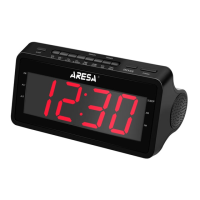
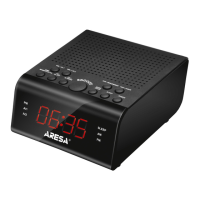
This document provides an instruction manual for the ARESA AR-3901 Radio-Clock, designed for household use.
Function Description
The ARESA AR-3901 is a radio-clock designed to receive and display current date and time information, as well as to receive radio signals in both AM and FM bands. It features an alarm clock with snooze function, a sleep mode, and adjustable display brightness.
Control Buttons and Display Elements:
The device features several control buttons and a digital display.
- CH-/AL OFF: Turns on the previous saved radio station or turns off the alarm.
- SLEEP: Activates sleep mode.
- TIME/MEN/SCAN: Used for clock setting, station preset, and radio station search.
- VOL+/AL2: Increases volume or activates Alarm 2.
- Vol-/AL1: Decreases volume or activates Alarm 1.
- Display: Digital display showing time, frequency, and various indicators.
- Speakers: Integrated speakers for audio output.
- CH+/AL MODE: Turns on the next radio station or selects an alarm mode.
- BAND/12/24: Selects radio band (AM/FM) or time format (12/24 hour).
- TUN+/HOUR: Searches for the nearest radio station (upwards) or sets the hour value.
- TUN-/MIN/DIMMER: Searches for the nearest radio station (downwards), sets the minute value, or adjusts display brightness.
- POWER: Turns the radio mode on/off.
- SNOOZE: Activates the alarm reminder (snooze).
Display Indicators:
- PM: Indicates afternoon time (when 12H format is active).
- AL1: Alarm 1 indicator.
- AL2: Alarm 2 indicator.
- SLEEP: Sleep mode active indicator.
- FM: FM band indicator.
- AM: AM band indicator.
Important Technical Specifications
- Supply Voltage: 220-240 V ~ 50 Hz
- Power Consumption: 1.5 W
- Frequency Range:
- AM: 522-1620 KHz
- FM: 64-108 MHz
- Power Supply: 2 x AAA batteries (for time settings backup)
- Service Lifetime: 3 years
- Warranty Period: 12 months
Usage Features
Installation and Battery Replacement:
- The device requires 2 AAA batteries (not supplied) for time settings backup. Ensure correct polarity (+ and -) when installing.
- Remove batteries if the radio-clock is not used for a long time to prevent electrolyte leakage.
- Warning: Incorrect battery installation may cause an explosion. Replace batteries only with the same or equivalent type.
Time Setting:
- In time display mode, press TIME. The display will show "24H". To switch between 24-hour and 12-hour formats, press 12/24H.
- Press TIME again to save settings. Use HOUR and MIN buttons to set the hour and minute values. Setting minutes precisely will set seconds to zero.
Sleeping Mode:
- In time display mode, press SLEEP to enter sleep mode. The device will automatically switch to radio mode.
- Press SLEEP repeatedly to select the desired shutdown time (in minutes). Options include: 120->110->100->90->80->70->60->50->40->30->20->10->OFF (sleep mode disabled).
Alarm Clock Setting:
- In time display mode, press AL1 to set Alarm 1. Use HOUR or MIN to set the time. Press AL1 again to activate the alarm. The AL1 indicator will light up.
- During alarm settings, press AL MODE to select the alarm mode (BB/FM/AM).
- New alarm settings will replace old ones by default in alarm recap mode.
- To turn off the alarm, press ALL OFF. The alarm will only activate the next day at the same time.
- If the alarm sounds for 30 minutes without any button presses, it will automatically turn off and activate the next day at the same time.
- During alarm settings, press AL OFF to make the alarm indicator blink. Press AL OFF again to turn off Alarm 1. The AL1 indicator should go off.
- If RADIO alarm mode is selected and the device is already in radio mode when the alarm goes off, the alarm sound will not play. The alarm will only appear as a light indication, and the device will continue in radio mode.
- Alarm AL2 is configured similarly to Alarm AL1.
- The unit has two alarms. After the first alarm, it becomes inactive.
Repeated Alarm Clock Signal (Snooze):
- When the alarm goes off, press SNOOZE. The alarm will sound again after 9 minutes.
- If SNOOZE is not pressed, the alarm will turn off after 10 operations and will only work the next day at the same time.
Brightness Adjustment:
- In time display mode, press DIMMER to adjust display brightness. Options include: very bright, bright, dim. By default, brightness is set to BRIGHT.
Radio Tuning:
- Press and hold POWER to turn the radio on/off. Press BAND to switch between AM/FM bands. The default band is FM.
- Press TUN+ or TUN- to search for the nearest station. Holding these buttons speeds up the search.
- Press VOL+ or VOL- to adjust volume. Holding these buttons speeds up volume adjustment. There are 16 volume levels, displayed on the screen.
- Press TUN+ or TUN- to display the radio station frequency.
- Saving Radio Stations:
- Press MEMORY, "PXX" will appear on the display.
- Use CH+ and CH- to select a memory number for the station.
- Press MEMORY again to save the station.
- Enabling Stored Radio Stations:
- In radio mode, press CH+ or CH- to select the memory location (P01-P20). The corresponding station number will be displayed.
- Automatic Search and Storage:
- In radio mode, press and hold SCAN to automatically search for stations. Each found station will play for 3 seconds and be saved.
- The unit can store up to 20 stations per band.
- Attention: Stored radio stations are not saved after power is turned off. The device will not work if disconnected from the mains. Batteries are only for time settings backup.
Maintenance Features
Transportation:
- Transport the device in any covered vehicle, ensuring proper cargo securing to preserve its appearance and safe operation.
- DO NOT expose the device to shock loads during handling.
Cleaning:
- Before cleaning, turn off the radio-clock power.
- Wipe the cover, display, and buttons with a damp cloth.
- DO NOT use abrasive cleaners, detergents containing powder, alcohol, gasoline, or other chemicals.
Storage:
- Store the device indoors in conditions that preserve its appearance and safe operation.
- To avoid damaging the cord, do not wind it around the body.
Disposal:
- Dispose of the appliance and packaging materials with minimal environmental harm, in accordance with local waste disposal regulations.
Important Safeguards:
- Ensure product specifications match mains supply before initial use.
- Not for use by persons with reduced physical, sensory, or mental capabilities, or lack of experience, unless supervised.
- Do not use if the cord, plug, or device itself is damaged or defective. Take it to a service center.
- Repairs must be performed by an authorized service center.
- To avoid electric shock, do not immerse the casing or power cord in water or other liquids.
- Ensure the power plug or connector remains readily accessible as a disconnect device.
- Do not let the cord hang over table edges or touch hot surfaces/sharp edges.
- Place the device on a dry, level surface, away from hot surfaces or heat sources.
- Supervise children to prevent them from playing with the appliance.
- Use the appliance only for its intended purposes as specified in the manual.
- Not for outdoor use. For household use only.
- Be extremely careful when children are near the appliance.
- Never move the appliance by pulling the cord. Do not wind or bend the power cord.
- The manufacturer reserves the right to make minor design changes without notice, as long as they do not affect safety, operability, or functionality.
- Keep this instruction manual for future reference.

 Need help?
 General

 To Next Page