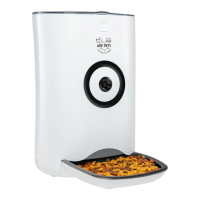
The Arf Pets® Smart Automatic Pet Feeder with Wi-Fi® (model APAFWIFI) is designed to provide automated feeding for pets, offering convenience and control through a smartphone application. This device is intended for household use only and is covered by a limited one-year warranty.
Function Description:
The Smart Automatic Pet Feeder dispenses dry kibble to pets according to a pre-set schedule or manual commands via the Arf Pets® app. It features Wi-Fi® connectivity, allowing users to manage feeding times, portion sizes, and monitor feeding records remotely. The feeder operates primarily when plugged into a power outlet, with alkaline D batteries serving as a backup power supply in case of power outages or if the adapter is disconnected. In battery mode, the feeder will continue to follow the last set schedule but cannot be operated from the app.
Important Technical Specifications:
- Dimensions: 15" L x 9.3" W x 16" H (38.2 x 23.6 x 40.6 cm) with the food bowl attached.
- Weight: 3.80 lbs. (1.72 kg).
- Capacity: 18 cups (4.3 L) of dry kibble.
- Material: ABS plastic.
- Battery Type: Requires three (3) alkaline D batteries (not included) for backup power. These batteries are estimated to last approximately one (1) year, depending on the quantities and frequency of food dispensed.
- Wi-Fi® Connectivity: Operates only at 2.4 GHz. Optimal performance is achieved when located 3 to 10 feet (1 to 3 meters) from a router, without walls or other obstructions.
Usage Features:
- App Control: The Arf Pets® app (available on App Store® and Google Play™) is central to operating the feeder. Users must register an account and add the device to the app.
- Device Setup: The feeder can be connected to the app using two modes:
- EZ Mode (Rapid Blinking Light): For quick setup, connect the DC adapter, turn on the device, select "Pet Feeder" in the app, choose your Wi-Fi® network, and enter the password. If the Link Indicator doesn't blink, press and hold the SET button for five seconds to reset.
- AP Mode (Slow Blinking Light): Useful if EZ mode fails due to poor internet connection or many devices in the area. After selecting "AP Mode" in the app, hold the SET button until the light blinks slowly, then connect your phone to the "SL-Arfpets-xxxx" network.
- Link Indicator: A solid Link Indicator light confirms the device is connected.
- Feeding Schedule: Users can set and modify feeding times and desired portion sizes through the app. A portion chart is provided to guide portion selection.
- Feeding Records: The app logs past feeding times, allowing users to verify feeder operation.
- Manual Feeding: Food can be dispensed manually via the app, with options to select the number of portions. An instant feeding option is also available by pressing the SET button on the feeder itself.
- Device Information: The app provides device updates and allows users to delete or rename the device.
- Battery Compartment: Located at the bottom of the feeder, it requires three alkaline D batteries. Batteries should be installed before connecting the adapter for backup functionality.
- Food Compartment: The top cover opens to access the food compartment.
- Cover Lock: Secures the food compartment.
- Food Bowl: Detachable for easy cleaning and assembly.
Maintenance Features:
- Assembly and Disassembly:
- Food Bucket: To assemble, align with slots in the main body and press down. To disassemble, hold both sides and lift upwards. If difficulty is encountered, manually rotate the upper impeller inside the food compartment.
- Food Bowl: To assemble, press buckles on either side and push the tray into the main body. To disassemble, pull the bowl outward.
- Cleaning:
- Always turn off and unplug the device before cleaning.
- The food bucket and food bowl are dishwasher-safe once removed from the main body.
- The main body is NOT dishwasher-safe and should not be immersed in water to prevent damage to internal electronics, electrical shock, or fire.
- Clean the main body with a soft, damp cloth and a mild cleaning agent.
- Ensure all parts are completely clean and dry before refilling with food.
- Battery Replacement: If the LOW BATTERY indicator LED flashes, replace the D batteries in the compartment or connect the feeder to a power adapter. Remove batteries if the feeder will not be used for an extended period. Do not mix battery types or brands.
- Food Level Check: Regularly check the food level to ensure proper dispensing.
- Safety Precautions:
- This product contains small parts and is not suitable for children under 3 years old. Keep packaging materials away from children and pets.
- Use only dry kibble.
- Operate indoors, in a dry place, on solid, even ground, and in a shady area to avoid sunlight damage.
- Do not use or store in temperatures below -4 °F (-20 °C).
- Keep fingers and hands clear of the internal food wheel.
- Do not place anything on top of the feeder.
- Do not allow pets to chew on any part of the feeder, especially the power cord (consider a cord conduit).
- Do not operate if the power cord or plug is damaged.
- This product is not intended for use or play by children; adult supervision is required.
- Do not disassemble or repair the feeder yourself.
- Lift and carry the feeder only by its base, maintaining an upright position.

 Need help?
 General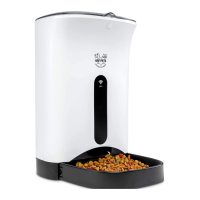

 To Next Page