Need help?
Do you have a question about the ArfPets APAFNEW2 and is the answer not in the manual?
Lists key capabilities of the automatic pet feeder, including clock display, LCD, timed feeding, and voice recording.
Covers crucial warnings like avoiding water immersion, keeping clear of the unit, and supervision around children and pets.
Details cautions regarding pet interaction with parts and the importance of proper handling and placement.
Provides notices about repairs, extension cord usage, weather exposure, and correct lifting procedures.
Diagram and labels identifying the external parts of the automatic pet feeder.
Details the buttons, display, and indicator lights on the feeder's control panel.
Step-by-step guide to setting the current time and scheduling multiple meal times.
Instructions on how to adjust the amount of food dispensed for each meal.
Process for recording a custom voice message for feeding calls.
Methods for unlocking the screen and dispensing food manually.
Guidance on powering the unit with batteries and filling the food reservoir.
Instructions for safely cleaning the pet feeder and its removable parts.
Technical details including dimensions, capacity, material, and power requirements.
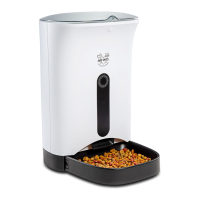
The Arf Pets Automatic Pet Feeder is a sophisticated device designed to provide targeted pet food dispensation for dogs and cats, offering greater control over feeding times and food consumption to support your pet's dietary needs and overall health. This product is intended for indoor household use only and is covered by a limited one-year warranty.
The primary function of this automatic pet feeder is to dispense dry pet food at pre-set times and in adjustable portions. It features a clock display and a blue backlight LCD display, allowing for easy programming and monitoring of feeding schedules. Users can set up to four distinct feeding times for any time of the day or night. A unique feature is the personal voice message recorder, which allows you to record a message of up to 10 seconds to call your pet at mealtime, adding a personal touch to their feeding routine. The feeder is designed to work with dry dog or cat food, ensuring proper distribution and preventing clogs. It operates on either three "D" size alkaline batteries or via a DC power adapter, providing dual power supply options. When the adapter is not in use, the product defaults to battery power.
Setting up the feeder involves a straightforward process. First, you need to install three "D" size alkaline batteries into the battery compartment, ensuring correct polarity, or connect the DC power cable to the DC jack if using outlet power. Once powered, the device allows you to set the current time. This is done by pressing the SET button, then using the increase or decrease value buttons to adjust the hour and minute digits, saving each step with the SET button.
After setting the time, you can program the meal times. The unit enters Meal Time Setting Mode, where you can set up to four individual meal times. For each meal, you'll adjust the hour and minute digits using the increase or decrease value buttons and save with the SET button. Following the meal time settings, you can adjust the portion size for each meal. In Meal Portion Setting Mode, the LCD will display "P" and the portion digits, which you can modify using the increase or decrease value buttons and save with SET.
To record a meal call for your pet, press and hold the REC button. The MIC light will illuminate, indicating that recording is active. Speak into the recording port (a small hole near the MIC light) to record your message, up to 10 seconds in length. Release the REC button when finished, and the MIC light will turn off. You can then press the PLAY button to listen to your recorded message.
The screen automatically enters standby mode if no activity occurs for 25 seconds. To unlock the screen and access settings, press the SET button for three seconds. For manual feeding, with no times or portions set and the display lights on, you can press and hold the decrease value button to dispense one portion of food manually.
Filling the food compartment is also simple. Press the cover release button on the front of the unit to unlock and lift the cover. Then, press both sides of the food compartment and slide it upward for removal. Fill the compartment with dry pet food, being careful not to overfill, as this can lead to clogging. Once filled, slide the food compartment back into place, rotate the rotary impeller to align with the slot, and press both sides of the food compartment to secure it.
Proper maintenance is crucial for the longevity and optimal performance of the Arf Pets Automatic Pet Feeder. Before any cleaning, ensure the unit is turned off and disconnected from power. The exterior of the feeder can be wiped with a soft cloth dampened with a small amount of soapy water; avoid using a fully soaked cloth.
The food tray and food compartment are removable, making them easy to clean. It is important never to submerge the base unit in water, as it contains vital electronic components that could short circuit. Additionally, none of the parts should be cleaned in an automatic dishwasher. After cleaning, ensure all parts are completely dry before operating or refilling the food compartment.
Regular checks are recommended to ensure the pet feeder is dispensing properly. If the food compartment is over-full, the infrared sensors may malfunction, and food may clog. In such cases, clean out the food compartment and refill it according to the capacity lines to ensure proper food distribution. If the LCD screen displays "EEEE," it indicates that the Pet Feeder has entered Automatic Protection Mode. This requires inspecting the food compartment for any stuck food at the bottom. Thoroughly clean the compartment, replace it, and perform a manual feed to confirm functionality.
When batteries are low, the settings may slow down, indicating it's time to replace them with new alkaline batteries; rechargeable batteries should not be used. It is also advised to dispose of all packaging materials properly, especially polybags, to prevent suffocation hazards for children and pets. To protect the power cord from pets chewing on it, consider purchasing a cord conduit (a hard plastic protector) from a hardware store. Always position the power cord out of the way of foot traffic to avoid tripping. Do not attempt to repair the pet feeder yourself; if an issue arises, contact customer service for assistance.
 Power
Power| power supply | “D” size alkaline batteries (x3) / DC adapter |
|---|---|
| dc power | 5V1A standard power supply |
| motor rated voltage | 4V |
 Motor Specifications
| motor working life | 2, 000 hours |
|---|---|
| motor rotate speed | 8RPM |
| motor rated voltage | 4V |
 Weight and Dimensions
| size | 9.65” X 11.8” X 15” |
|---|---|
| capacity | 1.14 gal |
| net weight | 4.63 lbs. |

 To Next Page