Managing the Settings
Setting the Time
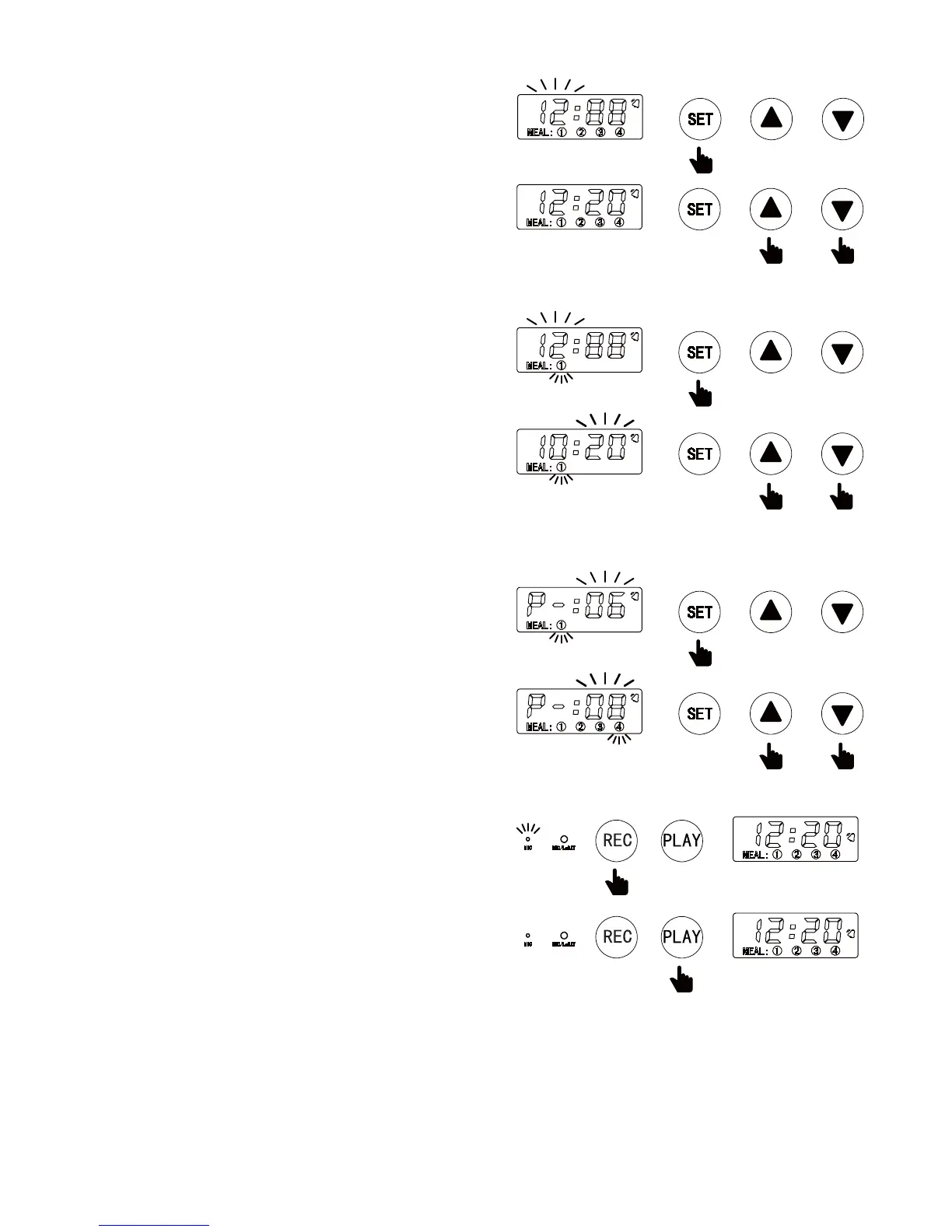
1. Press the SET button. The hour digits will flash.
2. Press the ▲ or ▼ buttons to find the current hour
and press SET again to save.
3. Once hour is saved, the minute digits will flash.
4. Press the ▲ or ▼ buttons to find the current minute
and press SET again to save and enter Meal Time
Setting Mode.
Setting the First Meal Time
1. Once the time is set, the unit will enter Meal Time Setting
Mode. The LCD will display the ① icon and the hour
digits will flash.
2. Press the ▲ or ▼ buttons to find the hour and press
SET again to save.
3. Once hour is saved, the minute digits will flash.
4. Press the ▲ or ▼ buttons to find the minute and press
SET again to save.
5. Repeat the steps above to set additional Meal Times
(up to 4) or enter the Meal Portion Setting Mode.
Setting the First Meal Portion
1. Once the time is set, the unit will enter Meal Time Setting
Mode. The LCD will display the P and the portion digits
will flash.
2. Press the ▲ or ▼ buttons to set the portion size and
press SET again to save.
3. Repeat the steps above to set additional portions
(up to 4).
Recording Meal Call for your Pet
To record a call to your pet at mealtime follow these steps.
1. Press and hold the REC button. The MIC light will display
on the control panel.
2. Speak into the Recording Port (small hole by the MIC light)
and record your message (up to 10 seconds).
3. Release the REC button when finished recording. The
MIC light will go o.
4. Press the PLAY button to listen to the message.
Unlocking the Screen
If no activity takes place in 25 seconds, the unit will shut down and enter standby more. Press the SET
button for three (3) seconds to unlock the screen and follow the instructions above to manage settings.
Manual Feeding
With no times or portions set and display lights on, press and hold the ▲ button to dispense one portion
of food manually.
4


 To Next Page