Fan Coil Unit Wall Mounted Type
14
y
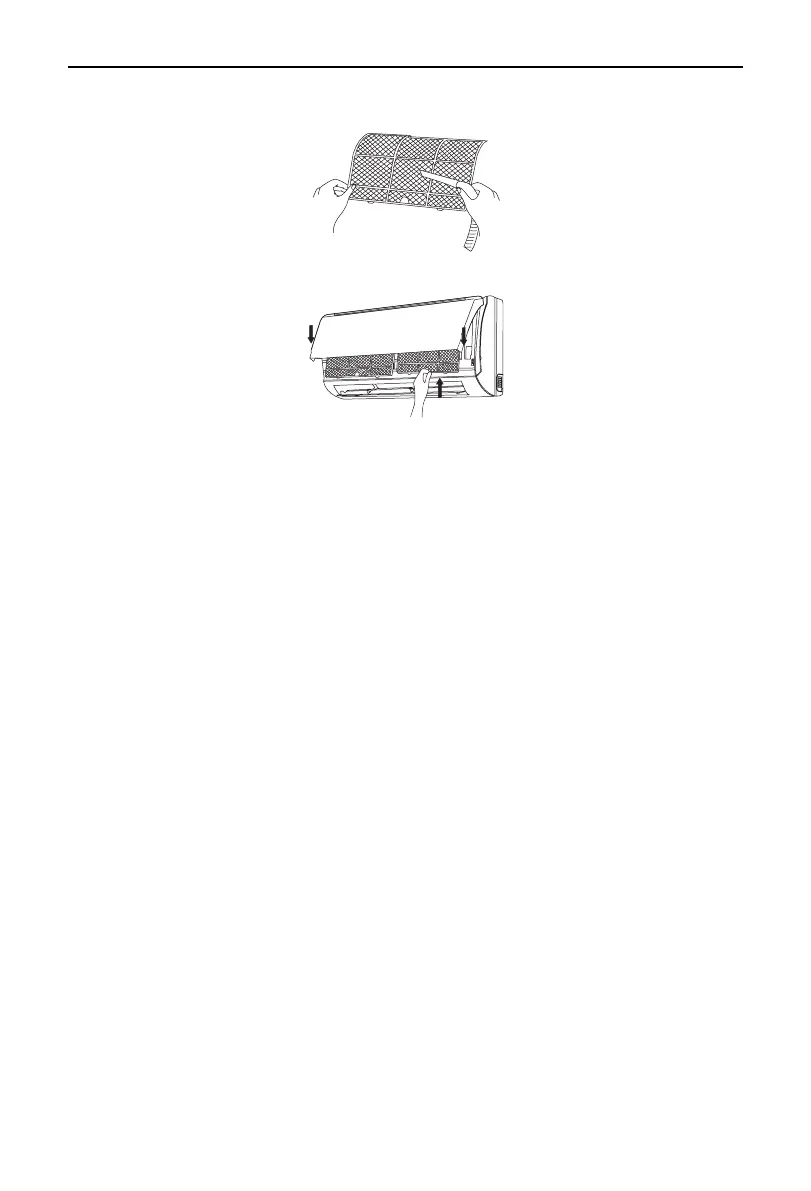
Reinstall the air lter
Reinsert the lters along the direction of arrowhead, and then to cover the cover and clasp it.
Fig.13
3.4.3 Installation and Maintenance of Healthy Filter (optional)
◆
Installation Instructions
(1) Forcibly pull the panel for a specic angle from the two ends of the front panel according to the arrow
direction. Then pull the air lter downwards to remove it. (See Fig.15.)
(2) Mount the healthy lter onto the air lter, (as shown in Fig.16). If the air lter cannot be installed,please
mount the healthy lter on the front case (as shown in Fig.17).
(3) Mount the air lter properly along the arrow direction in Fig.18, and then close the panel cover.
◆
Cleaning and Maintenance.
Take out the healthy filter before cleaning and reinstall it after cleaning according to the installation
instruction. Pay special attention that silver ion filter can't be cleaned with water, while active carbon,
photocatalyst, low temperature conversion (LTC) catalyst, formaldehyde eliminator, catechin or mite killing
lter can, but can't with brush or hard things. Dry it in the shade or sun after cleaning, but not by wiping.
◆
Service Life
(1) The healthy lter commonly has its usage lifetime for one year under normal condition. As for silver ion
lter, it is invalid when its surface becomes black (green).
(2) This supplementary instruction is provided for reference to the unit with healthy lter. If the graphics
provided herein is different from the physical goods, the latter one shall prevail. The quantity of healthy
lters shall be based on the actual delivery.



 To Next Page