1
How to set up your scanner
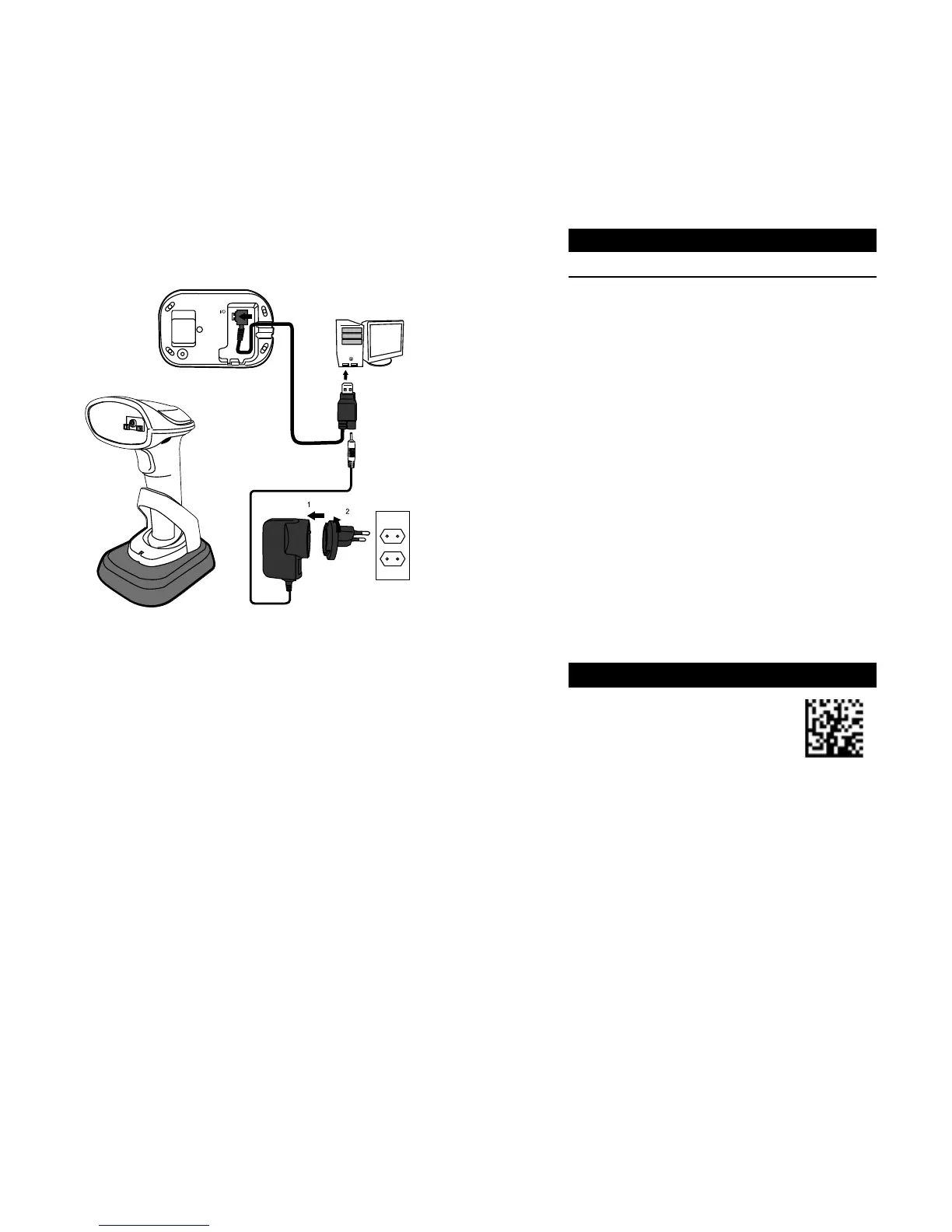
1. Connect the USB or the RS-232 cable to your
cradle. Lay the cable into the notch on the
cradle edge.
2. Connect the USB or the RS-232 cable to your
computer.
Note 1 If you’ve purchased the USB pack, you
can charge your scanner by connecting the USB
cable to your computer. You can also charge it
by connecting a power supply (optional) to your
USB cable. The charging time is shorter with a
power supply.
Note 2 If you’ve purchased the RS-232 pack,
connect the power supply to the RS-232 cable
and the wall outlet.
2
USB Cable 4.5 hours
3. Place your scanner on your cradle to charge it to
full (cradle’s LED glows green).
4. Scan the Data Matrix code at the bottom of
your cradle to establish the connection between
your scanner and cradle.
5. To test your scanner, start a text processing
program like Notepad or Word. Scan a bar code
and see if the data can be sent to your computer.
If it’s successful, you’ll hear a beep and the bar
code data shows in the program.
Reset your Scanner
Scan the following bar code to restore your
scanner to factory settings.
Reset
your
scanner
Restore your
scanner to factory
settings.
Align Mode
Decode only the bar codes aligned under the
center of the aiming pattern.



 To Next Page