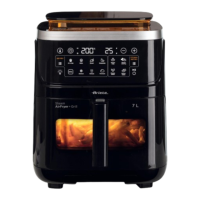
2 ,nsert the basket into the cooking compartment C. 7he correct insertion is done with a click
Fig. 12.
TKe aSSOiance is eTXiSSeG ZitK a s\steP tKat SreYents its oSeration iI tKe EasNet is not
inserteG correctO\ in tKe cooNinJ coPSartPent.
3 Plug the appliance into the power outlet Fig. 13.
4 Press the 212FF button
Fig. 14. 7he appliance beeps.
:Ken XsinJ tKe aSSOiance Ior tKe Àrst tiPe \oX Pa\ notice tKe reOease oI a sOiJKt sPeOO
anG a OittOe sPoNe tKis is to Ee consiGereG SerIectO\ norPaO EecaXse soPe Sarts KaYe Eeen
sOiJKtO\ OXEricateG it ZiOO stoS occXrrinJ aIter a sKort tiPe. TKis ZiOO KaYe no eIIect on tKe
oSeration oI tKe aSSOiance.
5 Press the Menu button repeatedly until selecting the desired cooking program Fig. 15.
5ead the paragraph Cooking tips for details on the programs. 7he symbol of the selected cook-
ing program lights up without blinking on the display.
Each pre-set cooking program has a default cooking time but it is possible to manually set the
cooking temperature and time
- Press once the 7EMPE5A7U5E7,ME button to manually set the cooking temperature Fig.
16.
- Press the + or - buttons to set the cooking temperature in interYals of 5C Fig. 17.
- Press twice the 7EMPE5A7U5E7,ME button to manually set the cooking time Fig. 18.
- Press the + or - buttons to set the cooking time in interYals of 1 minute Fig. 19.
7o increase the selection speed press and hold down the + or - buttons.
- Press twice the 6HA.E button to actiYate the function that suggests mixing the foods
Fig. 20. Halfway through cooking the appliance will emit a sound signal Fig. 24.
6 Press the 67A57PAU6E button Fig. 21. 7he appliance starts to cook food. :hile cook-
ing the display A will alternately show the decreasing time and the set temperature Fig. 22.
7he appliance can be paused at any moment for example to mix the ingredients independently
during the cooking process.
Warning
Danger of burns. Do not touch the basket the non-stick plate and the metal parts of the
appliance.
:hen the basket is remoYed from the cooking compartment air and hot steam also escape.
.eep your hands and face away from the cooking compartment.
- Grab the handle E and remoYe the basket F from the cooking compartment C Fig. 25. 7he
appliance stops the cooking process.
- 6hake the basket to cook the ingredients eYenly Fig. 26.
- 7o resume the appliance operation insert the basket into the cooking compartment Fig. 27. 7he
appliance automatically resumes the cooking process Fig. 28.
AlternatiYely press the 67A57PAU6E button to pause the appliance operation. 7o resume
the appliance operation press the 67A57PAU6E button again.
Press the Light button to turn on the light inside the cooking compartment if you want to
check the cooking process of the food.
27
EN


 To Next Page