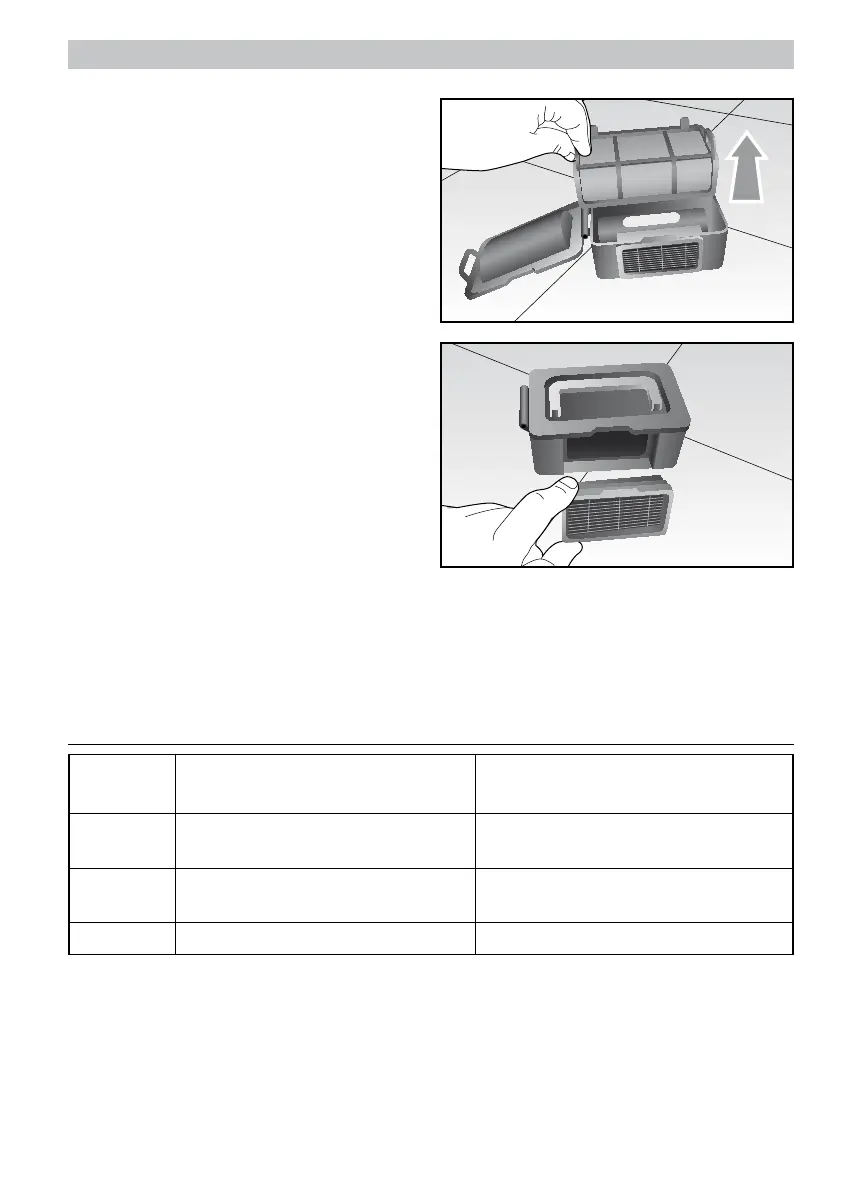
- Open the container by means of the appropri-
ate side tab and extract the inner primary filter
(K); clean it with the supplied brush (D) and
wash it, if necessary.
- Remove the HEPA filter by means of the
appropriate tab and clean it with the brush.
ATTENTION: wash the HEPA filter every
15-30 days and replace it every 6 months.
- Empty the container and clean it using the
brush and/or wash it.
- After having wiped all components, assemble
them being careful to insert the Hepa filter
into the appropriate housing.
ATTENTION: always make sure that thee objects or the dirt do not obstruct the suction inlet
and remove, if necessary.
- Clean Pro Evolution using a soft, dry cloth being careful with the sensor band (F).
- Make sure the wheels or their housing is not obstructed by dirt.
TROubLEsHOOTING
Acoustic
signal
Cause Solution
Wheels or side brushes not operating. Check and clean the wheels and the side
brushes.
Sensor fault. Clean the sensors (F-O) and check there
are no foreign objects above.
Pro Evolution jams. Move Pro Evolution and re-start.
Note: if errors still occur, contact the Ariete Service centre.



 To Next Page