EasyManua.ls Logo

Arista AP-3500 - User Manual

Arista AP-3500
48 pages
Print Icon
To Next Page IconTo Next Page
Loading...
USER MANUAL
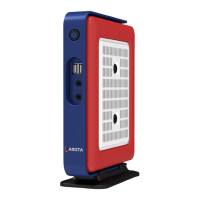
AP-3500 (ACP Enabled)
* INTEL ATOM N 270, 1.6 GHz
* UP TO 2GB DDR2-667 SODIMM
* ACP ENABLED VERSION
* DUAL MONITOR VGA + DVI
* VESA MOUNTING BRACKET (OPTIONAL)
Question and Answer IconNeed help?

Do you have a question about the Arista AP-3500 and is the answer not in the manual?

Summary

Product Safety Precautions

Product Features

Key Specifications

Lists the main technical attributes of the AP-3500.

Product Overview

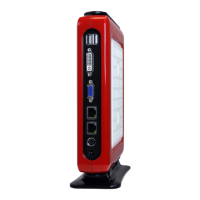
I;O Panel Description

Details the input/output ports and their functions.

VGA Pin Description

DVI Pin Description

Physical Dimensions

Installation Guide

Mounting the Unit

Steps for physically attaching the unit to a screen.

Connecting Peripherals

Display and Input Devices

Connecting monitors, keyboard, and mouse.

Network, Audio, and Power Connections

Network and Audio Setup

Connecting network, audio devices.

Power Adapter Connection

Guide to connecting the AC/DC power adapter.

Using the BIOS Setup Utility

BIOS Navigation and Basic Settings

Understanding the setup utility, keys, and general configuration.

Standard CMOS Features

Date, Time, and SATA Settings

Configuring date, time, and SATA drives.

Advanced BIOS Features

Advanced Chipset Features

DRAM Timing and PCI Express Settings

Adjusting memory timing and PCI Express configurations.

Integrated Peripherals

IDE, Audio, and LAN Configuration

Managing IDE, Audio, and LAN settings.

Super IO Device Settings

Power On Function Settings

Configuring keyboard or hotkey power on.

Power Management Setup

ACPI and Power Saving Options

Configuring ACPI, suspend types, and power saving.

PnP;PCI Configurations

PC Health Status

BIOS Management Options

Defaults, Passwords, and Exit

Loading defaults, setting passwords, saving, and exiting.

System Specifications

Maintenance and Warranty

Regular Maintenance and Limited Warranty

Routine care and warranty details.

Technical Support and Returns

Technical Support and RMA Procedures

Getting assistance and product return steps.

RMA Policies

Credit and Transportation Policies

Policies for returns, credit, and shipping.

RMA Shipping Instructions

Shipping and Packaging Guidelines

How to package and label products for return.

Legal and Disclaimers

Limited Liability and Disclaimer

Limitations on liability and Arista's right to change terms.
Arista AP-3500 Specifications

General IconGeneral
BrandArista
ModelAP-3500
CategoryDesktop
LanguageEnglish