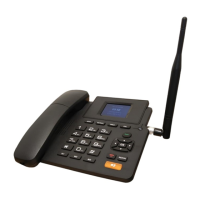
The Aristel Genius X2 is a 4G/SIP Desktop Phone designed for both cellular and Voice over IP (VoIP) communication, offering a versatile solution for various telecommunication needs. It supports 4G VoLTE/3G/2G cellular networks and can integrate with VoIP services, providing flexibility for users without traditional landlines or those seeking advanced communication features.
Function Description:
The Genius X2 serves as a primary communication device, capable of making and receiving calls over cellular networks (using a SIM card) or over the internet via VoIP (requiring a SIP account and internet connectivity). It can also function as a Wi-Fi access point (hotspot), allowing other devices like tablets and laptops to connect to the internet using the SIM card's data plan. Alternatively, it can connect to an existing Wi-Fi network to enable VoIP calls, making it suitable for NBN-enabled environments or as a failover for cellular calls.
Key functionalities include:
- Cellular Calls: Supports 3G/4G networks for standard mobile phone calls. VoLTE (Voice over LTE/4G) is enabled for calls over the data network, provided a compatible SIM card is used.
- VoIP Calls: Allows calls over the internet using a SIP account, offering the possibility of a landline number. Up to two SIP accounts can be configured.
- Wi-Fi Access Point (Tethering): Creates a Wi-Fi hotspot, enabling other devices to access the internet via the phone's SIM card data. This is particularly useful in areas without NBN or as a portable internet solution.
- Wi-Fi Client Mode: Connects to an existing Wi-Fi network to facilitate VoIP calls and firmware upgrades.
- SMS Messaging: Capable of sending and receiving SMS messages via the SIM card and compatible network.
- Call Management: Features include mute, hold, add call (for conferencing), redial, and speakerphone function.
- Call Records & Contacts: Maintains a log of dialed and received calls and stores contacts from both the SIM card and phone memory.
- Voice Message: Supports voice mailbox access for SIP accounts.
- Emergency Calls: Can make emergency calls (e.g., dial 000) regardless of configuration, provided a mobile network is available.
Important Technical Specifications:
- Display: 2.4-inch Colour display.
- Chipset: Spreadtrum 9820e.
- Frequencies:
- FDD-LTE: B1/B3/B7/B20/B28 (customizable band combinations).
- TDD-LTE: B38/B39/B40/B41.
- WCDMA: B1/B2/B5/B8.
- GSM: B2/B3/B5/B8.
- Wi-Fi: IEE802.11b/g/n.
- Bluetooth: 4.0.
- Battery: 1000mAh, providing backup power.
- Antenna: TNC detachable antenna connector, or fixed or built-in antenna.
- Power Input: Micro USB 5VDC.
- SIP Protocol: SIP 2.0 (RFC3261).
- Transport Protocol: UDP/TCP/TLS.
- DTMF: In-band, Out-of-band (RFC 2833), and SIP INFO.
- Audio Codec: G.722/G.729/AMR/AMRWB/GSM/PCMA/PCMU/SPEEX/ILBC/DTMF/ISACWB/OPUS.
- Audio Features: AEC/VAD/CNG/AGC/ANS.
- SRTP: NONE/FORCE/PREFER.
- 3GPP: TS 24.605.
- Call Transfer: YES.
- STUN: YES.
- SIP Line: 2 lines.
Usage Features:
- Easy Assembly: Simple installation of antenna, handpiece, and SIM card.
- SIM Card Compatibility: Supports full-size SIM cards; micro or nano SIMs require an adapter.
- Power Management: Powered via USB charger, with a backup battery for continued operation. A red LED indicates USB power. The battery is designed for backup, not as a primary mobile power source.
- Intuitive Navigation: Features a clear main menu with icons for Call Records, Contact, Wi-Fi, Voice Message, SMS, About, Account, and Settings.
- Dialing: Numbers can be dialed using the keypad, with options to use the handset or speakerphone. The Menu button allows selection of call type (VoIP or GSM) if multiple accounts are configured.
- Answering Calls: Calls can be answered by lifting the handpiece or pressing the speakerphone key. During a VoIP call, incoming cellular calls are alerted, with options to accept or reject.
- Ending/Rejecting Calls: Calls can be ended by placing the handpiece on the hook, pressing the speakerphone key, ESC key, or red power key. Incoming calls can be rejected via menu options.
- In-Call Features: Mute and Hold functions are available during calls. The "Add Call" feature allows for initiating a second call and setting up a three-way conference (Meeting).
- Memory Keys: One-touch memory keys (M1, M2, M3) for quick dialing.
- Input Modes: Dial pad supports various input modes (Ab, ab, AB, 12) for entering information, with * for symbols and # for toggling modes.
- Volume Control: Left/Right navigation keys adjust in-call volume.
- Dealer Settings: A specialized "Dealer Code" (*#83731#) allows for configuring VoIP accounts and other settings via the keypad or a web interface (http://:8080) without a computer, enabling restoration to pre-configured settings. This is useful for remote support and maintaining specific configurations.
Maintenance Features:
- Firmware Upgrades: The device can be upgraded via Wi-Fi, with data charges potentially applying over cellular networks. Upgrades should only be performed with the assistance of qualified technicians.
- Reset Options:
- Soft Reset (Long press Reset key): Restores the phone to dealer configuration, removing user-made changes but retaining dealer settings.
- Factory Reset: A complete factory reset is available, requiring a password (00000000) to clear all settings, including dealer configurations.
- Troubleshooting Guide: Provides solutions for common issues such as no display, call establishment problems, low battery, noise during calls, and SIM card errors.
- Cleaning: Recommends using a soft cloth for cleaning and ensuring the power is OFF during cleaning.
- Battery Care: Emphasizes using only the provided battery and charger, proper installation, and ensuring the phone is OFF during battery installation/removal.
- Environmental Requirements: Guidelines for safe usage, including avoiding unstable surfaces, hazardous environments (gas stations, chemical factories), strong sunlight, high temperatures, and contact with liquids.
- Interference Avoidance: Advises keeping the phone away from equipment that may cause interference and being aware of potential interference with medical equipment.
- Antenna Positioning: Recommends positioning the antenna upright and away from interference sources for maximum call quality.
- Signal Strength Monitoring: Users can check cellular signal strength (RSSI) in the "About" menu to optimize phone placement.


 To Next Page
 General