Connecting the load
1
2
3
4
5
7
3
3
3
13
6
6
6
6
6
11
7
11
7
11
7
11
7
11
3
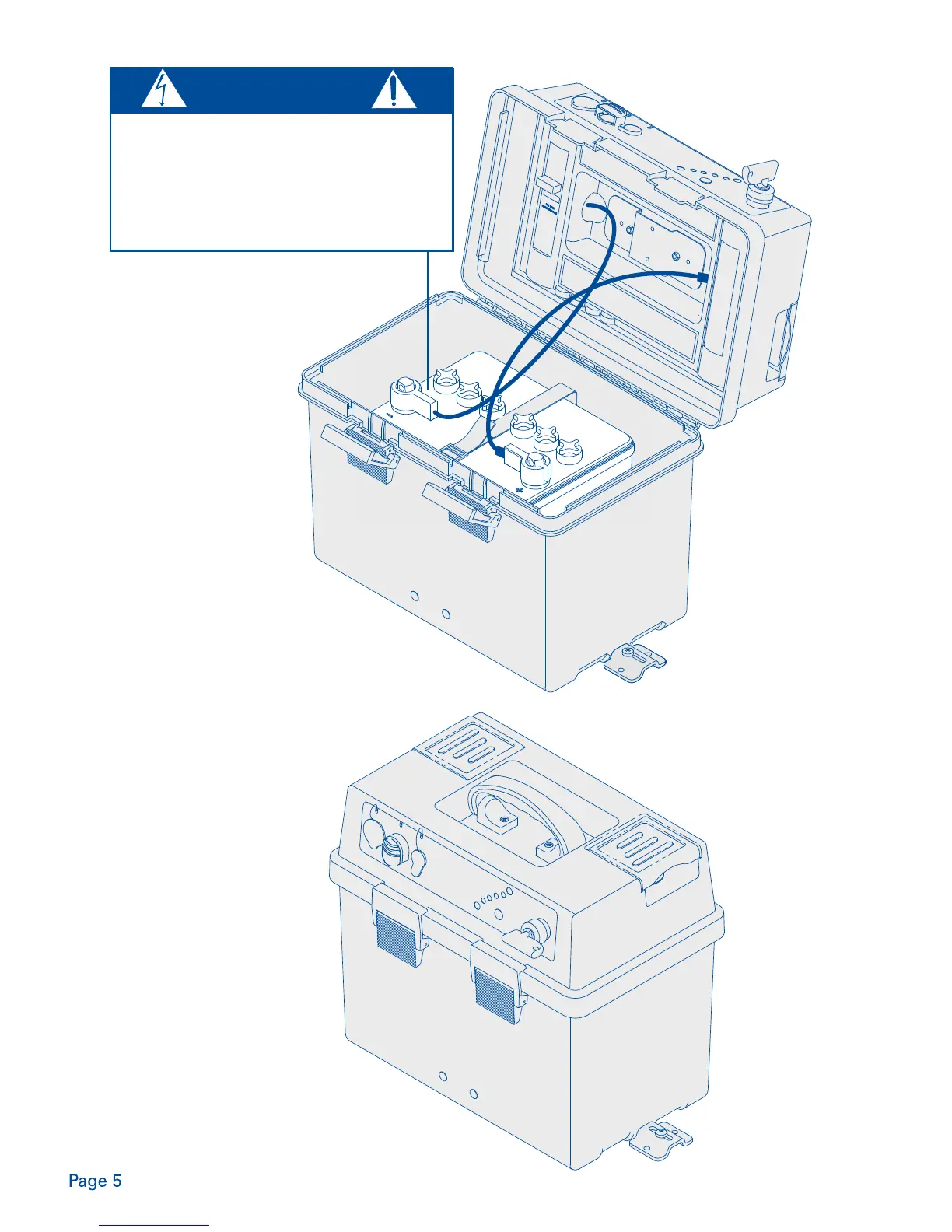
There are two output connection options:
The positive and negative high current terminals or the
accessory port
Both the high current terminals & the accesssory port
can be disconnected by the battery isolator switch
Note: a battery is a high current device. For your safety never
connect a device or load to the high current terminals
without turning the battery isolator switch to the
off position.
To connect a device or load to the Powerpack high current
terminals, undo red and black wing nuts.
Note: do not remove powerpack terminal washers. Washers
must be below the terminals.
Connect positive cable (red) of the device to the positive (+)
Powerpack high current terminal and tighten red wing
nut securely.
Connect negative cable (black) of the device to the negative (-)
Powerpack high current terminal and tighten black wing
nut securely.
Turn the isolator switch to the ‘on’ position when current
is required.
The accessory port is protected by a 10A
replaceable fuse. Should this fuse fail, turn battery isolator
switch to the off position & replace fuse. The isolation
switch has a removable key for extra security.
Batteries can generate
explosive gases, ensure free
air flow around the Powerpack
and tighten terminals securely.
CAUTION


 To Next Page