HD8RV29 | Arkon Pro Stand for Phones, Cameras, or Pico Projectors
7
6
8
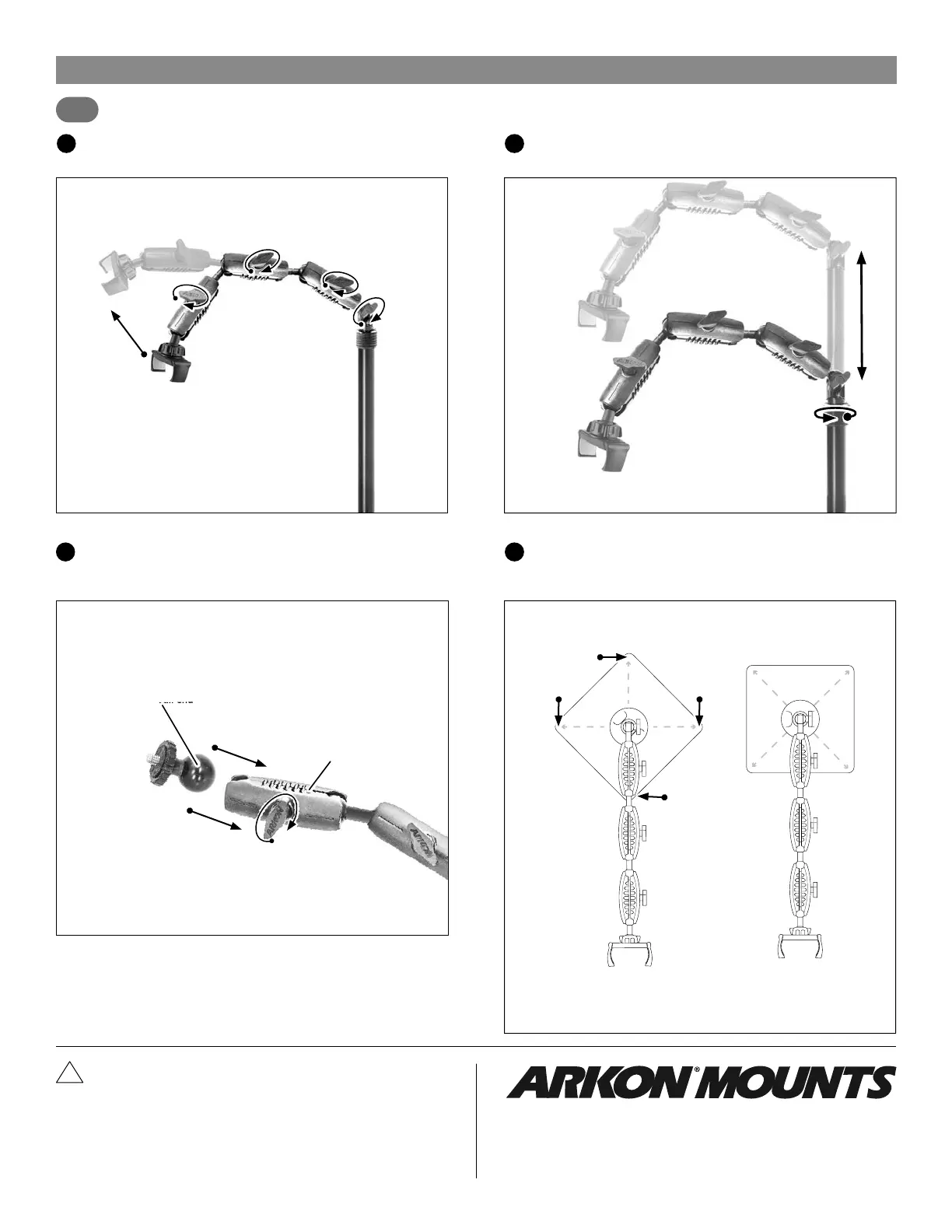
To attach optional camera/pico projector adapter, unscrew shaft knob
and remove phone holder, ring, and ball adapter. Attach the 25mm ball
end of the camera adapter to the shaft and tighten clockwise to secure.
5
Adjust the height of the pole by loosening the adjustment collar
counterclockwise. Tighten clockwise to set height.
To maintain stability and to prevent tipping when used in the overhead
view position, position the 3-shaft top arm assembly out over one of the
four corners of the weighted base, not out over one of the four sides.
Shafts can be adjusted by unscrewing the shafts’ knobs to loosen.
Tighten knobs to set.
Consumer Hotline:
USA (800) 841-0884
INT’L (626) 254-9005
Monday - Friday 9 am -5pm, PST
www.arkon.com
Arcadia, CA 91006 USA
Designed in USA | Made in Taiwan
© Copyright 2022 Arkon Resources, Inc.
Safety Precautions
To maintain stability and to prevent tipping when used in the overhead view
position, position the 3-shaft top arm assembly out over one of the four corners
of the weighted base, not out over one of the four sides. Always use two hands
(one on shaft, and one on base) when carrying. Failure to properly secure the
stand’s shaft to the base could cause bodily injury or harm. The Arkon Pro Stand
is designed for use with smartphones and small cameras. If using heavier devices,
be sure to add a counterbalance in order to prevent the stand from falling over.
Arkon Resources, Inc. is not responsible for any damages caused to your device or
yourself due to the installation or use of this mount.
!
rev.021022
page 2
Base Corner
Base Corner
Base Corner
Overhead Illustration View
Base Corner
Pro Stand arm aligned
with base corner
(Correct)
Pro Stand arm not aligned
with base corner
(Not correct)
25mm ball end
Shaft


 To Previous Page
 Loading...