EasyManua.ls Logo

Arlo All-in-One Sensor - Page 3

Arlo All-in-One Sensor
4 pages
Print Icon
To Next Page IconTo Next Page
To Previous Page IconTo Previous Page
Loading...
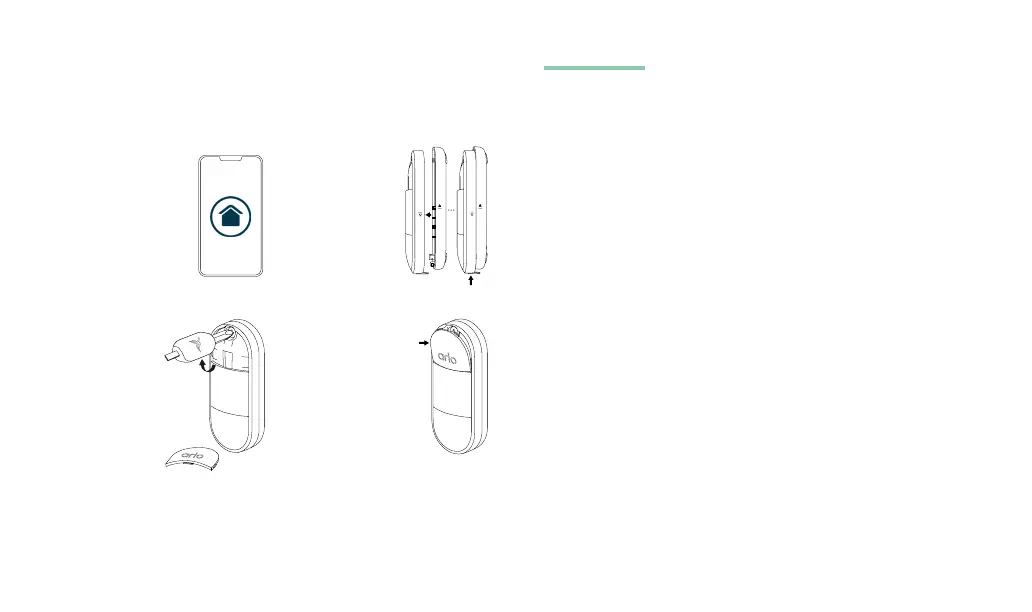
5. Onboard your Sensor.
Open the Arlo Secure
App, tap the “+”
icon to add device,
and follow setup
instructions for your
All-in-One Sensor.
7. Using the
screwdriver,
turn the screw
clockwise to
tighten it securely.
8. Place bottom of
screw cover in
rst, then snap
top part in.
Note: Keep the screw cover and back cover separate from
your Sensor.
Do not attach the sensor adhesive unless the app instructs you to
do so. If you’re using the sensor to detect water leaks, the adhesive
isn’t needed.
Need help?
We are here for you.
Visit www.arlo.com/support for quick answers and:
How-to videos
Troubleshooting tips
Additional support resources
6. Reattach front
and back cover,
then slide
until lines are
aligned and you
hear a click.
54

Related product manuals