EasyManua.ls Logo

Armada Pro290 - Kit Contents; Battery Installation; Setting up the Transmitter

Armada Pro290
4 pages
Print Icon
To Next Page IconTo Next Page
To Previous Page IconTo Previous Page
Loading...
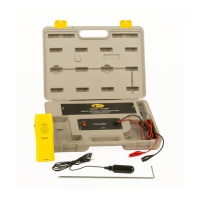
The Armada
Technologies
Pro290
wire
and cable locator
is
designed
to find lost
or broken wires,
and trace
their
paths.
The
complete
Pro290
kit
consists
of;
.
(1)
Pro290R
Receiving
Wand
and Antenna.
.
(1)
Pro290T
Transmitter
and
Carrying
Case
and Leads.
.
(1)
ProGS
Ground
Stake.
.
(1)
Operating Manual
Please
be
sure that all items
are
included
before
operating
the Pro290.
Batterv
Installation
-
The Pro290
transmitter
requires
8
'C'
cell batteries.
The
Pro290 receiver
requires
one
gv
battery. To
install
the batteries
in
the Pro290
transmitter,
open
the transmitter
case and remove
the 3 holding
screws
on the
battery compartment
located
at the
upper center
of the
unit. Place
the
batteries
in
the
holder,
orienting them
in
accordance
with
positive
and negative
poles.
Turn
on the Pro290T
using
the red
on/off
rocker
switch.
The red
LED
on the
transmitter
will now
blink dimly
indicating
the batteries
and
unit are ready
for
operation. lf
no response
is
seen,
try adjusting
the batteries
to insure
good
connection. lf
still no response,
be sure
the batteries
are
good
and fresh.
The
Pro290
receiver
battery
compartment
is located
on the
backside
of the
Pro290R
unit. Remove
the
battery
compartment
cover
and install
the 9 volt
battery. Replace
the
cover.
Settinq up the Transmitter
-
Disconnect
and
de-energize
the wire
that
you
want
to trace. With
the transmitter
off,
connect
the
red
lead
to the wire
you
want
to trace
and the black
lead to
the included
ground
stake.
Insert
the
ground
stake
into
the soil. Do
not use
common
grounds
if
possible
as
these may
give
false
indications.
lt
is important
that
the
ground
stake
be in
the soil and
independent
for the Pro290
to work
properly.
Turn
the Pro290
transmitter
on.
The
LED located
on
the
Pro290
transmitter
should now
blink brightly.
This LED
is
an indicator
of how
good
the
grounded
connection
is. The
better
the
ground
connection,
the brighter
the light.
lt is
important
to note that
the better
the
ground
connection
and LED,
the better
and
easier the
locate will
be. A
good
ground
is crucial
for optimum
operation.
Soil
conditions
can also affect
the
ground
connection.
In
general,
the wetter
the
ground,
the
better the
ground
connection.
Dry
climates
are more
difficult to
achieve
good grounding.
lf the
ground
is dry,
you
may wish
to moisten
the
grounding
area.