EasyManua.ls Logo

Armada Pro290 - Tracing Wire and Cable; Receiver Operation; Signal Interpretation

Armada Pro290
4 pages
Print Icon
To Next Page IconTo Next Page
To Previous Page IconTo Previous Page
Loading...
SrHef;y
(r$np*rtinent
Trir-rsnr,lttcf
Ground LES
Sf *l0f
F----------------Stxltch
Bcd *-e*d
S*sck
-t'
tnk'!ilv4ndb
\#-tr-dJhtuf-/'nnvn$r
r,ft*t
"dill-
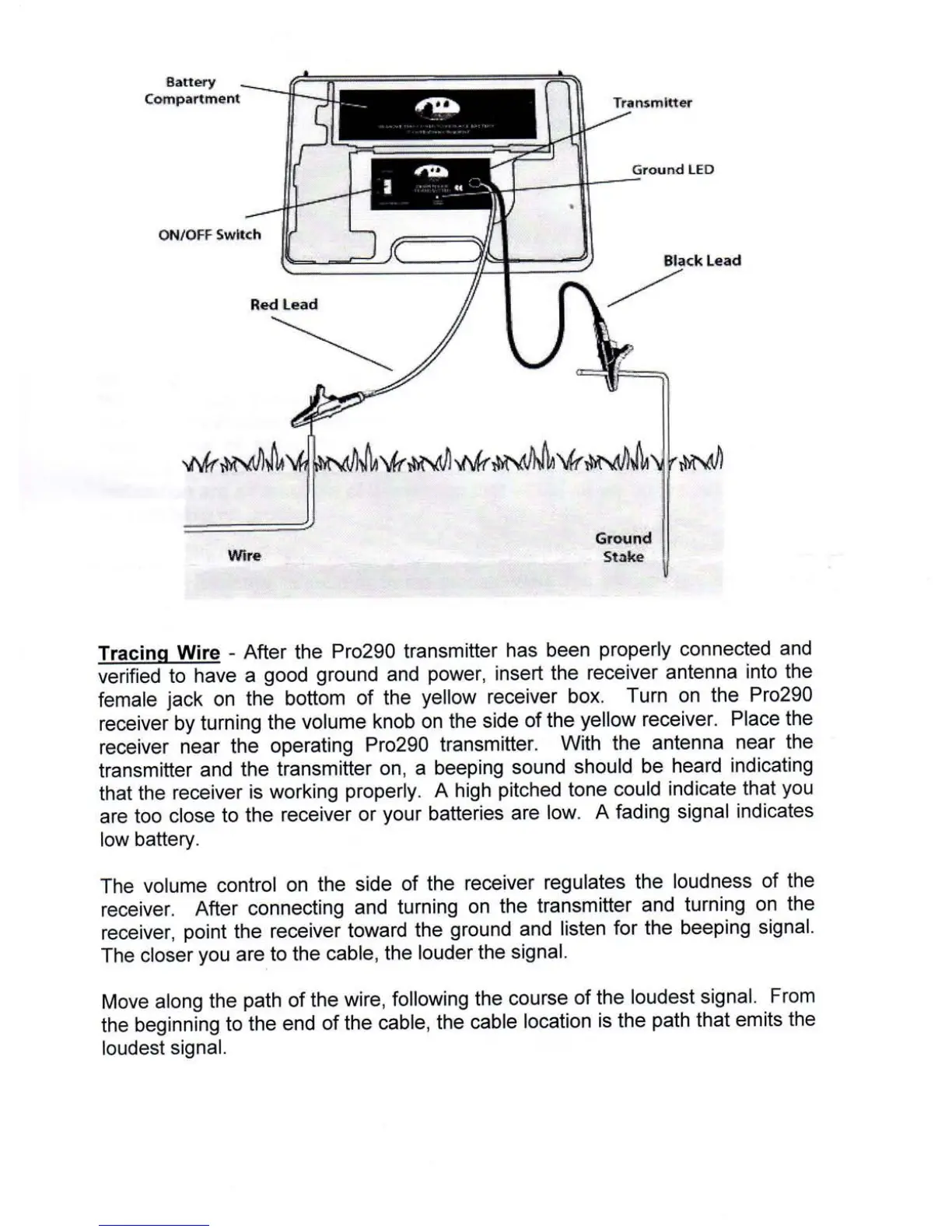
Tracinq
Wire
-
After the
Pro290
transmitter
has
been
properly
connected
and
verified
to
have
a
good
ground
and
power,
insert
the
receiver
antenna
into the
female
jack
on
the
bottom
of the
yellow
receiver
box.
Turn on
the
Pro290
receiver
by turning
the
volume
knob
on the
side
of the
yellow
receiver.
Place the
receiver
near
the
operating
Pro290
transmitter.
With
the
antenna
near the
transmitter
and
the
transmitter
on,
a
beeping
sound
should
be
heard
indicating
that
the
receiver
is
working
properly.
A high
pitched
tone
could
indicate
that
you
are
too close
to the
receiver
or
your
batteries
are
low.
A
fading
signal
indicates
low battery.
The
volume
control
on
the
side
of the
receiver
regulates
the
loudness
of
the
receiver.
After
connecting
and
turning
on the
transmitter
and
turning
on
the
receiver,
point
the
receiver
toward
the
ground
and
listen
for the
beeping
signal.
The closer
you
are
to the
cable,
the
louder
the
signal.
Move
along
the
path
of
the
wire,
following
the
course
of the
loudest
signal,
From
the
beginning
to the
end
of the
cable,
the
cable
location
is the
path
that
emits the
loudest
signal.