Page 9@+-*)/93='91<*A,/()'+=(B*4</1(/*91<<*CDEEEDE!!D$%F%6Item 64357
GH@;IJKLGIHMMHIKNLOHPIG*MKGI
T+,=)*I&*)+*R1<<*T+,=)
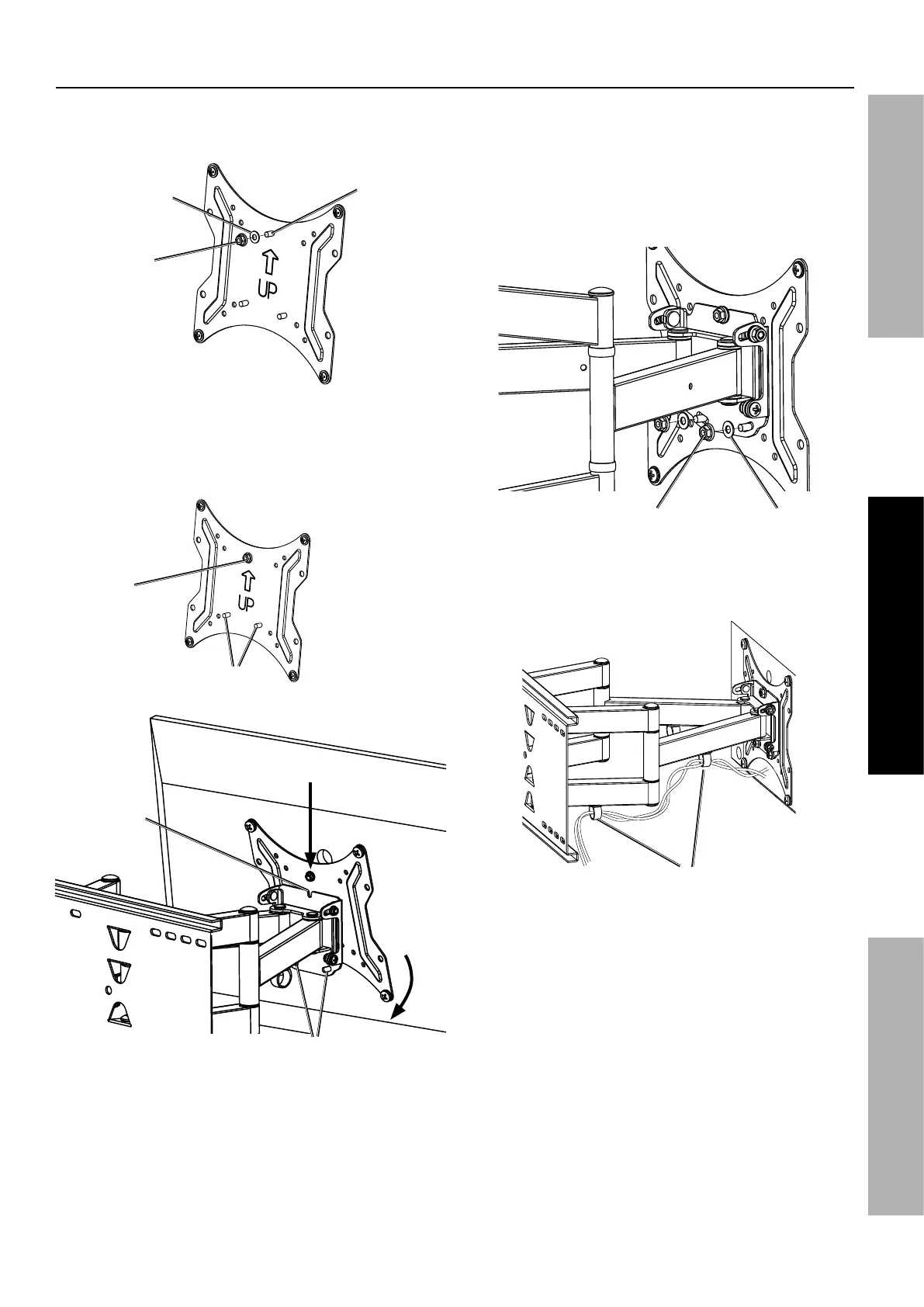
1. Attach TV Plate Washer (16) and Nut (15) to Upper
Post using included Wrench. Do not tighten Nut.
I&*O<1)/*
L,)*]C$^
I&*O<1)/*
R1(3/-*]C!^
[44/-*
O+()
2. Using an assistant, lift TV, slide TV Plate
Nut over Notch on TV Mount and route
Lower Posts through Lower Post Holes.
M+./-*
O+()(
L+)93
M+./-*
O+()*Z+</(
I&*O<1)/*
L,)
3. Attach TV Plate Washers (16) and
Nuts (15) to Lower Posts using included
Wrench. Do not tighten Nuts.
4. Level TV, then tighten Nuts on Upper
and Lower Posts securely.
I&*O<1)/*
R1(3/-*]C!^
I&*O<1)/*
U+<)*]C$^
5. Route TV wires through clips.
Q<'4(


 To Next Page